Document Library Web Part

Benefits
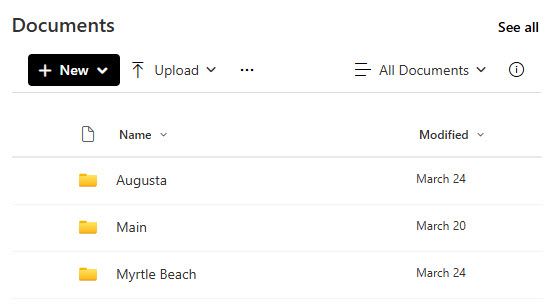
- Files where people need them: the library appears right on the page, so documents are found without navigating to the library itself.
- Full file management in place: users with permission can upload, rename, download, delete, and pin files without leaving the page.
- Targeted slices: show one view or one folder, so each page presents only the documents that belong there.
- Safe exploration for viewers: sorting, filtering, and grouping on the page is session-only and never changes the library.
- Clean reference pages: hide the command bar and the See all button for a polished, read-only presentation.
- Always current: the web part is a window into the real library, so the page always reflects what is actually there.
What You Can Display
- Any document library: every library on the current site can be selected and displayed.
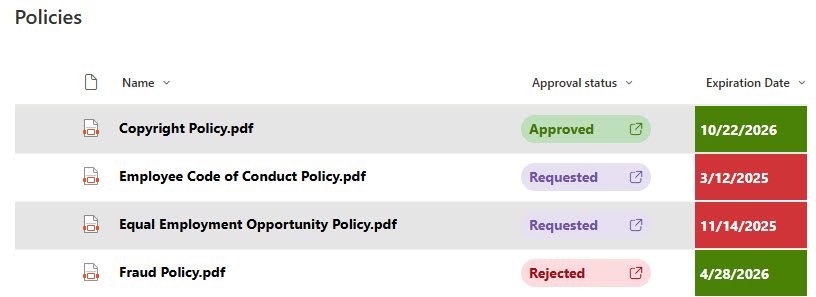
- A specific view: create the view on the library first, then select it in the web part.
- A specific folder: type the folder name, with ‘/’ separating nested folders (Projects/Presentations).
- Details or Tiles: viewers can flip between a list view and icon tiles from the toolbar.
- Formatting carries over: column formatting and nested folders from the source library render the same on the page.
Settings
Web part level:
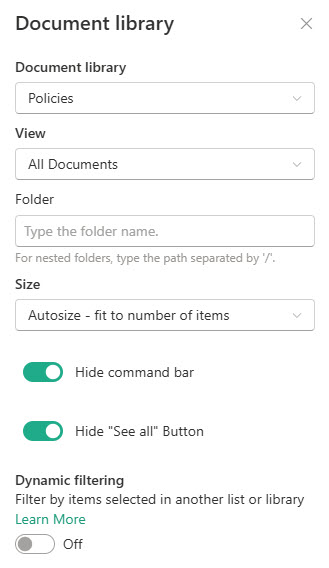
- Document library: choose which library on the site to display.
- View: select any saved view from the underlying library.
- Folder: show only the contents of a specific folder, including nested folders.
- Size: control how much vertical space the web part takes.
- Hide command bar: removes + New, Upload, and the other toolbar actions for a cleaner look.
- Hide the See all button: keeps viewers on the page instead of jumping to the full library.
- Dynamic filtering: connect the library to another list or library on the same page.
Limits and Nuances
- The library must live on the same site as the page: to surface documents from other sites, use the Highlighted Content web part instead.
- Sorting, filtering, and grouping done by a viewer is session-only: the underlying library and its saved views are not changed.
- Not every command from the full library appears in the web part: actions like version history or check-out require clicking See all to open the library.
- Hiding the command bar also removes + New and Upload: use it on read-only reference pages, not on pages where people add files.
- Deleting a file in the web part deletes it from the actual library: the web part is a window, not a copy.
- Nested folder paths use a forward slash: typing Projects/Presentations displays the Presentations folder inside Projects.
- Dynamic filtering supports a single filter connection: you cannot chain multiple filters onto one web part.
- Pin to top works right in the web part: handy for keeping a key document first without renaming files to force sort order.
Document Library Web Part vs the Alternatives
- Document Library vs List web part: Document Library is for files; List is for structured data in rows and columns.
- Document Library vs Highlighted Content: Document Library shows one library with full file commands; Highlighted Content rolls up documents from many sites, read-only and search-based.
- Document Library vs File and Media: File and Media displays a single file or document preview; Document Library presents the whole collection.
- Document Library vs Quick Links to files: Quick Links is hand-picked and goes stale; the Document Library web part always reflects what is actually in the library.
Common Questions About the Document Library Web Part
What is the Document Library web part in SharePoint?
The Document Library web part displays a document library – or one view or folder of it – directly on a SharePoint page. People can open, upload, rename, download, delete, and pin files right in the web part, subject to their permissions, and switch between a details list and a tiles view. It is the standard out-of-the-box way to put files on a page.
Can I show just one folder or a specific view of the library?
Yes. In the web part settings, pick any saved view from the library, or type a folder name to show only that folder’s contents – use a forward slash for nested folders, like Projects/Presentations. This is the cleanest way to give each department page its own slice of a larger, centrally managed library.
Can users upload and manage files directly from the page?
Yes – users with permission can create new documents and folders, upload files (dragging them in is the easiest way), and rename, download, delete, or pin files to the top of the library without leaving the page. Remember the web part is a window into the real library: deleting a file here deletes it from the library itself.
Does sorting or filtering in the web part change the library for everyone?
No. Sorting, filtering, and grouping done inside the web part apply to the current viewer’s session only – the underlying library and its saved views are untouched, and other visitors see the page exactly as configured. If you want a permanent arrangement, build it into a view on the library and select that view in the web part.
Why are some buttons from the full library missing in the web part?
The web part offers the everyday actions – new, upload, rename, download, delete, pin – but not everything the full library can do. For actions like version history or check-out, click See all to open the library itself. If you prefer a clean, read-only look on the page, you can hide the command bar and the See all button entirely.
Should I use the Document Library web part or Highlighted Content for documents?
Use the Document Library web part when people need to work with files in one library – upload, rename, manage. Use Highlighted Content when you want a read-only, automatically updating rollup of documents from across sites. The document management designs on LookBook 365 use both, built the only way Greg Zelfond works – out-of-the-box web parts with a custom theme.