Header
The SharePoint header is the top navigation area of a SharePoint site that provides space for the site logo, title, and navigation links.
Common Use Cases
- Display your organization’s logo and title consistently across pages
- Provide intuitive navigation for users to access key areas of the site
- Strengthen site identity and branding at the top of your intranet pages
Benefits
- Enhanced branding: space to showcase your organization’s logo and visual identity
- Stronger visual impact: larger header area creates a more engaging first impression
- Improved site recognition: Users immediately see your brand and site name
Key Details
- There are four header types: Minimal, Compact, Standard, and Extended
- Supports using a custom image instead of a solid color block
- Extended headers support three logo alignment options: left, center, or right
- Header settings are configured per site and do not automatically carry over to other sites or from a hub site to its associated sites
- Recommended banner size for Extended Header: 2560 × 164 px (JPEG or PNG)
- If no site logo is uploaded, SharePoint displays a placeholder square with the site name abbreviation instead

SharePoint Extended Header Example

SharePoint Extended Header Example

SharePoint Extended Header above a SharePoint Page
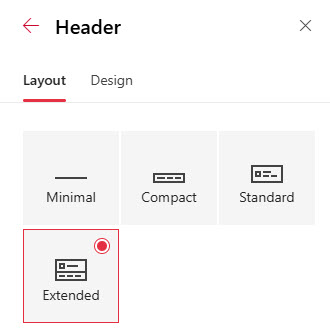
SharePoint Header Layouts
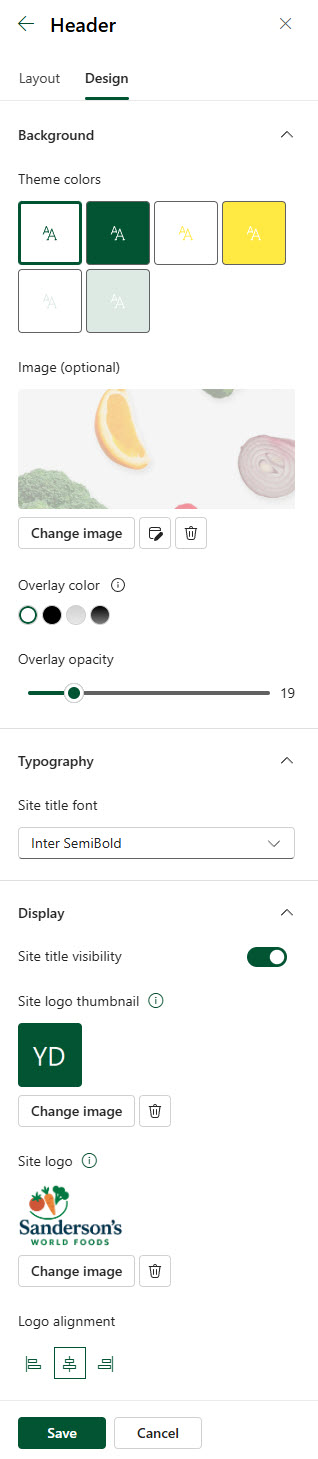
SharePoint Header Configuration