Text
The Text web part is used to add and format blocks of text on a SharePoint page with options for headings, lists, and styles.
Benefits
- Adds context, instructions, or narrative to pages
- Supports rich formatting and styling
- Simple for all users to edit
- Useful for announcements or descriptions
- Can be combined with other web parts to create richer, well-organized page layouts
Key Features
- Rich text editor with formatting toolbar
- Formatting Styles: bold, italics, underline, lists, links
- Paragraph Styles: H2, H3, H4
- Supports embedded tables and images
- Allows for font colors and highlighting
- Fully responsive on all devices

Text Web Part with H2 Heading

Text Web Part over the background image
Text Web Part with Headings

Text Web Part in a News Post
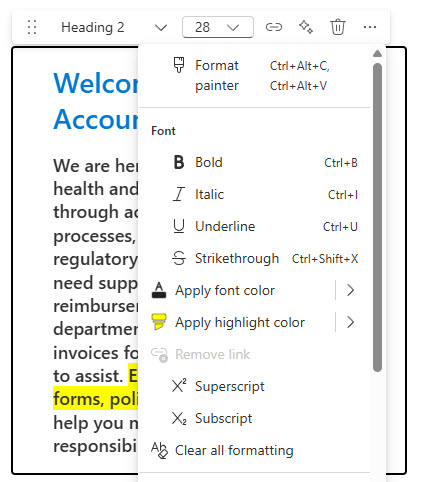
Text Web Part Configuration Options