
Facilities Maintenance Checklist

The Facilities Maintenance Checklist is a task-based checklist built in Microsoft Planner for facilities teams to assign, track, and complete routine and preventive maintenance work. With no custom code or third-party tools, it brings together a board organized by maintenance category or location, grid and calendar views, task filtering, and built-in charts and reports - keeping every inspection and repair visible and on schedule.
Built with
Keywords
Facilities
Category
Trackers

Want one like this?

Talk to Greg
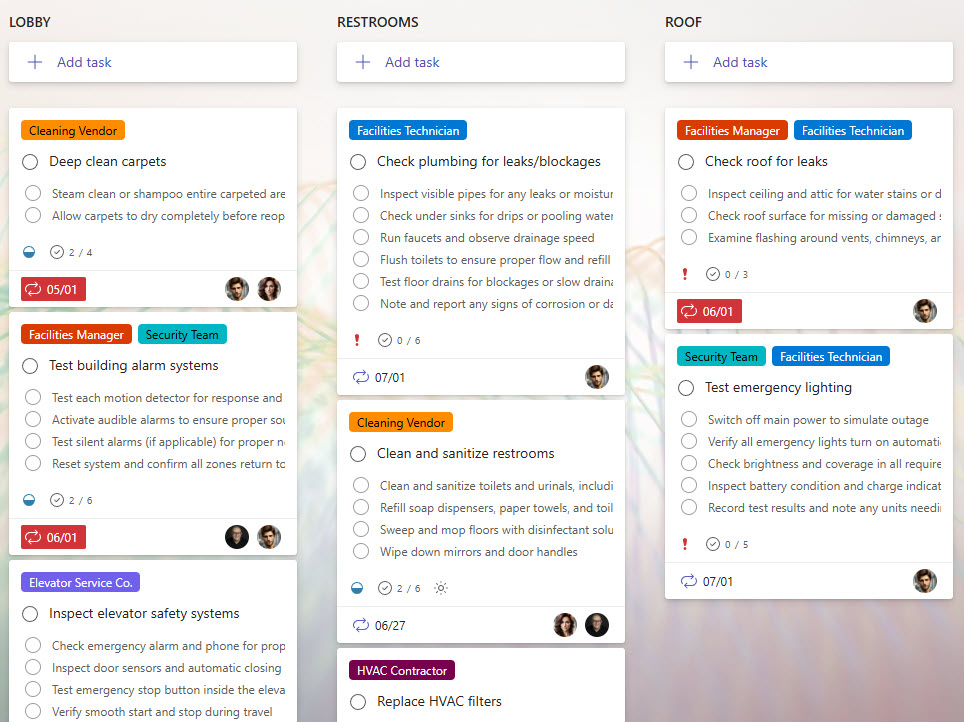
  • A centralized task board for all maintenance activities (daily, weekly, monthly, annual).
  • Assign maintenance tasks to individual team members or contractors with clear due dates.
  • Use Buckets to organize by maintenance category or location (Lobby, Roof, Restrooms)
  • Set up recurring tasks to ensure routine inspections and maintenance are never missed
  • Create checklists within each task to track multiple steps or inspection points
  • Attach photos, manuals, or inspection reports directly to tasks for quick access
  • Update task status in real-time for immediate visibility of progress
  • Improved Accountability: Tasks are clearly assigned with deadlines, reducing missed maintenance activities
  • Streamlined Communication: Comments and attachments keep all task details and updates in one place
  • Prioritization & Scheduling: Easily prioritize urgent maintenance issues and visualize upcoming tasks
  • Mobile Accessibility: Facilities staff can view and update checklists directly from their mobile devices
  • Audit & Compliance Ready: Maintain task completion records for inspections, audits, and compliance reporting
Common Questions About This Facilities Maintenance Checklist

What is this Facilities Maintenance Checklist built with?

The checklist is built entirely in Microsoft Planner, the task management app included with Microsoft 365 – structured with buckets for maintenance categories and locations, recurring tasks, sub-task checklists, and attachments. There is no custom code and there are no third-party tools. It is the kind of clean, collaborative checklist Greg Zelfond builds for facilities and operations teams.

What’s included in the Facilities Maintenance Checklist?

The checklist centralizes daily, weekly, monthly, and annual maintenance tasks on one board, with buckets organized by category or location such as lobby, roof, and restrooms. Each task carries an assignee, due date, priority, a checklist of inspection points, and attachments like photos, manuals, or inspection reports. Grid, calendar, and chart views plus filtering round out the tracker.

Does this design use any custom code or third-party tools?

No. The checklist is built entirely with Microsoft Planner, which is included with most Microsoft 365 business and enterprise plans – no custom code, no third-party add-ons, and nothing extra to buy. That keeps it stable, secure, and easy to maintain, with everything stored safely inside your Microsoft 365 environment. Out-of-the-box is the only way Greg builds.

Can this checklist be customized for our facilities team?

Absolutely. The buckets, tasks, and schedules can all be tailored to your buildings and your maintenance program – office facilities, warehouses, retail locations, or multi-site portfolios. Task checklists can mirror your actual inspection points, and recurrence can match your real service intervals. Greg adapts the structure to the way your facilities team actually works.

How does the checklist handle recurring maintenance tasks?

Planner supports recurring tasks natively, so routine inspections and preventive maintenance reset automatically on the schedule you choose – daily, weekly, monthly, or annual. Combined with due dates and clear assignments, that means walkthroughs, inspections, and seasonal work are never missed. Facilities staff can also view and update tasks from their mobile devices while out in the building.

Can Greg build this checklist for our organization?

Yes – this is exactly the kind of work Greg Zelfond does. As an independent SharePoint and Microsoft 365 consultant and Microsoft MVP, he designs and builds checklists and trackers like this one in Microsoft Planner, Lists, and SharePoint, tailored to the way your facilities team manages maintenance. Reach out through the contact page to get started.

Facilities Maintenance Checklist (Board View)
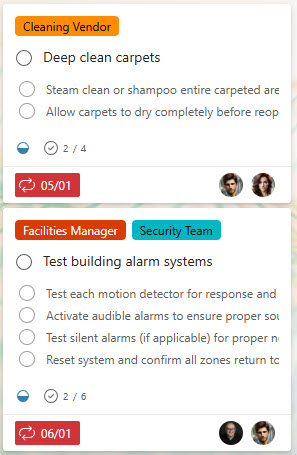
Facilities Maintenance Checklist Tasks
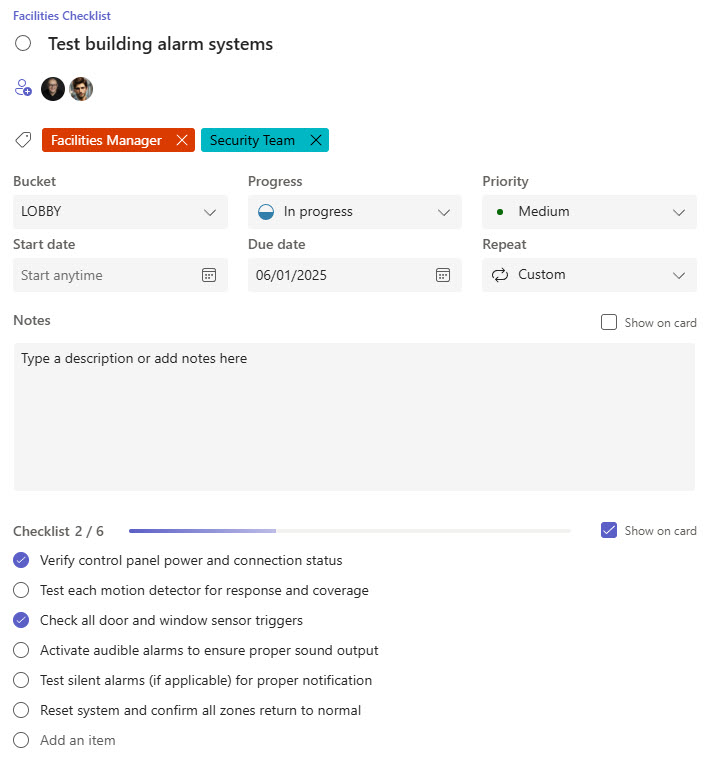
Facilities Maintenance Checklist Task with subtasks
Facilities Maintenance Checklist (List View)
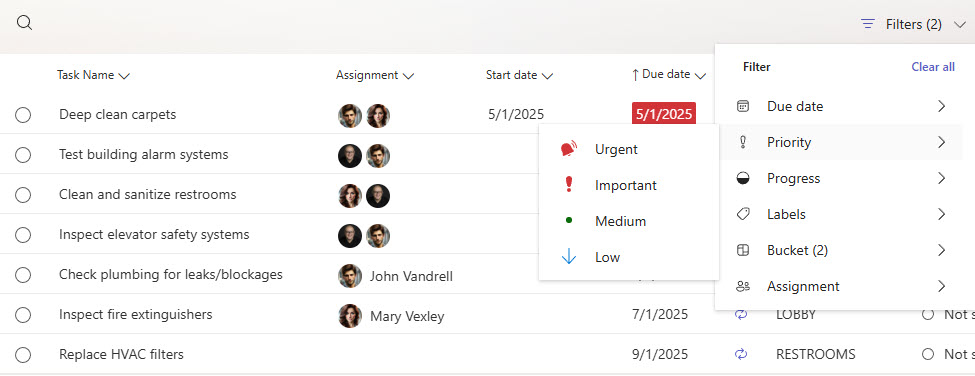
Facilities Maintenance Checklist Filtering
Facilities Maintenance Checklist Calendar View
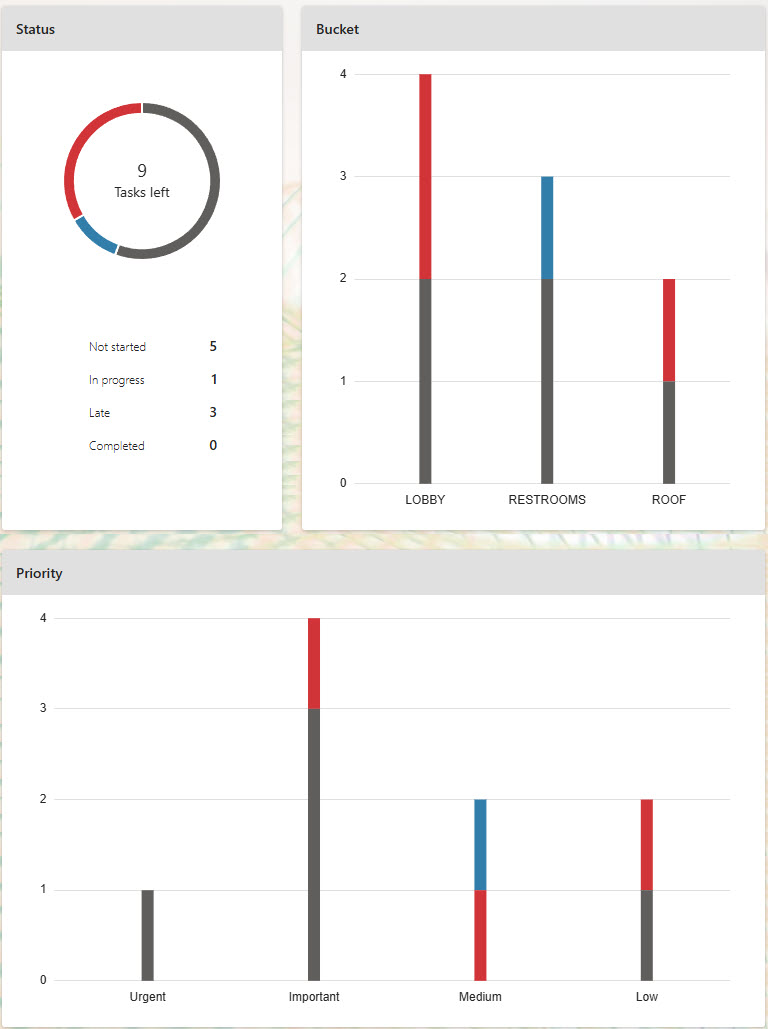
Facilities Maintenance Checklist Chart & Reports