How to Set Up a Single Source of Truth for Company Policies
Posted on May 28, 2026
A single source of truth for company policies is one of the most fixable problems on the intranet, and one of the most commonly fumbled. The fix is not a better tool – it is a structural discipline applied to a tool you already own. In this post, I will walk you through the seven elements every real single source of truth requires, as well as the four structural decisions to make before you build anything.
This is not a small problem. Outdated or inconsistent policies create real legal and compliance risk. They make it impossible for employees to act with confidence. They burn out HR and Legal teams who spend their week answering questions that should be self-service. They make new-hire onboarding harder than it should be. And in the worst case, an old version of a policy gets cited in a dispute, contradicting the current version that nobody had bothered to publish properly.
The good news is that this is one of the most fixable problems on the intranet. SharePoint is genuinely well-suited to hosting a single source of truth for company policies – and you don’t need expensive add-ons or custom development to make it work. In this post, I’ll walk through the structural decisions to make first, the setup steps that follow, and the ongoing care that separates a policies library that stays trusted from one that quietly decays.
What “single source of truth” actually means
Before getting into how to build one, it’s worth being precise about what a single source of truth actually is. The phrase gets used loosely. In the context of policies, here’s what it specifically requires:
- One location where each policy lives. Not three locations with copies – one place that is the authoritative version.
- Clear version control. The current version is obvious. Old versions are preserved for reference and audit, but they are clearly marked as superseded.
- A named owner for each policy. Somebody is accountable for keeping it current and accurate.
- A defined review cadence. Each policy is reviewed on a schedule, with the next review date visible.
- Easy findability. Employees can quickly locate the right policy by browsing or searching.
- Linked from everywhere relevant. The HR site, the intranet homepage, training pages, and onboarding hubs – all of them link to the canonical version, never to a copy.
- Old copies are actively retired. When a policy is updated, the old version is archived, and copies that previously circulated are withdrawn.
If even one of these elements is missing, you don’t really have a single source of truth – you have a primary source plus shadow copies that will eventually contradict it. The discipline of all seven is what makes the structure hold over time.
The structural decisions to make first
Before building anything in SharePoint, work through these decisions with the policy owners and stakeholders. Getting these right at the start saves significant rework later.
Decision 1: One central library, or one per department?
The two main models are a single company-wide policies library that hosts everything, or separate libraries per department (HR policies, Finance policies, IT policies, etc.) tied together with a unified browsing experience. Both can work. The single-library model is simpler to set up and easier for employees to search across. The per-department model gives each department more control over their own content but requires more discipline to keep the experience cohesive.
For most small and mid-sized companies, I recommend the single library. Less coordination overhead, simpler search, easier governance. For larger organizations or for companies where departments genuinely need different metadata schemes, the per-department model can make sense – but unify them on a single browsing page so the employee experience still feels like one place.
Decision 2: Who owns each policy?
Every policy needs a named owner. Not a department, not a committee – a named individual. The owner is responsible for keeping the policy current, scheduling the next review, processing updates, and answering questions about it.
Spend the time to assign owners explicitly, in writing, before you migrate any policies into the new library. If a policy doesn’t have an obvious owner, that’s worth knowing – it usually means the policy itself is in question, or the responsibility hasn’t been thought through. Either way, that conversation is better had now than 18 months from now when something goes wrong.
Decision 3: What’s the review cadence?
Set a default review cadence – annual is the right baseline for most policies – and make exceptions for the ones that need it. Critical policies (data privacy, code of conduct, security) might warrant a tighter cycle. Stable, low-risk policies might get away with longer. The point is that every policy has a defined next-review date, and the system reminds the owner before it lapses.
Decision 4: What metadata categorizes each policy?
The metadata you assign to each policy is what makes browsing and searching useful. The right set keeps the library navigable as it grows from a handful of policies to dozens or hundreds.
Suggested columns
- Policy Name
- Policy ID (Number)
- Department (HR / Finance / IT / Legal / Operations / etc.)
- Audience (All Employees / Managers / Specific Department)
- Effective Date
- Last Reviewed Date
- Next Review Date
- Owner (Person)
- Status (Current / Under Review / Superseded)
- Version/Revision
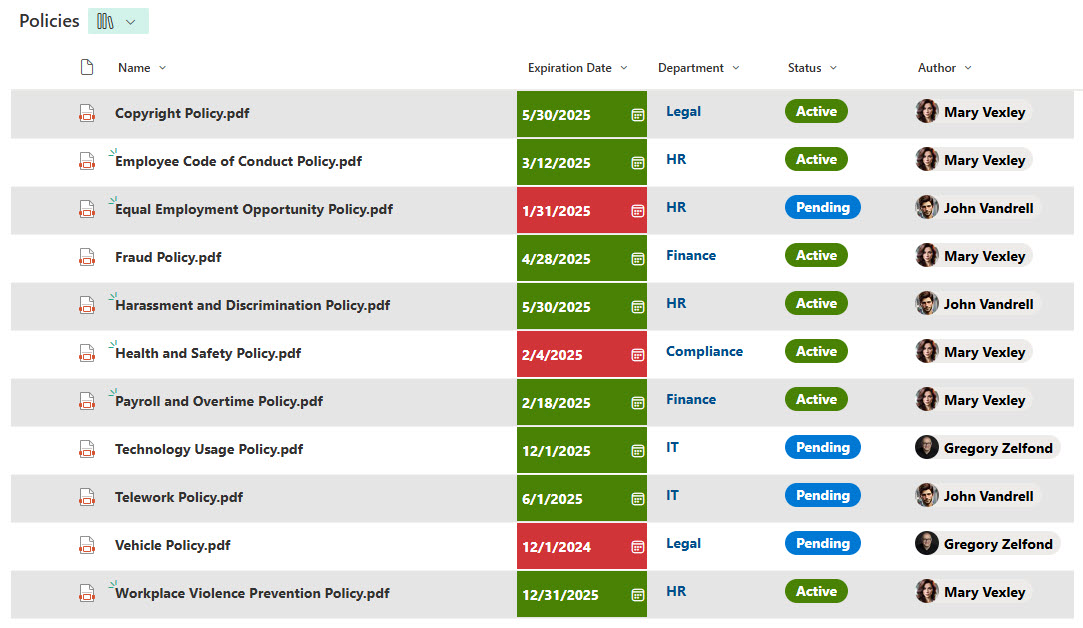
Example of a Policies Document Library configured with custom Metadata
Check out additional examples here.
The ongoing care that keeps it trusted
Setting up the library is the easy part. Keeping it trusted over the next several years is what separates a policies library that holds up from one that decays. The companies that get this right build a few habits into their operating rhythm:
- A periodic review where the policies team scans for upcoming reviews, retired policies that need final retirement actions, and any inconsistencies that have crept in.
- A periodic check on the metadata – are categories drifting, are owners still accurate, are statuses being maintained correctly.
- A clear publishing workflow for new policies – draft, review, legal sign-off, approval, publish, communicate to employees.
- A clear retirement workflow for old policies – when a policy is replaced or no longer needed, mark it superseded, archive it, and update any places that still link to it.
- A communication discipline when major policies change. Don’t quietly update a major policy and assume employees will notice. Send a brief announcement, link to the new version, summarize what changed, and why.
Quick reference: Policy elements mapped to SharePoint features
A side-by-side reference for what each element of a single source of truth requires – and the SharePoint feature that delivers it.
| Element of a single source of truth | How to deliver it in SharePoint |
|---|---|
| One location | A single dedicated SharePoint document library |
| Clear version control | Major/minor versioning + Status column |
| Named owner per policy | Owner (person) column populated with a named individual |
| Defined review cadence | Next Review Date column + Power Automate reminders |
| Easy findability | Custom views grouped by Category and Audience |