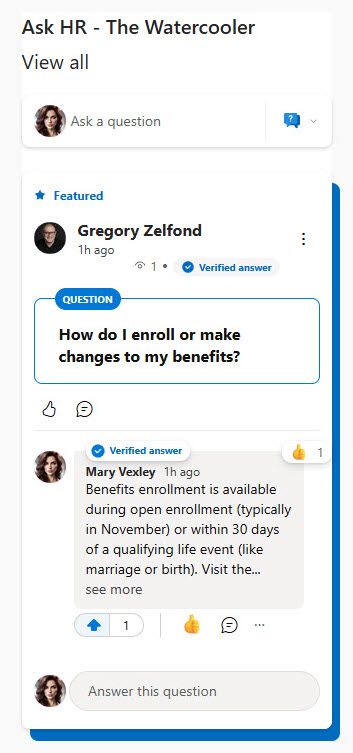
Conversations Web Part

Benefits
- Brings discussion onto the page: live Viva Engage conversations appear right on the intranet, where casual readers actually see them.
- Cuts context-switching: people read, reply, and start new posts without leaving SharePoint.
- Supports rich participation: questions, polls, and praise can be posted straight from the page, complete with images and files.
- Flexible sourcing: show a community, a topic, one person’s activity, or each viewer’s personal home feed.
- Keeps communication transparent: discussions happen in the open on pages people already visit, instead of buried in a separate app.
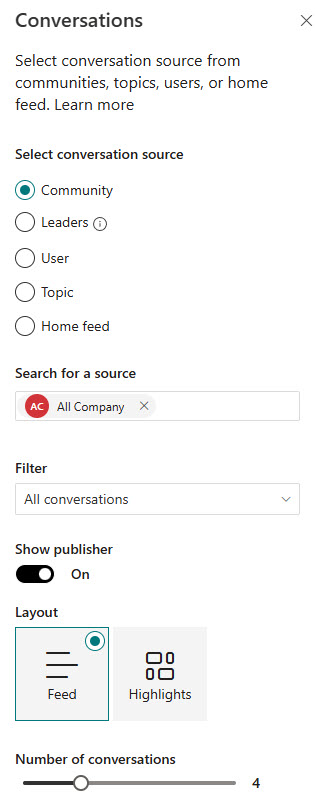
Settings
- Conversation source: Community (Group), User, Topic, or Feed.
- Search for a source: type the name of the community, person, or topic to connect.
- Number of conversations to show: controls how much page height the web part takes; it can display as few as 2 and a maximum of 12 conversations.
- Theme: inherited from the page automatically; light themes show conversations on white cards, dark themes on grey cards.
- Community (Group): the most recent conversations from one chosen Viva Engage community; visitors can also start new conversations right from the page.
- User: the most recent conversations a chosen person has participated in; read and reply only, this mode does not show the box to start a new post.
- Topic: the most recent conversations tagged with a chosen topic; also read and reply only.
- Feed: the viewer’s personal Viva Engage home feed; every visitor sees their own feed and can start a conversation in any of their communities.
Limits and Nuances
- Vanity domains break it: the web part only works when the site uses the original *.onmicrosoft.com domain. On a custom (vanity) SharePoint domain, conversations are not supported.
- External users see an error: guests cannot use the web part, even if they are eligible to see the community in Viva Engage itself.
- You cannot hand-pick conversations: there is no curated mode. To display specific conversations, use the Highlights web part, which accepts up to four conversation URLs.
- The feed updates in real time: the web part reflects new posts as they appear in Viva Engage, so the page never shows a stale snapshot; a pinned community conversation also displays at the top, in addition to your configured count.
- Conversations display vertically only: there is no horizontal or carousel layout, so budget for page height; certain custom theme colors can also cause display issues in the conversation cards, though all out-of-the-box themes are supported.
- Safari and the SharePoint iOS app may hide images: with Prevent Cross-Site Tracking enabled, images in posts show a file error; disabling that Safari setting restores them.
- The legacy Highlights feed is retired: Microsoft retired the older Yammer Highlights web part on January 31, 2025; migrate any pages still using it to the Conversations web part.
Conversations vs. the Alternatives
- Conversations vs. Highlights web part: Conversations is fully interactive (new posts, replies, polls, praise, best answers); Highlights shows only the first message of each conversation, and it is the one to use when you need hand-picked conversations.
- Conversations vs. a Viva Engage community page: the web part is a window into the community for casual readers on the intranet; send power users to the full community for search, files, and membership.
- Conversations vs. a Teams channel: Viva Engage suits open, organization-wide discussion and announcements; Teams suits fast back-and-forth inside a defined working group.
- Conversations vs. page comments: comments live only on that one page; the Conversations web part connects the page to a real community whose discussion continues everywhere Viva Engage appears.
Common Questions About the Conversations Web Part
What does the Conversations web part do in SharePoint?
It embeds live Viva Engage discussions on a modern SharePoint page. Visitors can read full conversations, reply, and – depending on the source mode – start brand-new posts, including questions, polls, and praise, without leaving the page. It is the standard way to add two-way discussion to intranet pages like leadership, HR, IT, or community sites, and it updates as new messages are posted.
Why is the Conversations web part not loading on my site?
The most common cause is a vanity domain – the web part only works when the SharePoint site uses the original *.onmicrosoft.com domain, and it is not supported on custom domain names. External guest users also see an error regardless of their Viva Engage access. Finally, your organization needs an active Viva Engage (formerly Yammer) tenant for the web part to have anything to show.
Can users post to Viva Engage directly from the SharePoint page?
Yes, when the source is a Community or the Feed. In those modes, visitors get the full Viva Engage publisher and can create any post type – questions, polls, praise – plus upload images and files and use rich text, all from the SharePoint page. When the source is a User or a Topic, the web part is read-and-reply only and the publisher does not appear.
How many conversations can the web part display?
The web part can show as few as 2 conversations and a maximum of 12, and you control the count in the web part settings to manage how much page height it takes. One nuance worth knowing: if the connected community has a pinned conversation, it displays at the top in addition to the number you configured, so the web part can run slightly longer than expected.
What is the difference between the Conversations and Highlights web parts?
Conversations is the modern, fully interactive experience – whole threads, replies, new posts, polls, and best answers right on the page. Highlights shows only the first message of each conversation and requires a click into Viva Engage to respond, but it is the only one that lets you hand-pick specific conversations by URL. For most pages, Conversations is the better default.
Do I need Viva Engage to use the Conversations web part?
Yes – the web part is a window into Viva Engage, so your organization needs an active Viva Engage network and at least one community worth surfacing. When that foundation exists, it is one of the strongest engagement elements on an intranet homepage; several designs on LookBook 365 feature it, built with out-of-the-box web parts only – the way Greg Zelfond builds every design. Conversations Web Part Example Conversations Web Part Example Conversations Web Part Settings