Mileage Reimbursement (Form)


Overview
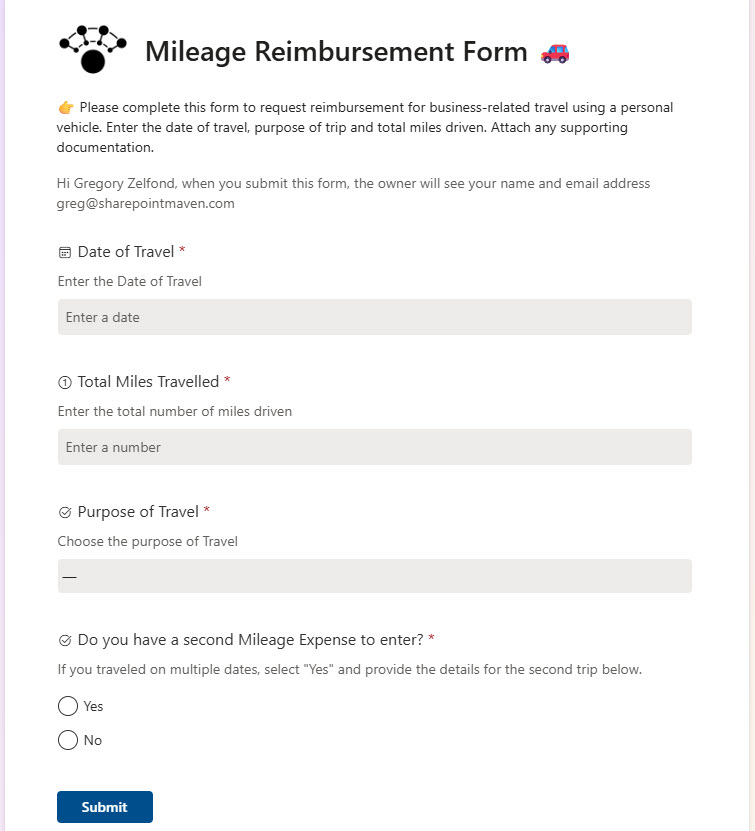
- Form-Based Input: Employees submit mileage claims through an easy-to-use Microsoft Form
- Automatic List Population: Each submission is recorded in a connected Microsoft List for tracking and approval
- Custom Fields: Capture details like trip date, origin/destination, miles traveled, purpose, and reimbursement amount
- Multiple Trips per Form: The mileage form allows employees to enter multiple trips in a single submission
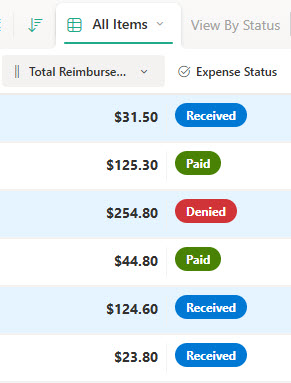
- Status Tracking: Add columns to monitor approval status, reviewer comments, and payment issued date
- Automatic Calculations: Reimbursement amounts are calculated in the list using a simple formula and the current mileage rate
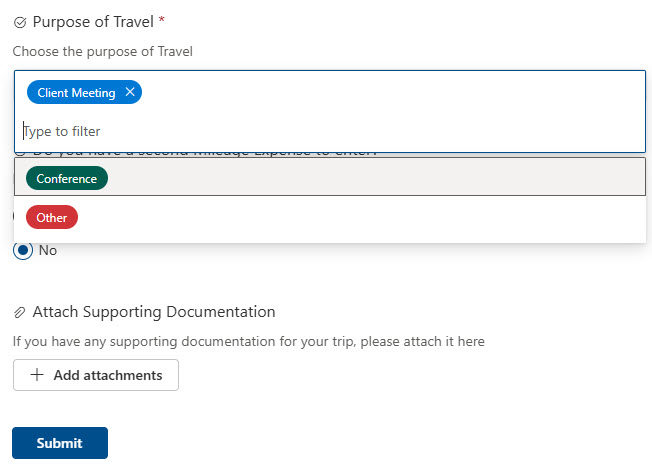
- Categories and Attachments: submissions in the tracker can be organized with categories and supporting attachments
Benefits
- Streamlined Submission: Replaces manual spreadsheets and email chains with a modern, user-friendly form
- Centralized Tracking: All requests are logged in one place, making auditing and reporting effortless
- Automatic Calculations: Reimbursement amounts are calculated in the list using a simple formula and the current mileage rate
- Flexible Form Logic: Form branching allows employees to enter and organize multiple trips in a single submission
- Audit-Friendly History: Easily track and export data for compliance, audits, or year-end reporting
- Mobile-Ready: Submit mileage on the go from any device, anytime
Common Questions About This Mileage Reimbursement Form
What is this Mileage Reimbursement Form built with?
The design is built entirely with Microsoft Forms and Microsoft Lists – employees submit claims through an easy-to-use form, and every submission is recorded in a connected list for tracking and approval. There is no custom code and no third-party tools involved. It is the kind of clean, maintainable solution Greg Zelfond builds for finance and accounting teams inside Microsoft 365.
What’s included in the Mileage Reimbursement Form?
The design includes the submission form, with branching that lets employees enter multiple trips in a single submission, and a Mileage Reimbursement Tracker list that records every claim. The tracker captures trip date, origin and destination, miles traveled, and purpose, calculates the reimbursement amount with a simple formula and the current mileage rate, supports categories and attachments, and includes a view grouped by status.
Does this design use any custom code or third-party tools?
No. Everything in this design uses standard Microsoft Forms and Microsoft Lists functionality available in Microsoft 365. That matters because out-of-the-box solutions are stable, secure, and easy to maintain – nothing breaks when Microsoft rolls out updates, and there are no third-party licenses to manage. Out-of-the-box is the only way Greg builds.
Can this form be customized for our organization?
Absolutely. The form questions, trip fields, mileage rate, categories, and status columns can all be tailored to your reimbursement policy. Greg adapts the design to the way your finance team actually processes claims – approval status, reviewer comments, and payment issued date columns can match your workflow – so the tracker reflects your real process, not a generic template.
What happens after an employee submits a mileage claim?
Each submission is automatically recorded in the connected Microsoft List, where the reimbursement amount is calculated using a simple formula and the current mileage rate. Finance can monitor approval status, add reviewer comments, and record the payment issued date, with a grouped-by-status view showing where every claim stands – and the data can be exported for compliance, audits, or year-end reporting.
Can Greg build this form for our organization?
Yes – this is exactly the kind of work Greg Zelfond does. As an independent SharePoint and Microsoft 365 consultant and Microsoft MVP, he designs and builds out-of-the-box solutions like this one, tailored to your mileage rates, approval steps, and reporting needs. If you want mileage claims out of spreadsheets and into one tracker, reach out through the contact page to get started.