New Hire Provisioning (Tracker)



Overview
- Custom Fields to match the unique needs of different departments and roles
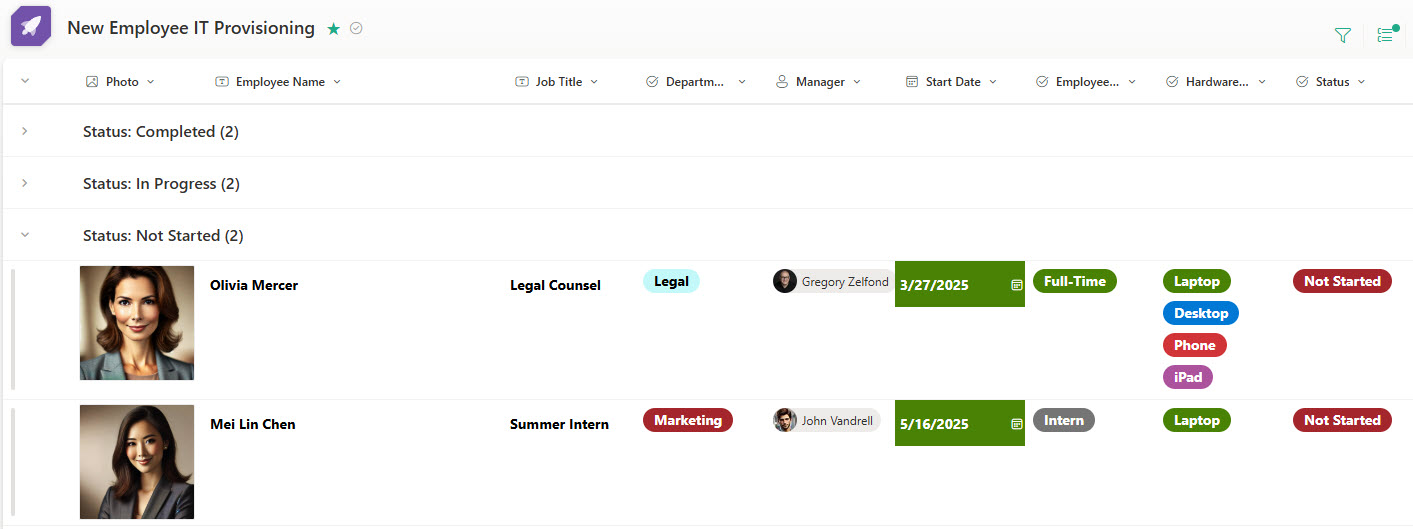
- Gallery & Board views provide a visually engaging way to manage submissions
- Integrated Form for Human Resources ensures a streamlined and efficient submission process for new hires
- Status Column offers a clear overview of request progress at a glance
- Automated notifications alert relevant users instantly when a new request is submitted
Benefits
- Consolidates IT setup requests in one place, eliminating scattered emails and spreadsheets between HR and IT
- Improves communication and visibility between HR and IT teams, so nothing slips through the cracks during onboarding
- Assigns clear ownership and due dates, ensuring accountability for each setup task (e.g., hardware, accounts, access)
- Tracks request status in real time, allowing both HR and IT to see progress and follow up as needed
- Reduces onboarding delays, by streamlining request intake and task tracking for each new hire
- Creates a repeatable, scalable process, making it easy to manage IT setup for multiple hires across departments
Common Questions About This New Hire IT Provisioning Tracker
What is this New Hire IT Provisioning Tracker built with?
The tracker is built entirely with Microsoft Lists and Microsoft Forms, both included with Microsoft 365 – a custom list with status tracking and multiple views, fed by an integrated form for request intake. There is no custom code and there are no third-party tools. It is the kind of clean, collaborative tracker Greg Zelfond builds for HR and IT teams.
What’s included in the New Hire IT Provisioning Tracker?
Each request captures the new hire’s setup needs – hardware, accounts, and access – in custom fields that can flex by department and role. A status column shows progress at a glance, with a view grouped by status, board and gallery views, and filtering. An integrated submission form gives HR a streamlined intake process, and automated notifications alert IT the moment a request lands.
Does this design use any custom code or third-party tools?
No. The tracker is built entirely with Microsoft Lists and Microsoft Forms, both included with most Microsoft 365 business and enterprise plans – no custom code, no third-party add-ons, and nothing extra to buy. That keeps it stable, secure, and easy to maintain, with everything stored safely inside your Microsoft 365 environment. Out-of-the-box is the only way Greg builds.
Can this tracker be customized for our IT team?
Absolutely. The custom fields can match the unique needs of different departments and roles – laptop models, software licenses, security groups, badge access, or phone setup. Statuses, views, and notifications can be reshaped around your handoff between HR and IT. Greg adapts the tracker to your real provisioning workflow rather than forcing your team into a generic template.
How do new provisioning requests get submitted?
Through an integrated Microsoft Forms submission form designed for Human Resources. When a new hire is confirmed, HR fills out the form and the request flows straight into the tracker – no scattered emails, no spreadsheets. Automated notifications instantly alert the relevant IT staff that a new request has been submitted, so setup work starts right away.
Can Greg build this tracker for our organization?
Yes – this is exactly the kind of work Greg Zelfond does. As an independent SharePoint and Microsoft 365 consultant and Microsoft MVP, he designs and builds trackers like this one in Microsoft Lists, Forms, Planner, and SharePoint, tailored to the way your HR and IT teams handle new hire setup. Reach out through the contact page to get started.