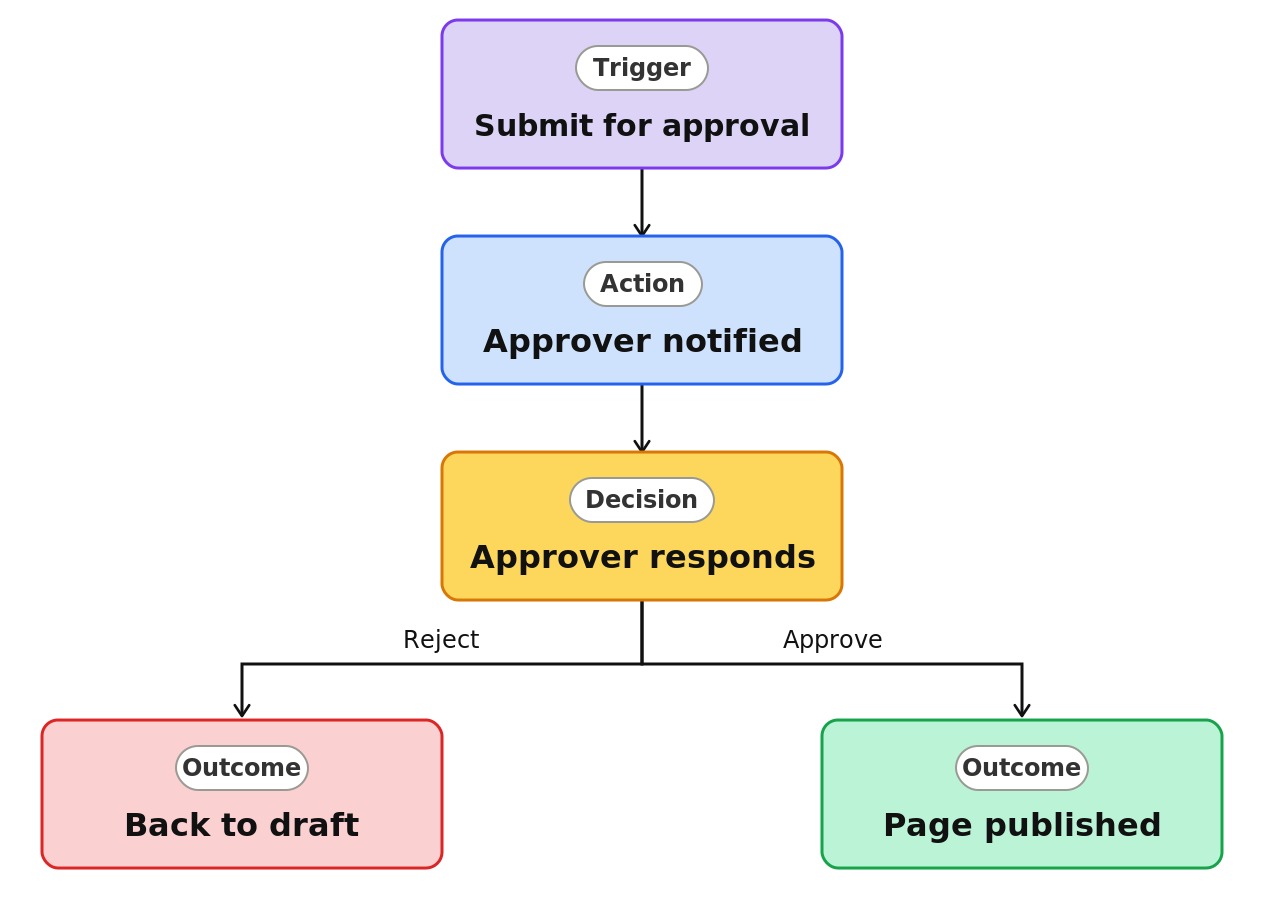
Company News Approval


Overview
- Holds every page and news post as a draft until an approver signs off
- Configured on the Site Pages library of a communication or modern team site
- Changes the author’s Publish action to Submit for approval
- Notifies the approver, who approves or rejects in the Microsoft Teams Approvals app
- Tracks each page as draft, pending, approved, or rejected
- Runs on SharePoint’s built-in page approval flow, with no custom development
Common Use Cases
- Reviewing corporate news before it reaches every employee
- Approving HR and policy pages before changes go live
- Meeting review and audit requirements in regulated industries
- Governing a multi-author intranet where a small group controls publishing
- Checking layout, tone, and branding before a page is published
- Verifying executive announcements for accuracy and timing
Common Questions About Company News Approval
If LookBook 365 is code-free and out-of-the-box, why does it include this workflow example?
Page approval is a native SharePoint capability you switch on, not custom code. When you enable it, SharePoint creates an approval flow for you behind the scenes – it stays inside your Microsoft 365 tenant, needs no development, and can be extended later in Power Automate if your review process grows. You get governed publishing with none of the build work.
Can visitors see a page that is waiting for approval?
No. While a page is pending, visitors keep seeing the last approved version, or nothing at all if it has never been published. Draft visibility settings on the Site Pages library keep pending pages limited to the author, editors, and approvers.
Does page approval cover news posts as well as pages?
Yes. Both site pages and news posts live in the Site Pages library, so once approval is on, both follow the same review-before-publish path.
What happens when a page is rejected?
It returns to the author as a draft, so they can revise and resubmit. The approver can add a comment explaining what needs to change, keeping the discussion in one place.
Can the approval process be customized?
Yes. Because it runs on Power Automate, the flow can be extended with extra approval stages, routing by page metadata, or notifications to a Teams channel. The standard single-stage setup suits most sites, and I can build the more advanced routing when you need it.
Can you set this up and train my team?
Absolutely. I configure page approval on your sites, set the right approvers and draft visibility, and show your authors the submit-and-review flow. If you need multi-stage or section-specific approvals across an intranet, I can design the flow and the governance around it.