Meeting Agenda

Overview
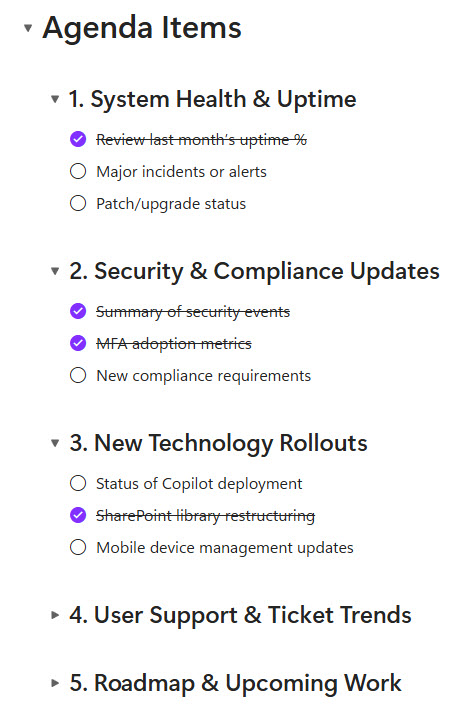
- Contains a Table of Contents component for fast navigation across agenda topics
- Includes structured Meeting Information (date, time, attendees, objectives)
- Features collapsible agenda items for better organization and readability
- Each topic incorporates Loop checklists for capturing notes, decisions, and follow-ups
- Includes links to supporting documents stored in SharePoint
- Co-authorable in real time across Loop, Teams, and Outlook
Benefits
- Focused, organized meetings: a consistent agenda structure keeps every session on track
- Less clutter: topics can be collapsed or expanded as needed, so the agenda stays easy to scan
- Collaboration at every stage: attendees can contribute in real time before, during, and after the meeting
- Always the latest documents: direct links to SharePoint ensure attendees reference the current version
- Simpler follow-up: built-in checklists capture decisions and action items as the meeting happens
- Reusable structure: the agenda can be duplicated for recurring committees, project teams, or planning sessions
- Easy to share: the agenda works as a Loop component for pre-reads or post-meeting summaries
Common Questions About This Meeting Agenda
What is this Meeting Agenda built with?
The agenda is built entirely with Microsoft Loop, using standard capabilities – a Table of Contents component, collapsible headings, Loop checklists, and real-time co-authoring across Loop, Teams, and Outlook. There is no custom code and no third-party meeting tools involved. It is the kind of clean, maintainable agenda Greg Zelfond builds for committees and project teams working inside Microsoft 365.
What’s included in the Meeting Agenda?
The agenda includes a Table of Contents component for fast navigation across topics, a structured Meeting Information section with date, time, attendees, and objectives, and collapsible agenda items for better organization. Each topic incorporates Loop checklists for capturing notes, decisions, and follow-ups, and the agenda links directly to supporting documents stored in SharePoint – all co-authorable in real time across Loop, Teams, and Outlook.
Does this design use any custom code or third-party tools?
No. Everything in this agenda uses standard Microsoft Loop functionality available in Microsoft 365. That matters because out-of-the-box solutions are stable, secure, and easy to maintain – nothing breaks when Microsoft rolls out updates, and there are no third-party licenses to manage. Out-of-the-box is the only way Greg builds.
Can this Meeting Agenda be customized for our meetings?
Absolutely. The meeting information fields, agenda topic structure, checklists, and document links can all be tailored to the way your meetings actually run. Greg adapts the agenda to your sessions – recurring committees, project team meetings, leadership reviews, or planning workshops – so every meeting starts from a consistent, ready-to-use structure instead of a blank page.
Can we use this Meeting Agenda inside Teams or Outlook?
Yes. Loop components sync across Microsoft Teams chats, Outlook emails, and the Loop app, so the agenda stays current wherever attendees open it. An organizer can send the agenda in an Outlook meeting invite or share it in a Teams chat, and any topic added or checklist updated appears instantly for everyone – no resending required.
Can Greg build this Meeting Agenda for our organization?
Yes – this is exactly the kind of work Greg Zelfond does. As an independent SharePoint and Microsoft 365 consultant and Microsoft MVP, he designs and builds out-of-the-box agendas like this one, tailored to your committees, project teams, and meeting cadence. If you want meetings that start organized and end with clear follow-ups, reach out through the contact page to get started.