Meeting Minutes

Overview
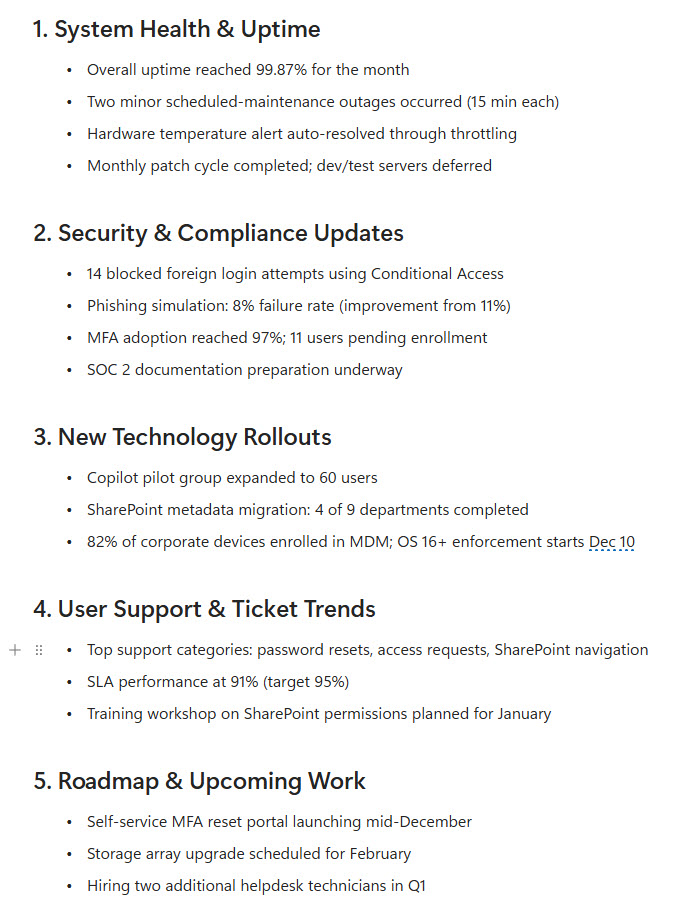
- Provides a clean, structured Meeting Minutes template built in the Microsoft Loop app
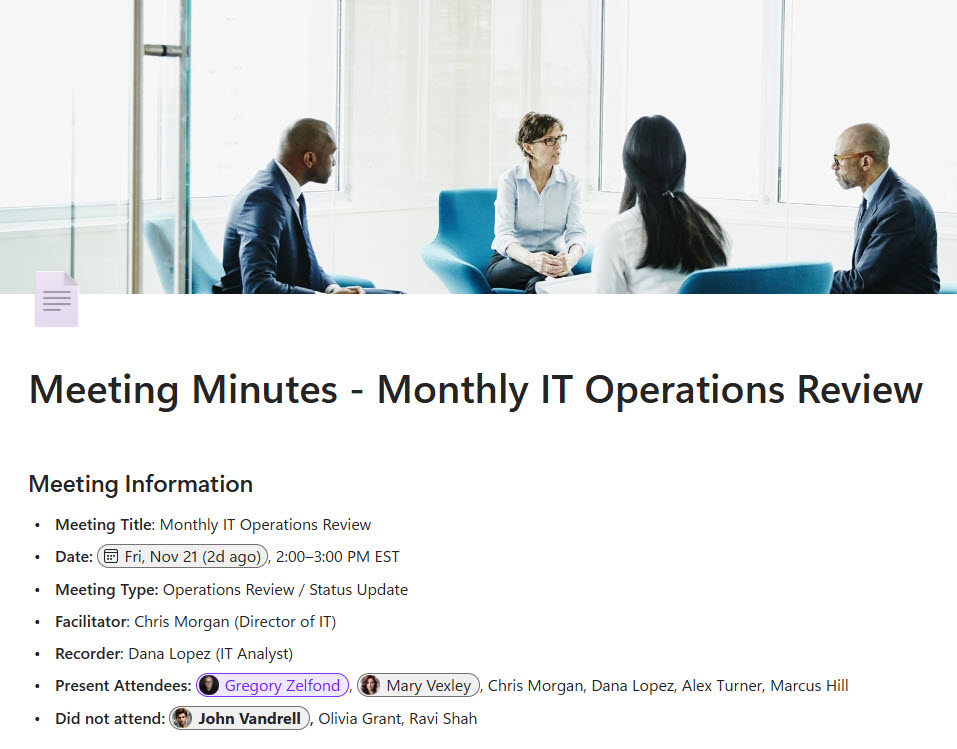
- Includes a dedicated Meeting Information section capturing date, time, location, facilitator, attendees, and those absent or excused
- Real-time co-authoring allows everyone to contribute during the meeting from Loop, Teams, or Outlook
- Collapsible headings and a simple layout make it easy to track agenda items, notes, decisions, and next steps
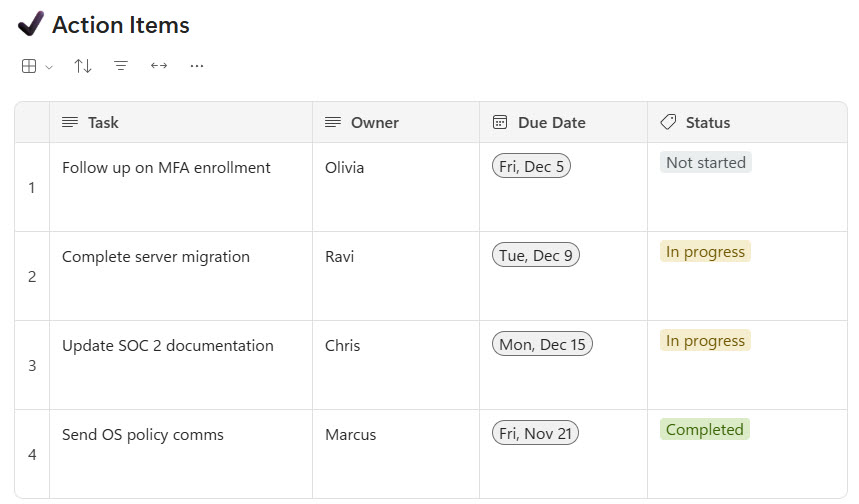
- Action items include owners and due dates, ensuring clear accountability and follow-up
- Supports embedding or linking relevant SharePoint documents for additional context
Benefits
- Complete meeting documentation: attendance, discussions, decisions, and tasks are tracked in one place
- Improved team alignment: everyone can edit and update the minutes live, reducing gaps or miscommunication
- Clear responsibility: action items include assignment fields and due dates for easier follow-through
- Reusable template structure: quickly duplicate for recurring sessions to maintain consistency
- Integrated into Microsoft 365: works seamlessly across Teams, Outlook, SharePoint, and Loop workspaces
- Easy to review and navigate: collapsible sections and clean formatting make reviewing past minutes effortless
Common Questions About This Meeting Minutes Template
What is this Meeting Minutes template built with?
The template is built entirely with the Microsoft Loop app, using standard capabilities – structured sections, collapsible headings, real-time co-authoring, and action items with owners and due dates. There is no custom code and no third-party note-taking tools involved. It is the kind of clean, maintainable template Greg Zelfond builds for teams that want consistent meeting documentation inside Microsoft 365.
What’s included in the Meeting Minutes template?
The template includes a Meeting Information section capturing date, time, location, facilitator, attendees, and those absent or excused. Collapsible headings organize agenda items, notes, decisions, and next steps, while an Action Items section assigns owners and due dates for clear follow-up. It also supports embedding or linking relevant SharePoint documents, and everyone can contribute live from Loop, Teams, or Outlook.
Does this design use any custom code or third-party tools?
No. Everything in this template uses standard Microsoft Loop functionality available in Microsoft 365. That matters because out-of-the-box solutions are stable, secure, and easy to maintain – nothing breaks when Microsoft rolls out updates, and there are no third-party licenses to manage. Out-of-the-box is the only way Greg builds.
Can this Meeting Minutes template be customized for our teams?
Absolutely. The meeting information fields, section headings, and action item structure can all be tailored to the way your meetings actually run. Greg adapts the template to your meeting types – project status meetings, committee sessions, leadership reviews, or recurring team check-ins – so every group captures minutes the same consistent way without reinventing the format each time.
Can we use these Meeting Minutes inside Teams or Outlook?
Yes. Loop components sync across Microsoft Teams chats, Outlook emails, and the Loop app, so the minutes stay current wherever people open them. Attendees can update notes or check off action items directly from a Teams chat during the meeting, and every change appears instantly in the original document – no one has to merge versions afterward.
Can Greg build this Meeting Minutes template for our organization?
Yes – this is exactly the kind of work Greg Zelfond does. As an independent SharePoint and Microsoft 365 consultant and Microsoft MVP, he designs and builds out-of-the-box templates like this one, tailored to your meeting types, teams, and follow-up process. If you want meeting documentation your organization will actually keep up with, reach out through the contact page to get started.