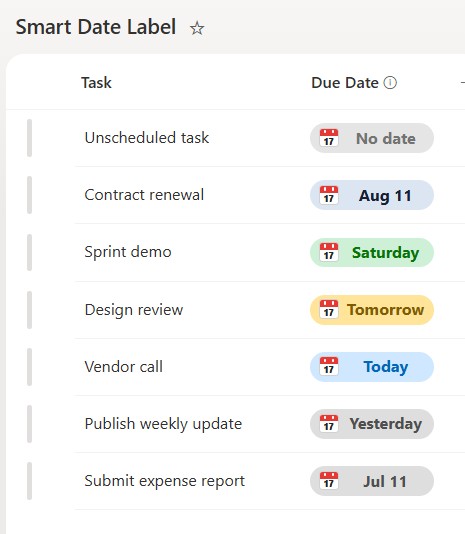
Smart Date Label


Overview
- Rewrites a date column as a friendly pill – Yesterday, Today, Tomorrow, a weekday, or a short date
- Names the weekday for any date within the coming week, so near-term items read instantly
- Color-codes each pill by proximity, so today, soon, and past dates stand apart at a glance
- Falls back to a clean month-and-day label for dates further out
- Applied as column-formatting JSON on the date column, so it changes the display but never the stored date
- Shows a neutral No date pill when the field is empty, so the column never looks broken
Common Use Cases
- Task or project due dates
- Renewal or expiry dates
- Event or meeting dates
- Onboarding or milestone dates
- Content review or publish dates
- Any date you want people to read at a glance
Details
- Design Pattern: Dates & Time
- Format Scope: Column
Required Columns
| Display name | Column type | Internal name |
|---|---|---|
| Due Date | Date and Time | [DueDate] |
Prerequisites
- Add a Date column to your list before you paste the JSON.
- Then populate it with your dates.
- The JSON reads a column named DueDate – either name your date column DueDate or change [$DueDate] in the JSON to match your column’s internal name.
- Use a real Date column, not a text column that only looks like a date.
- Test several values – yesterday, today, tomorrow, a date later this week, a further-out date, and a blank field.
- If a label reads one day early or late, check whether the column is set to Date only or Date and time and confirm the site’s regional time zone before changing the JSON.
How to Apply JSON code
- Select the Due Date column header, then Column settings, then Format this column.
- Switch to Advanced mode.
- Paste the JSON below and click Save.
JSON Code
{
  "$schema": "https://developer.microsoft.com/json-schemas/sp/v2/column-formatting.schema.json",
  "elmType": "div",
  "style": {
    "display": "flex",
    "align-items": "center",
    "justify-content": "center",
    "height": "100%",
    "width": "100%",
    "box-sizing": "border-box"
  },
  "children": [
    {
      "elmType": "div",
      "style": {
        "position": "relative",
        "display": "flex",
        "align-items": "center",
        "width": "108px",
        "height": "26px",
        "box-sizing": "border-box",
        "border-radius": "13px",
        "font-size": "14px",
        "font-weight": "700",
        "line-height": "20px",
        "white-space": "nowrap",
        "color": "=if(@currentField == '', '#737373', if((floor(Number(Date(@currentField)) / 86400000) - floor(Number(Date(@now)) / 86400000)) == 0, '#0067b8', if((floor(Number(Date(@currentField)) / 86400000) - floor(Number(Date(@now)) / 86400000)) == 1, '#805b00', if((floor(Number(Date(@currentField)) / 86400000) - floor(Number(Date(@now)) / 86400000)) == -1, '#4f4f4f', if(((floor(Number(Date(@currentField)) / 86400000) - floor(Number(Date(@now)) / 86400000)) > 1) && ((floor(Number(Date(@currentField)) / 86400000) - floor(Number(Date(@now)) / 86400000)) <= 7), '#087508', if((floor(Number(Date(@currentField)) / 86400000) - floor(Number(Date(@now)) / 86400000)) < 0, '#4f4f4f', '#172033'))))))",
        "background-color": "=if(@currentField == '', '#e5e5e5', if((floor(Number(Date(@currentField)) / 86400000) - floor(Number(Date(@now)) / 86400000)) == 0, '#cfe8ff', if((floor(Number(Date(@currentField)) / 86400000) - floor(Number(Date(@now)) / 86400000)) == 1, '#ffe49a', if((floor(Number(Date(@currentField)) / 86400000) - floor(Number(Date(@now)) / 86400000)) == -1, '#dedede', if(((floor(Number(Date(@currentField)) / 86400000) - floor(Number(Date(@now)) / 86400000)) > 1) && ((floor(Number(Date(@currentField)) / 86400000) - floor(Number(Date(@now)) / 86400000)) <= 7), '#cef0d7', if((floor(Number(Date(@currentField)) / 86400000) - floor(Number(Date(@now)) / 86400000)) < 0, '#dedede', '#dce6f2'))))))"
      },
      "children": [
        {
          "elmType": "div",
          "style": {
            "position": "absolute",
            "left": "8px",
            "top": "4px",
            "width": "17px",
            "height": "17px",
            "overflow": "hidden",
            "box-sizing": "border-box",
            "background-color": "#ffffff",
            "border": "1px solid #d1d1d1",
            "border-radius": "3px"
          },
          "children": [
            {
              "elmType": "div",
              "style": {
                "position": "absolute",
                "left": "0",
                "right": "0",
                "top": "0",
                "height": "6px",
                "background-color": "#e53935"
              }
            },
            {
              "elmType": "div",
              "style": {
                "position": "absolute",
                "left": "3px",
                "top": "1px",
                "width": "2px",
                "height": "3px",
                "background-color": "#ffffff",
                "border-radius": "1px"
              }
            },
            {
              "elmType": "div",
              "style": {
                "position": "absolute",
                "right": "3px",
                "top": "1px",
                "width": "2px",
                "height": "3px",
                "background-color": "#ffffff",
                "border-radius": "1px"
              }
            },
            {
              "elmType": "span",
              "style": {
                "position": "absolute",
                "left": "0",
                "right": "0",
                "top": "5px",
                "height": "11px",
                "display": "flex",
                "align-items": "center",
                "justify-content": "center",
                "font-size": "8px",
                "font-weight": "800",
                "line-height": "11px",
                "color": "#242424"
              },
              "txtContent": "17"
            }
          ]
        },
        {
          "elmType": "span",
          "style": {
            "position": "absolute",
            "left": "30px",
            "right": "6px",
            "top": "3px",
            "height": "20px",
            "line-height": "20px",
            "text-align": "center"
          },
          "txtContent": "=if(@currentField == '', 'No date', if((floor(Number(Date(@currentField)) / 86400000) - floor(Number(Date(@now)) / 86400000)) == 0, 'Today', if((floor(Number(Date(@currentField)) / 86400000) - floor(Number(Date(@now)) / 86400000)) == 1, 'Tomorrow', if((floor(Number(Date(@currentField)) / 86400000) - floor(Number(Date(@now)) / 86400000)) == -1, 'Yesterday', if(((floor(Number(Date(@currentField)) / 86400000) - floor(Number(Date(@now)) / 86400000)) > 1) && ((floor(Number(Date(@currentField)) / 86400000) - floor(Number(Date(@now)) / 86400000)) <= 7), if(((floor(Number(Date(@currentField)) / 86400000) + 4) % 7) == 0, 'Sunday', if(((floor(Number(Date(@currentField)) / 86400000) + 4) % 7) == 1, 'Monday', if(((floor(Number(Date(@currentField)) / 86400000) + 4) % 7) == 2, 'Tuesday', if(((floor(Number(Date(@currentField)) / 86400000) + 4) % 7) == 3, 'Wednesday', if(((floor(Number(Date(@currentField)) / 86400000) + 4) % 7) == 4, 'Thursday', if(((floor(Number(Date(@currentField)) / 86400000) + 4) % 7) == 5, 'Friday', 'Saturday')))))), (if(getMonth(Date(@currentField)) == 0, 'Jan', if(getMonth(Date(@currentField)) == 1, 'Feb', if(getMonth(Date(@currentField)) == 2, 'Mar', if(getMonth(Date(@currentField)) == 3, 'Apr', if(getMonth(Date(@currentField)) == 4, 'May', if(getMonth(Date(@currentField)) == 5, 'Jun', if(getMonth(Date(@currentField)) == 6, 'Jul', if(getMonth(Date(@currentField)) == 7, 'Aug', if(getMonth(Date(@currentField)) == 8, 'Sep', if(getMonth(Date(@currentField)) == 9, 'Oct', if(getMonth(Date(@currentField)) == 10, 'Nov', 'Dec'))))))))))) + ' ' + getDate(Date(@currentField))))))))"
        }
      ]
    }
  ]
}
Common Questions About the Smart Date Label
What is the Smart Date Label built with?
It is built with a standard Microsoft List (SharePoint list) and a small piece of column-formatting JSON applied to a date column. There is no custom development, no SPFx solution, and no third-party tools. It is the kind of clean, maintainable formatting Greg Zelfond builds for teams that want dates to read in plain language without ongoing development overhead.
How are the labels decided?
The pill compares the date to today. It shows Yesterday, Today, or Tomorrow for the days right around now, the weekday name for anything within the coming week, and a short month-and-day for dates further out. Each state gets its own color, and an empty date shows a neutral No date pill.
What column does it need?
Just one Date and Time column. The pill reads that column by its internal name, so either name your column DueDate to match the example or change the name inside the JSON. Everything else – the labels and colors – is handled by the formatting.
Does this design use any custom development or third-party tools?
No. It uses only out-of-the-box SharePoint column formatting, which Microsoft supports natively. That keeps it stable and easy to maintain, and nothing breaks when SharePoint is updated. Out-of-the-box is the only way Greg builds, so you can own and extend the design yourself for years.
If LookBook 365 is code-free and out-of-the-box, why does this example include JSON?
Because SharePoint formatting JSON is not custom code – it is a native configuration feature built into lists and libraries. It is declarative: it only describes how an existing column looks, and cannot run scripts, reach external services, or change your data. Nothing is deployed and nothing breaks when Microsoft updates SharePoint, and you can edit or remove it anytime. That is why LookBook 365 treats it as out-of-the-box and low risk.
Can Greg set up friendly dates like this on our lists?
Yes – this is exactly the kind of work Greg Zelfond does. As an independent SharePoint consultant and Microsoft MVP, he designs out-of-the-box list and library formatting like this so your team can read and maintain it without a developer. Reach out through the contact page to talk about your lists.