Age Heat Indicator


Overview
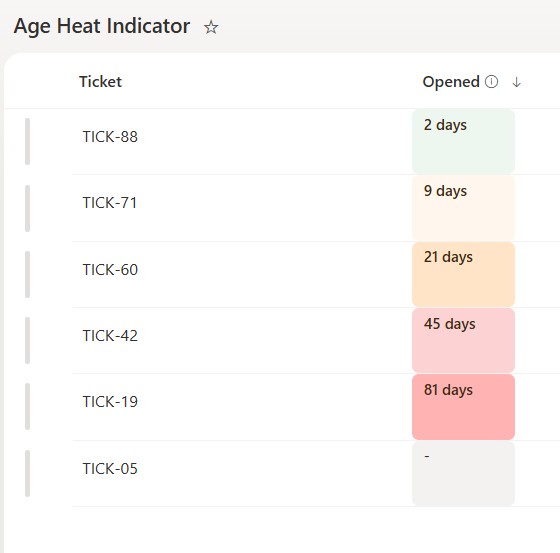
- Tints a date cell from cool to hot as the item ages
- Older items turn amber then red, so stale rows stand out
- Shows the age in days right in the cell
- Thresholds are set in the JSON and easy to change to your own bands
- Reads at a glance without sorting or filtering the list
- Applied as column-formatting JSON on a date field, so it changes nothing about the underlying data
Common Use Cases
- Open date on support tickets or cases
- Last-contact date on a follow-up list
- Created date on aging inventory or leads
- Last-reviewed date on documents or risks
- Received date on requests awaiting action
- Any date where older should raise a flag
Details
- Design Pattern: Dates & Time
- Format Scope: Column
Required Columns
| Display name | Column type | Internal name |
|---|---|---|
| Ticket | Single line of text | [Title] |
| Opened | Date and time | [Opened] |
Prerequisites
- Build a list with these columns before you paste the JSON.
- Then populate the list with dates.
- Because the JSON is applied at the column level, the Opened column can use any name you want.
- The age thresholds (7, 21, 45, and 55 days) live in the JSON – change them to match your own bands.
- Because the color bands are calculated from today’s date, the result depends on your tenant time zone and the time of day – test date rows close to midnight.
How to Apply JSON code
- On the Opened column, open the column header menu, choose Column settings, then Format this column.
- Switch to Advanced mode.
- Paste the JSON below and click Save.
JSON Code
{
  "$schema": "https://developer.microsoft.com/json-schemas/sp/v2/column-formatting.schema.json",
  "elmType": "div",
  "txtContent": "=if(@currentField == '', '-', if(Number(Date(@currentField)) == 0, '-', if(indexOf(((abs(((Number(@now) - Number(Date(@currentField))) / 86400000))) + ''), '.') < 0, ((abs(((Number(@now) - Number(Date(@currentField))) / 86400000))) + ''), substring(((abs(((Number(@now) - Number(Date(@currentField))) / 86400000))) + ''), 0, indexOf(((abs(((Number(@now) - Number(Date(@currentField))) / 86400000))) + ''), '.'))) + ' days'))",
  "style": {
    "display": "inline-block",
    "min-width": "70px",
    "padding": "4px 10px",
    "border-radius": "6px",
    "font-size": "13px",
    "font-weight": "600",
    "color": "#3d2b17",
    "background-color": "=if(@currentField == '', '#f3f2f1', if(Number(Date(@currentField)) == 0, '#f3f2f1', if(((Number(@now) - Number(Date(@currentField))) / 86400000) <= 7, '#eef6f0', if(((Number(@now) - Number(Date(@currentField))) / 86400000) <= 21, '#fff7ed', if(((Number(@now) - Number(Date(@currentField))) / 86400000) <= 45, '#ffe4c7', if(((Number(@now) - Number(Date(@currentField))) / 86400000) <= 55, '#fdd2d2', '#ffb3b3'))))))"
  }
}
Common Questions About the Age Heat Indicator
What is the Age Heat Indicator built with?
It is built with a standard Microsoft List (SharePoint list) and a small piece of column-formatting JSON. There is no custom development, no SPFx solution, and no third-party tools. It is the kind of clean, maintainable formatting Greg Zelfond builds for teams that want a date column that heats up as items get older without ongoing development overhead.
What columns does it need?
It needs one Date column, where the JSON is applied, plus any label column such as the ticket name. The tint and the day count are computed from that date against the current day.
Does this design use any custom development or third-party tools?
No. It uses only out-of-the-box SharePoint column formatting, which Microsoft supports natively. That keeps it stable and easy to maintain, and nothing breaks when SharePoint is updated. Out-of-the-box is the only way Greg builds, so you can own and extend the design yourself for years.
If LookBook 365 is code-free and out-of-the-box, why does this example include JSON?
Because SharePoint formatting JSON is not custom code – it is a native configuration feature built into lists and libraries. It is declarative: it only describes how an existing column looks, and cannot run scripts, reach external services, or change your data. Nothing is deployed and nothing breaks when Microsoft updates SharePoint, and you can edit or remove it anytime. That is why LookBook 365 treats it as out-of-the-box and low risk.
Can I change the age bands?
Yes. The points where the cell turns amber and red are day counts in the JSON, set here at 7, 21, 45, and 55 days. Adjust them so the colors match how your team defines stale.
Can Greg build a design like this for our lists?
Yes – this is exactly the kind of work Greg Zelfond does. As an independent SharePoint consultant and Microsoft MVP, he designs out-of-the-box list and library formatting like this so your team can read and maintain it without a developer. Reach out through the contact page to talk about your lists.