Employee Knowledge (Quiz)

Overview
- Intuitive Interface: Simple, web-based design for easy access and completion
- Multi-Language Support: Accommodates diverse teams with language flexibility
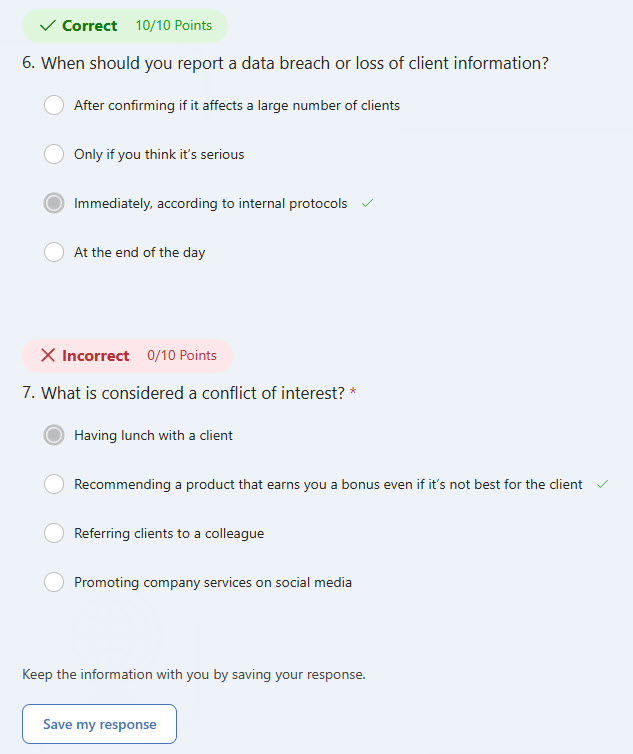
- Instant Results: Automated scoring displays results immediately after submission
- Customizable Look: Add images and branding for a tailored user experience
- Responses and Analytics: trainers can review individual quiz results and track overall performance with built-in analytics
Benefits
- Instant feedback: employees receive their results immediately after completing the quiz
- Easy to create and distribute: quizzes can be built quickly and shared via link, email, or embed
- Trackable results: responses and performance are monitored in real time with built-in analytics
- Mobile-friendly access: works seamlessly across desktop and mobile devices
- Customizable design: branding, images, and themes give the quiz a polished look
- Quizzes inside Stream videos: embedding quizzes directly into Microsoft Stream makes training videos interactive
Common Questions About This Employee Quiz
What is this Employee Quiz built with?
The quiz is built entirely with Microsoft Forms, using standard capabilities – automated scoring, instant results, multi-language support, and a customizable look with images and branding. There is no custom code and no third-party quiz software involved. It is the kind of clean, maintainable quiz Greg Zelfond builds for HR and training teams inside Microsoft 365.
What’s included in the Employee Quiz?
The design includes a simple, web-based quiz that employees can complete from desktop or mobile, with multi-language support for diverse teams. Scoring is automated, so each employee sees their individual quiz results immediately after submission. On the back end, a responses and analytics overview tracks performance in real time, and the quiz can even be embedded directly into Microsoft Stream training videos.
Does this design use any custom code or third-party tools?
No. Everything in this quiz uses standard Microsoft Forms functionality available in Microsoft 365. That matters because out-of-the-box solutions are stable, secure, and easy to maintain – nothing breaks when Microsoft rolls out updates, and there are no third-party licenses to manage. Out-of-the-box is the only way Greg builds.
Can this quiz be customized for our organization?
Absolutely. The questions, scoring, languages, and visual design – including your own images, branding, and themes – can all be tailored to your training and onboarding content. Greg adapts the quiz to the way your organization actually trains, whether that means new hire knowledge checks, policy reviews, or quizzes embedded in Stream training videos.
How does scoring work, and what do employees see?
Scoring is fully automated – as soon as an employee submits the quiz, their results appear instantly, with no manual grading. On the trainer’s side, built-in analytics make results trackable in real time, from a responses overview across all participants down to individual quiz results – so you can see who completed the quiz and how the team performed.
Can Greg build this quiz for our organization?
Yes – this is exactly the kind of work Greg Zelfond does. As an independent SharePoint and Microsoft 365 consultant and Microsoft MVP, he designs and builds out-of-the-box quizzes like this one, tailored to your training, onboarding, and knowledge check needs. If you want a quiz your employees will actually enjoy taking, reach out through the contact page to get started.