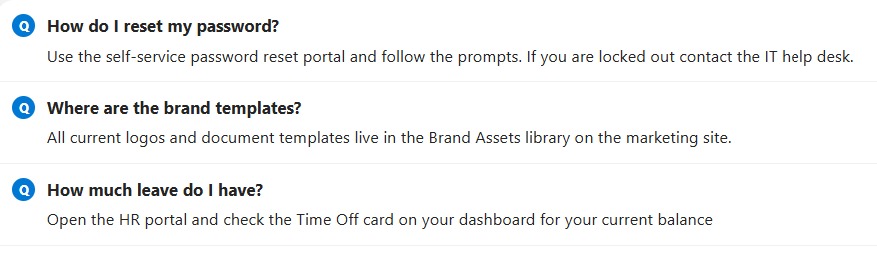
FAQ Layout


Overview
- Styles each row as a question with its answer beneath, like a knowledge base
- A small Q marker leads each question so entries are easy to scan
- The answer sits indented in a softer color for comfortable reading
- Hides the default column headers for a clean article-like look
- Applied as view formatting JSON on the rows, so it changes nothing about the underlying data
- Works on any list with a question and an answer column
Common Use Cases
- IT or HR FAQ
- Policy questions and answers
- Product or service FAQ
- Onboarding Q&A
- Help center articles
- Any question-and-answer list
Details
- Design Pattern: Grouped Views
- Format Scope: View
Required Columns
| Display name | Column type | Internal name |
|---|---|---|
| Title | Single line of text | [Title] |
| Answer | Multiple lines of text | [Answer] |
Prerequisites
- Build a list with these columns before you paste the JSON.
- Populate the list with your questions and answers.
- Internal column names (in brackets) must match the JSON exactly.
How to Apply JSON code
- Open the view dropdown at the top right, choose Format current view, and keep the layout set to List.
- Switch to Advanced mode, paste the JSON below, and click Save.
JSON Code
{
  "$schema": "https://developer.microsoft.com/json-schemas/sp/v2/view-formatting.schema.json",
  "hideColumnHeader": true,
  "hideSelection": true,
  "rowFormatter": {
    "elmType": "div",
    "style": {
      "display": "flex",
      "flex-direction": "column",
      "align-items": "flex-start",
      "width": "100%",
      "box-sizing": "border-box",
      "padding": "12px 14px",
      "border-bottom": "1px solid #f0f0f0",
      "text-align": "left"
    },
    "children": [
      {
        "elmType": "div",
        "style": {
          "display": "flex",
          "align-items": "flex-start",
          "justify-content": "flex-start",
          "width": "100%"
        },
        "children": [
          {
            "elmType": "div",
            "style": {
              "display": "flex",
              "align-items": "center",
              "justify-content": "center",
              "width": "20px",
              "height": "20px",
              "border-radius": "50%",
              "flex-shrink": "0",
              "margin-right": "10px",
              "background-color": "#0078d4",
              "color": "#ffffff",
              "font-size": "11px",
              "font-weight": "700"
            },
            "txtContent": "Q"
          },
          {
            "elmType": "div",
            "style": {
              "font-size": "14.75px",
              "font-weight": "700",
              "color": "#242424",
              "line-height": "1.35",
              "text-align": "left"
            },
            "txtContent": "[$Title]"
          }
        ]
      },
      {
        "elmType": "div",
        "style": {
          "font-size": "14.25px",
          "font-weight": "400",
          "color": "#484644",
          "margin-top": "6px",
          "padding-left": "30px",
          "line-height": "1.45",
          "text-align": "left",
          "width": "100%",
          "box-sizing": "border-box"
        },
        "txtContent": "[$Answer]"
      }
    ]
  }
}
Common Questions About the FAQ Layout
What is the FAQ Layout built with?
It is built with a standard Microsoft List (SharePoint list) and view formatting JSON applied to the rows. There is no custom development, no SPFx solution, and no third-party tools. It is the kind of clean, maintainable formatting Greg Zelfond builds for teams that want a readable FAQ without ongoing development overhead.
What columns does it need?
It needs two columns: the built-in Title for the question and an Answer column for the response. The row refers to each by its internal name, so the JSON and the columns must line up exactly – here those names are Title and Answer.
Is it a real collapsible accordion?
It styles each row as a question with the answer shown beneath, which reads like an FAQ. If you would rather the answers collapse and expand, that can be done by grouping the list by question and using group headers, which Greg can set up.
Does this design use any custom development or third-party tools?
No. It uses only out-of-the-box SharePoint view formatting, which Microsoft supports natively. That keeps it stable and easy to maintain, and nothing breaks when SharePoint is updated. Out-of-the-box is the only way Greg builds, so you can own and extend the design yourself for years.
If LookBook 365 is code-free and out-of-the-box, why does this example include JSON?
Because SharePoint formatting JSON is not custom code – it is a native configuration feature built into lists and libraries. It is declarative: it only describes how existing columns and views look, and cannot run scripts, reach external services, or change your data. Nothing is deployed and nothing breaks when Microsoft updates SharePoint, and you can edit or remove it anytime. That is why LookBook 365 treats it as out-of-the-box and low risk.
Can Greg build a view like this for our team?
Yes – this is exactly the kind of work Greg Zelfond does. As an independent SharePoint consultant and Microsoft MVP, he designs out-of-the-box list and library formatting like this so your team can read and maintain it without a developer. Reach out through the contact page to talk about your lists.