Heartbeat Line


Overview
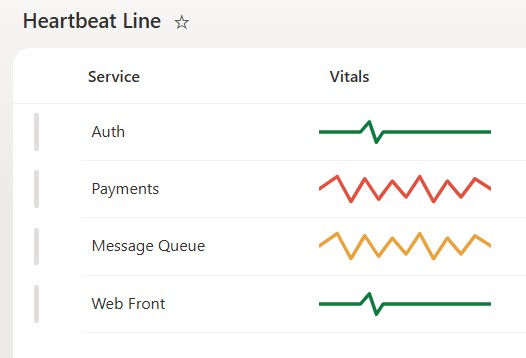
- Draws a heartbeat trace that reads like a monitor
- Calm green line when healthy, spiky red when critical
- The trace shape and color change with the status
- Drawn as a crisp inline SVG that stays sharp at any size
- A striking, memorable way to show health on a list
- Applied as column-formatting JSON on a choice column, so it changes nothing about the underlying data
Common Use Cases
- System or service health on an operations list
- Pipeline or queue health
- Site or endpoint uptime status
- Model or job health on a data list
- Team or morale pulse
- Any status you want shown as a vital sign
Details
- Design Pattern: Metrics & Progress
- Format Scope: Column
Required Columns
| Display name | Column type | Internal name |
|---|---|---|
| Service | Single line of text | [Title] |
| Vitals | Choice | [Vitals] |
Prerequisites
- Build a list with a choice column for the status before you paste the JSON.
- Then populate the list with status values.
- The JSON keys off specific words (Healthy, Degraded, Critical); use these exact words in your choice column or edit the words in the JSON to match yours.
- Apply the formatting to the status column.
- This is a status illustration, not a live waveform or a historical metric chart.
How to Apply JSON code
- On the Vitals column, open the column header menu, choose Column settings, then Format this column.
- Switch to Advanced mode.
- Paste the JSON below and click Save.
JSON Code
{
  "$schema": "https://developer.microsoft.com/json-schemas/sp/v2/column-formatting.schema.json",
  "elmType": "svg",
  "attributes": {
    "viewBox": "0 0 150 30",
    "preserveAspectRatio": "xMidYMid meet"
  },
  "style": {
    "width": "150px",
    "height": "30px",
    "display": "block"
  },
  "children": [
    {
      "elmType": "path",
      "attributes": {
        "d": "=if(@currentField == 'Healthy', 'M0 15 H36 L44 6 L50 24 L56 15 H150', 'M0 15 L16 4 L28 26 L40 6 L52 24 L64 8 L76 22 L88 4 L100 26 L112 8 L124 22 L136 6 L150 15')"
      },
      "style": {
        "stroke": "=if(@currentField == 'Healthy', '#0f7a3d', if(@currentField == 'Critical', '#e0523f', '#e8a33d'))",
        "stroke-width": "3px",
        "fill": "none",
        "stroke-linecap": "round",
        "stroke-linejoin": "round"
      }
    }
  ]
}
Common Questions About the Heartbeat Line
What is the Heartbeat Line built with?
It is built with a standard Microsoft List (SharePoint list) and a small piece of column-formatting JSON. There is no custom development, no SPFx solution, and no third-party tools. It is the kind of clean, maintainable formatting Greg Zelfond builds for teams that want a status column that reads as a heartbeat trace without ongoing development overhead.
What columns does it need?
It needs one Choice column holding the status, where the JSON is applied, plus any label column such as the service name. The trace is drawn from that value.
Does this design use any custom development or third-party tools?
No. It uses only out-of-the-box SharePoint column formatting, which Microsoft supports natively. That keeps it stable and easy to maintain, and nothing breaks when SharePoint is updated. Out-of-the-box is the only way Greg builds, so you can own and extend the design yourself for years.
If LookBook 365 is code-free and out-of-the-box, why does this example include JSON?
Because SharePoint formatting JSON is not custom code – it is a native configuration feature built into lists and libraries. It is declarative: it only describes how an existing column looks, and cannot run scripts, reach external services, or change your data. Nothing is deployed and nothing breaks when Microsoft updates SharePoint, and you can edit or remove it anytime. That is why LookBook 365 treats it as out-of-the-box and low risk.
Can I change the words or colors?
Yes. The status words, the trace shapes, and the colors are set in the JSON. Adjust them to match your own labels and palette.
Can Greg build a design like this for our lists?
Yes – this is exactly the kind of work Greg Zelfond does. As an independent SharePoint consultant and Microsoft MVP, he designs out-of-the-box list and library formatting like this so your team can read and maintain it without a developer. Reach out through the contact page to talk about your lists.