Choice Column
Common Use Cases
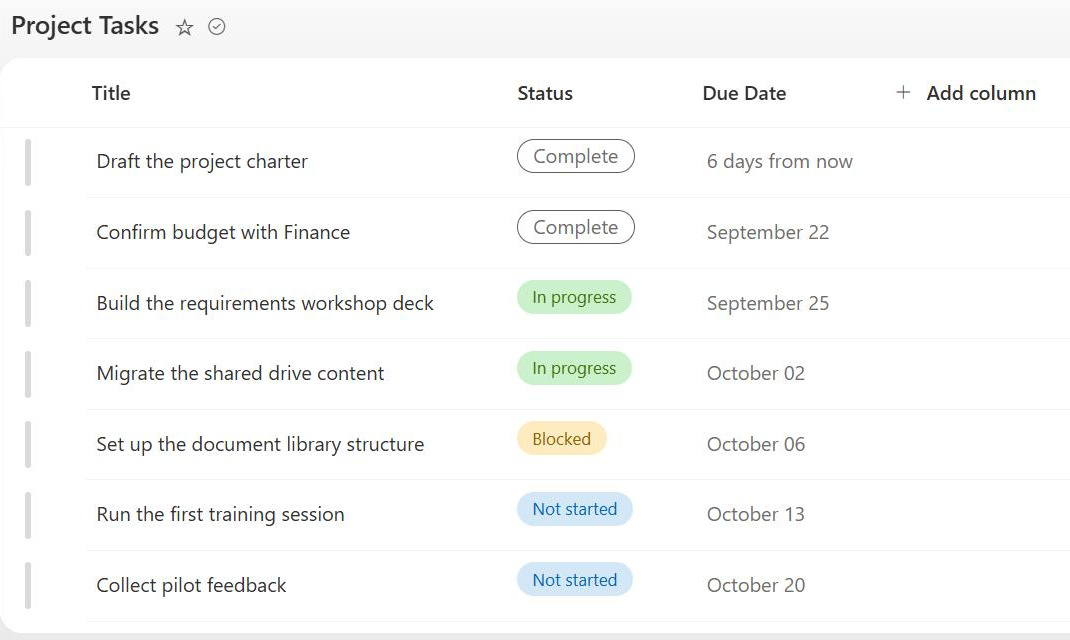
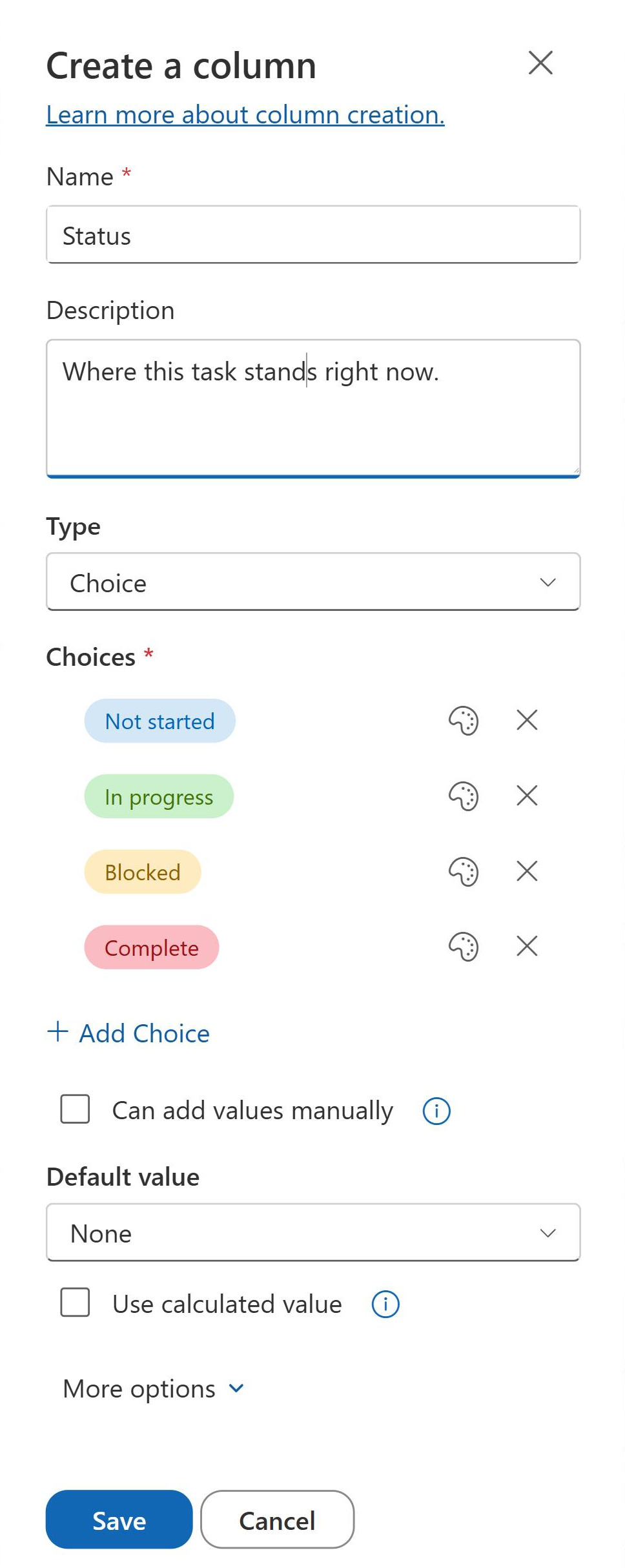
- Task status tracking: create a Status choice column (Not Started, In Progress, Completed) to track the status in an Actions or Issues Log
- Document classification: use a choice column for Document Type (Policy, Procedure, Template, Report) to enable consistent filtering and search refinement across libraries
- Priority management: add a Priority column (High, Medium, Low) with color badges so users immediately identify urgent items in any list view
- Event categorization: classify events by type (Training, Meeting, All-Hands, Social) to enable filtered calendar views
- Request routing: a Request Type column (Hardware, Software, Access) feeds filtered views so each team sees only its own queue
- Stage-based trackers: a single-select Stage column turns any tracker into a Board View with drag-and-drop progress updates
Benefits
- Drives Board View: Choice columns are the only column type that can serve as the bucket field for Board View, enabling Kanban-style drag-and-drop status management
- Color-coding: choice values can be assigned colors that appear as visual badges in list views, making status immediately scannable without opening items
- Consistent data entry: a predefined list eliminates misspellings and variations, and every item uses exactly the same values for reliable filtering and grouping
- Multi-select capability: checkbox display allows multiple choices per item, supporting scenarios like tagging an item with multiple applicable categories
- Supports conditional formatting: Choice column values are the most common driver for row and column color rules in modern list views
- Governance-friendly: unlike free-text columns, choice columns inherently constrain input, making data quality management straightforward
Details
- Feature Category: Columns & Views
Limits and Nuances
- Leave fill-in choices off: the Can add values manually option lets users type off-list values, reintroducing the misspellings and variants a Choice column exists to prevent
- Choice edits are not retroactive: renaming or deleting a choice leaves existing items with the old text value, so clean up tagged items before editing the choice list
- Keep the option set short: beyond roughly 20-30 values a dropdown becomes unwieldy; switch to a Lookup or Managed Metadata column
- Multi-select storage cap: the combined text of all selected values in one item cannot exceed 255 characters
- Board View needs single-select: a multi-select Choice column cannot organize a board, and the choice order dictates the lane order
- Colors are modern-only: choice color badges render as visual badges in the modern list experience
- Reuse via site columns: create the choice set once as a site column when it is needed on many lists, instead of rebuilding it per list
- Configure with column settings: set a default value, and mark the field required or unique, to keep new entries consistent
Common Questions About Choice Columns
What is a Choice column in SharePoint?
A Choice column presents users with a predefined list of values – typically as a dropdown – when they tag an item or document. Because everyone picks from the same options, the data stays consistent, which makes filtering, grouping, views, and conditional formatting reliable. It is the workhorse metadata column in most SharePoint lists and libraries.
When should I use a Choice column versus a Lookup column?
Use a Choice column for short, stable option sets that belong to one list – statuses, priorities, categories. Use a Lookup column when values change frequently, need their own metadata, or must be managed in one place for several lists. For vocabularies shared across many sites, a Managed Metadata column with the Term Store scales best.
Can choice values have colors?
Yes. In modern SharePoint, you can assign a color to each choice value, and the value renders as a colored badge in list views – High in red, Done in green, and so on. It is the quickest way to make a tracker scannable at a glance, with no formatting JSON or custom work required.
What happens to existing items if I rename or delete a choice?
Nothing automatic – items keep the old text value. A renamed choice leaves previously tagged items showing the outdated value, and a deleted choice strands them with a value that no longer exists in the column, which also removes the matching Board View lane. Update or re-tag existing items before editing the choice list.
Why does my Choice column not appear when creating a Board View?
Almost always because the column allows multiple selections. Board View can only bucket by a single-select Choice column or a Yes/No column. Edit the column, turn off multiple selections, and it will appear in the Organize board by dropdown. Lookup, Person, and Managed Metadata columns are not supported as board buckets.
How do I choose between a Choice column and other column types?
Use a Choice column for short, stable option sets that live in one list – statuses, priorities, categories; it also supports colors and Board View. Reach for a Lookup column when values change often, carry their own metadata, or must feed several lists from one place. Use a Managed Metadata column when the same vocabulary must be reused across many sites, with hierarchy and synonyms. Rule of thumb: under 20 to 30 options that rarely change and live in one list calls for Choice; anything bigger or shared calls for Lookup or Managed Metadata.
Should I allow fill-in choices?
Almost never. Fill-in lets users type values that are not on the list, which quietly reintroduces the typos and variants the column was meant to eliminate – and broken filtering follows. Greg leaves fill-in off on virtually every tracker he builds; if users keep needing new values, that is a sign the option list itself should be updated.