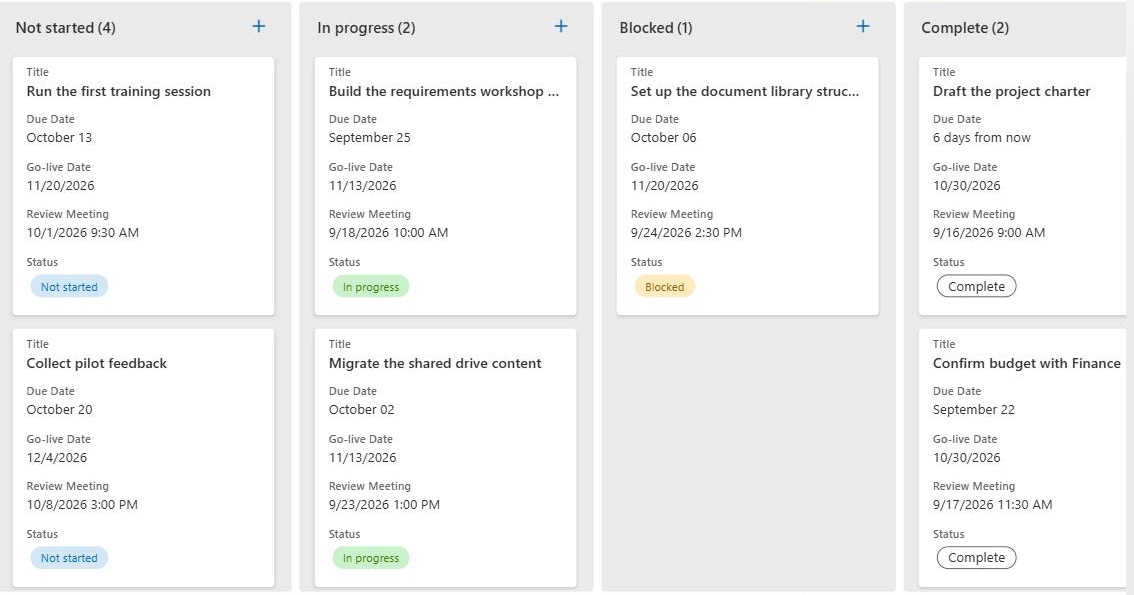
Board View
Common Use Cases
- Task tracking: visualize project tasks across Not Started / In Progress / Complete swimlanes with drag-and-drop status updates
- Content calendar: track content pieces through Draft / In Review / Approved / Published stages on a single board
- IT help desk queue: display support tickets grouped by status so the team can see workload distribution at a glance
- Hiring pipeline: move candidate records through Application Received / Phone Screen / Interview / Offer stages
- Change management: track change requests through Submitted / Under Review / Approved / Implemented columns
- Event planning: group event tasks by phase – Planning, Logistics, On-Site, Post-Event – for visual progress tracking
Benefits
- Visual workflow management: swimlanes make workflow state immediately visible, with no need to scan tabular rows to understand status distribution
- Drag-and-drop updates: moving a card between lanes instantly writes the new Choice value back to the list item, eliminating form navigation for status changes
- Integrated with list data: because Board View reads directly from the SharePoint list, all other views reflect drag-and-drop updates in real time
- Configurable card fields: choose which metadata columns appear on the card face to give team members the most relevant at-a-glance information
- Same data, many views: the board is just one view of the list; grid, gallery, and calendar views of the same items stay available and in sync
- Included with Microsoft 365: Board View ships with SharePoint and Microsoft Lists, so teams get a Kanban board without buying a separate tool
Details
- Feature Category: Columns & Views
How It Works
- A view type, not a separate app: any list can add a Board view alongside its other views, with a single-select Choice column defining the swimlanes
- One lane per choice value: every list item appears as a card in the lane matching its current value
- Drag to update: dropping a card in another lane writes the new value to the list item immediately, and all other views, filters, and automations see the change in real time
- Configurable cards: choose which columns appear on the card face and in what order, just like a Gallery view
- Gallery view in buckets: Board View is essentially a Gallery view grouped by one column; same cards, organized into lanes
- Default view option: the board can be set as the list’s default view so the team lands on it first
Limits and Nuances
- Single-select only: the board can only be organized by a single-select Choice or Yes/No column; multi-select Choice, Lookup, Person, and Managed Metadata columns cannot drive lanes
- Lists only: document libraries do not offer Board View
- Choice edits cascade: renaming or deleting a choice value removes its lane and strands items still tagged with the old value, so update tagged items before changing choices
- Lane order follows choice order: reorder the values in the Choice column settings; there is no independent lane ordering on the board itself
- Fill-in choices undermine the board: typed-in values have no matching lane, so keep Can add values manually turned off on the bucket column
- Edit permission required to drag: read-only users can see the board but cannot move cards
- New items follow the bucket value: when an item is created from the board, the value picked for the bucket column places its card in the matching lane
- Not a full project tool: no dependencies, due-date roll-ups, resource charts, or timelines; use Planner or Microsoft Project for complex scheduling
Common Questions About Board View
What is Board View in SharePoint?
Board View is a list view type that displays items as cards organized into swimlanes, one lane per value of a Choice column. It works like Planner or Trello: drag a card to a new lane and the underlying column value updates instantly. It is available out-of-the-box on any SharePoint or Microsoft Lists list.
Can I create a Board View on a document library?
No – Board View is available on lists only. Document libraries support standard, gallery, and other list-style views, but not boards. If you need a board-style workflow around documents, a common pattern is managing the review or approval workflow in a list with links to the files, while the documents themselves stay in the library.
Which columns can organize a Board View?
Only single-select Choice columns and Yes/No columns can serve as the bucket field. Multi-select Choice, Lookup, Person, and Managed Metadata columns are not supported as lanes. If your Choice column allows multiple selections, switch it to single-select and it will appear in the Organize board by dropdown when you create the view.
How do I change the order of the lanes?
Lane order follows choice order. Edit the Choice column (column header, Column settings, Edit), drag its values into the sequence you want, and save – the board immediately reflects the new order. There is no separate lane-ordering control on the board itself, which keeps the view and the column definition consistent.
What happens when I drag a card between lanes?
SharePoint writes the destination lane’s value into the item’s Choice column the moment you drop the card. Because the board reads directly from the list, every other view, filter, conditional formatting rule, and Power Automate flow watching that column reacts immediately. It is the fastest way to update status without opening a single form.
Should I use Board View or Planner?
Use Board View when you need custom metadata, multiple views, and structured list data alongside the board – it is the same list shown a different way. Use Planner when you want assignments, checklists, and personal task roll-ups. Greg often configures both on the project sites he builds, with lists handling structured trackers and Planner handling lightweight task management.