Managed Metadata
Common Use Cases
- Department and region tagging: one Departments term set powers columns, filters, and views on every site, so HR, Human Resources, and H.R. never drift apart
- Client and project taxonomies: tag deliverables across many sites with the same client list, then roll related content up by client in search and highlighted content
- Document type classification: a Document Types term set paired with content types keeps contracts, policies, and reports consistently labeled across libraries
- Records and compliance: retention and classification rules key off standardized term values instead of unreliable free text
- Multilingual intranets: terms carry labels in multiple languages, so users tag and filter in their own language while the underlying term stays one record
- Search refinement: managed metadata values can drive search refiners, letting users narrow results by department, region, or product
Benefits
- One dictionary for the whole tenant: terms are defined once in the Term Store and reused by every site, list, and library
- Central renaming: rename a term once and every item already tagged with it updates automatically
- Synonyms and hierarchy: other labels catch users’ shorthand, and parent-child terms let people tag broadly or precisely
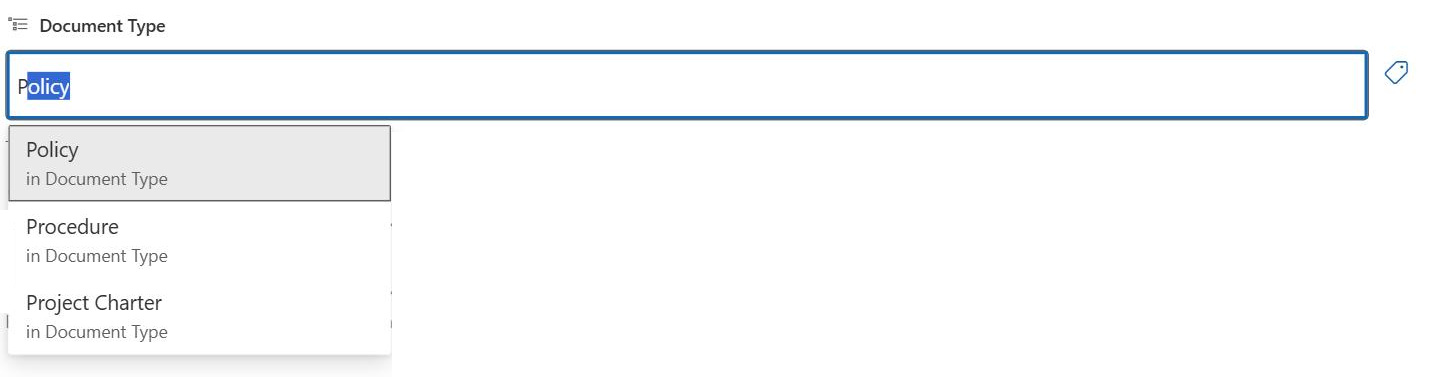
- Cleaner data entry: type-ahead suggestions against official terms eliminate misspellings and duplicate values
- Governance built in: layered roles for administrators, group managers, and contributors keep the taxonomy maintained without opening it to everyone
- Scales with the organization: support for up to 1 million terms per tenant means the taxonomy grows as the company does
Details
- Feature Category: Metadata & Taxonomy
How It Works
- Global and site-level scopes: global term sets are managed centrally and available to every site, while site-level term sets stay local to the site that created them
- Column scope: a Managed Metadata column points at one term set, or one branch of it, and users tag items by typing ahead or browsing the term tree
- Synonym matching: typing matches other labels too, so HR can resolve to Human Resources
- Reuse and central renaming: terms can be reused or pinned into other term sets, and renaming a term updates every item already tagged with it
- Layered roles: Term Store administrators manage everything, group managers own their term groups, and contributors maintain individual term sets
Limits and Nuances
- Lookup threshold: Managed Metadata counts toward the 12-column List View Lookup Threshold alongside Lookup and Person columns, so budget view columns accordingly
- Needs an owner: plan the taxonomy up front and assign Term Store managers, because routine changes go through them
- Closed term sets block fill-in: users cannot add terms unless the set’s submission policy is open and the column allows fill-in
- Tenant limits: 1 million total terms, 1,000 global term sets, and 1,000 global term groups
- Large term sets slow the picker: keep the sets users browse to a manageable size and use hierarchy to organize them
- No sorting on multi-value columns: multi-value Managed Metadata columns cannot be sorted in views; use a single-value column where sorting matters
- Calculated column restriction: formulas cannot reference Managed Metadata columns
- Not every scenario needs it: for a short, stable value list used on one site, a Choice column is the simpler out-of-the-box tool
Common Questions About Managed Metadata
What is Managed Metadata in SharePoint?
Managed Metadata is SharePoint’s centralized tagging system. Terms – like department names, regions, or document types – are stored once in the Term Store and reused across every site in the tenant. Users tag documents and list items by picking from the official terms instead of typing free text, which keeps spelling and naming consistent and makes filtering and search dramatically more reliable.
What is the Term Store?
The Term Store is the central dictionary behind Managed Metadata. It lives in the SharePoint admin center under Content services and organizes everything in a hierarchy: term groups contain term sets, and term sets contain the individual terms users pick from. Term Store administrators, group managers, and contributors maintain it, and changes made there flow to every column that uses the affected term set.
What is the difference between Managed Metadata and a Choice column?
A Choice column stores its values inside one list, so the same options retyped on another site can drift apart. Managed Metadata stores terms centrally and shares them tenant-wide, with extras a Choice column lacks: hierarchy, synonyms, multilingual labels, and central renaming. The trade-off is governance – the Term Store needs an owner. For a short value list used in one place, a Choice column is the simpler tool.
Can users add their own terms to a Managed Metadata column?
Only when two settings line up. The column must have Allow fill-in enabled, and the term set it points to must have an open submission policy in the Term Store. If the term set is closed – the common choice for governed taxonomies like departments – users can only pick from existing terms, and new ones must come from the term set’s designated contributors or managers.
How many terms can the SharePoint Term Store hold?
SharePoint Online supports up to 1 million total terms per tenant, with limits of 1,000 global term sets and 1,000 global term groups. Those ceilings are far beyond what most organizations ever need – in practice, the real constraint is usability, since a term set with thousands of entries becomes hard to browse in the picker. Keep the sets users interact with focused and use hierarchy to organize them.
Who should manage the Term Store?
Someone has to own it – that is the difference between a taxonomy that works and one that decays. Most organizations name one or two Term Store administrators centrally, then delegate term groups to the departments that own the vocabulary, such as HR owning the job titles set. Greg Zelfond, the consultant behind LookBook 365, builds this governance into every Managed Metadata rollout, because untended term stores fill with duplicates fast.