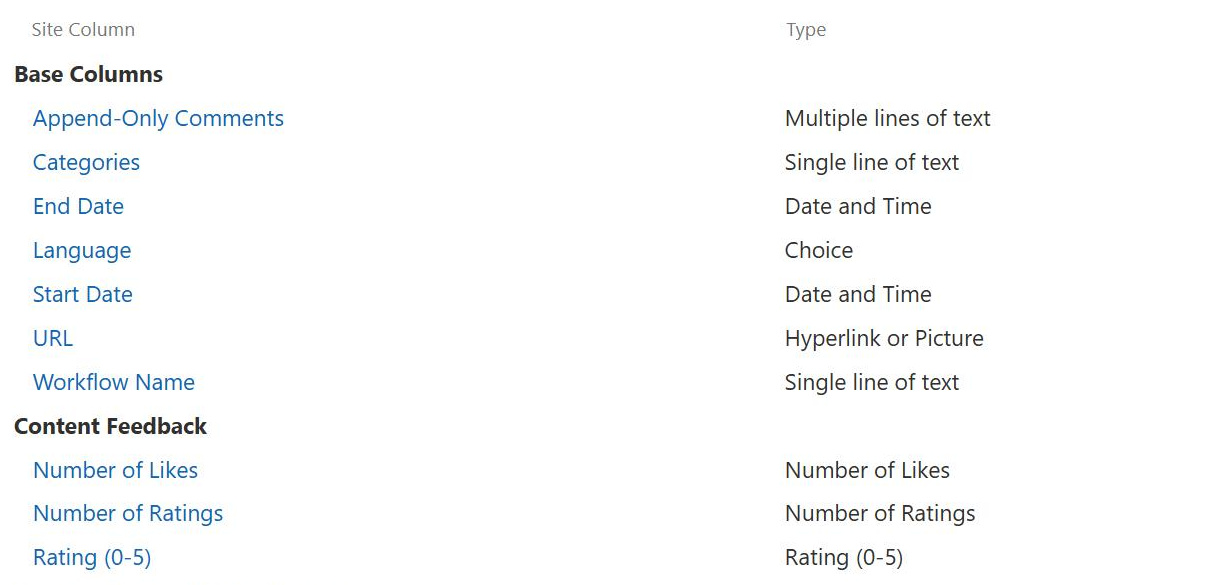
Site Columns
Common Use Cases
- Standard choice lists: define Department or Office Location once so every list offers the identical set of choices
- Document tagging at scale: reuse a Document Type column across all libraries so files are classified the same way everywhere
- Content type building blocks: combine site columns into content types like Contract or Policy that carry consistent metadata
- Search and filtering: identical columns across lists make search refiners and filtered views behave predictably
- Compliance metadata: standardize fields like Review Date or Record Owner that governance processes depend on
- Project tracking: share columns like Project Phase across the many lists a project site uses
Benefits
- Define once, use everywhere: one definition serves every list and library in the site and the sites below it
- Centralized updates: changing the site column can push the update down to every list column based on it
- Consistent reporting: identical column names and types across lists make rollups and search dependable
- Less rework: new lists inherit ready made columns instead of being rebuilt field by field
- Content type ready: site columns are the building blocks that reusable content types are made of
- Cleaner governance: administrators manage one definition instead of policing dozens of slightly different list columns
Details
- Feature Category: Metadata & Taxonomy
How It Works
- Stored in a gallery: site columns live in the site column gallery of the site where they are created
- Flows downward: a site column is available in the site where it is defined and in all sites beneath it
- Two ways to use: add a site column to a list directly, or add it to a content type and apply the content type to lists
- Push down updates: when a site column changes, SharePoint can update every list column created from it, because list columns keep the same column ID as their source
- Tenant wide reuse: publishing content types from the Content Type Gallery carries their site columns to other site collections
Limits and Nuances
- Scope is the site collection: site columns flow down from their source site, so sharing them across site collections requires content type publishing
- Push down overwrites: propagating a change replaces matching settings on list columns based on the column, including local tweaks someone made in a single list
- List columns stay local: a column created directly in one list is invisible to other lists; only site columns are reusable
- Built in columns abound: SharePoint ships with many ready made site columns, and reusing them is often better than creating near duplicates
- Modern flat architecture: with every modern site being its own site collection, plan tenant wide columns through the Content Type Gallery rather than deep subsite trees
Common Questions About Site Columns
What is the difference between a site column and a list column?
A list column exists only in the list where it was created and cannot be reused anywhere else. A site column is defined once at the site level and can be added to many lists and libraries, either directly or through content types. When consistency across lists matters, site columns are the right tool; for a one off field in a single list, a list column is fine.
Where can a site column be used once it is created?
A site column is available in the site where it was created and in all sites beneath it. From there it can be added to any list or library, or packaged into content types that carry it wherever they are applied. To use the same column across separate site collections, publish a content type containing it from the Content Type Gallery.
What happens when I update a site column?
You can choose whether the change propagates to the list columns that were created from it. Because each of those list columns keeps the same column ID as its source, SharePoint can find and update all of them in one operation. Propagation overwrites matching settings on those list columns, so local adjustments someone made in a single list are replaced.
Do I need content types to use site columns?
No. A site column can be added straight to a list or library on its own. Content types become valuable when several columns travel together, such as a Contract content type that always carries Effective Date, Counterparty, and Owner. Pairing site columns with content types is how SharePoint information architecture scales cleanly from one list to an entire tenant.
How do I reuse columns across multiple site collections?
Site columns flow downward from the site where they are defined, and in modern SharePoint every site is its own site collection. The supported route for tenant wide reuse is the Content Type Gallery: add the site columns to a content type there and publish it, and the columns become available across your sites along with the content type.
Who can design a metadata architecture built on site columns?
Site columns are simple to create, but deciding which columns should be standardized, how they map to content types, and how everything supports search takes experience. Greg Zelfond, the SharePoint consultant behind LookBook 365, designs and builds complete information architectures using only out of the box SharePoint features, so the result is durable and easy for internal teams to run.