Approved Suppliers (List)


Overview
- Built using native Microsoft Lists for flexibility and scalability
- Central repository for all approved and preferred suppliers
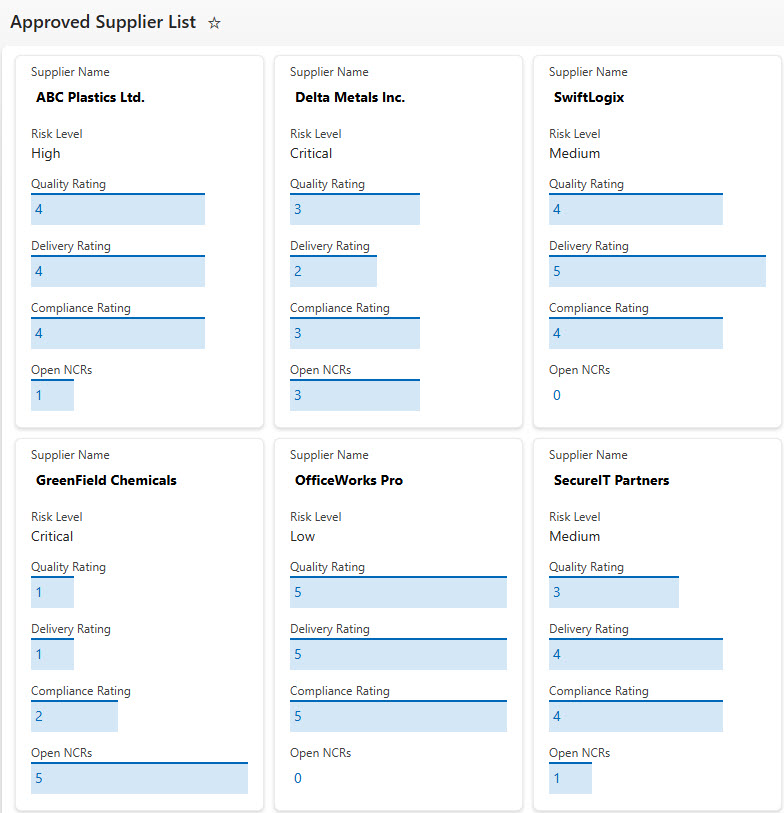
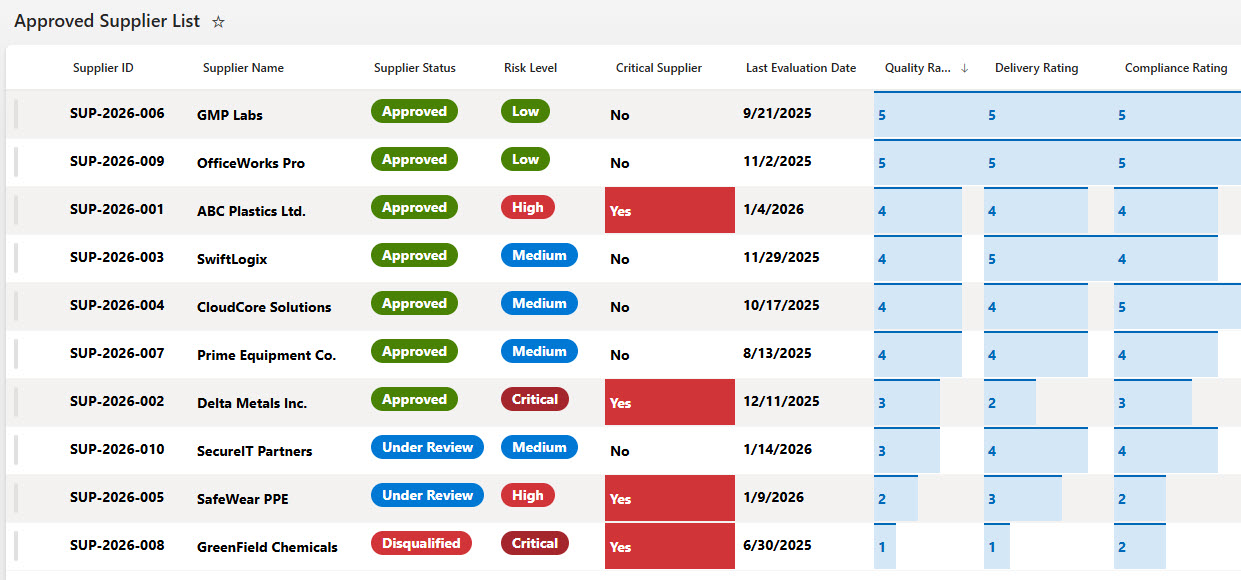
- Displays supplier risk level alongside quality and delivery ratings
- Structured fields for supplier status, categories, and performance metrics
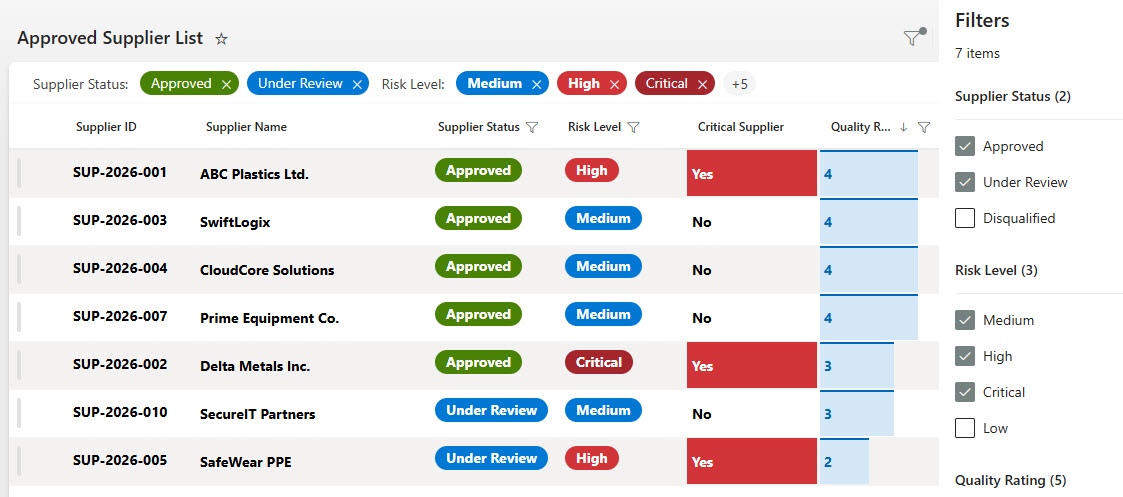
- Custom views to quickly filter by risk, quality score, or delivery rating
- Secure access controls aligned with business roles
Benefits
- Improves supplier governance with visible risk and performance indicators
- Enables informed decision-making based on quality and delivery ratings
- Reduces risk by ensuring teams engage with approved, low-risk suppliers
- Saves time by replacing spreadsheets with a single trusted source
- Enhances data consistency through standardized rating criteria
- Supports audits and reviews with clear, trackable supplier metrics
Common Questions About This Approved Supplier List
What is this Approved Supplier List built with?
The list is built entirely in Microsoft Lists, the app included with Microsoft 365 – structured with fields for supplier status, categories, risk level, and quality and delivery ratings, plus custom views and secure access controls. There is no custom code and there are no third-party tools. It is the kind of clean, collaborative tracker Greg Zelfond builds for procurement and quality teams.
What’s included in the Approved Supplier List?
The list is a central repository for all approved and preferred suppliers. Each supplier entry displays risk level alongside quality and delivery ratings, with structured fields for supplier status, categories, and performance metrics. Custom views filter quickly by risk, quality score, or delivery rating, available as both a List view and a visual Card view, and secure access controls align with business roles.
Does this design use any custom code or third-party tools?
No. The list is built entirely with Microsoft Lists, which is included with most Microsoft 365 business and enterprise plans – no custom code, no third-party add-ons, and nothing extra to buy. That keeps it stable, secure, and easy to maintain, with everything stored safely inside your Microsoft 365 environment. Out-of-the-box is the only way Greg builds.
Can this tracker be customized for our procurement process?
Absolutely. The supplier categories, status values, rating criteria, and performance metrics can all be tailored to your sourcing and quality requirements – whether you manage a handful of preferred vendors or a large supply chain across multiple categories. Greg adapts the structure to the way your procurement and quality teams actually evaluate and approve suppliers.
Can we filter suppliers by risk and performance?
Yes. Custom views let teams quickly filter suppliers by risk level, quality score, or delivery rating, so buyers engage only with approved, low-risk suppliers. Standardized rating criteria keep the data consistent, and the visible risk and performance indicators support informed sourcing decisions, supplier governance, and audit-ready reviews – all without maintaining a separate spreadsheet.
Can Greg build this tracker for our organization?
Yes – this is exactly the kind of work Greg Zelfond does. As an independent SharePoint and Microsoft 365 consultant and Microsoft MVP, he designs and builds trackers like this one in Microsoft Lists, SharePoint, Loop, and Planner, tailored to the way your organization manages suppliers and vendors. Reach out through the contact page to get started.