Audience Targeting
Common Use Cases
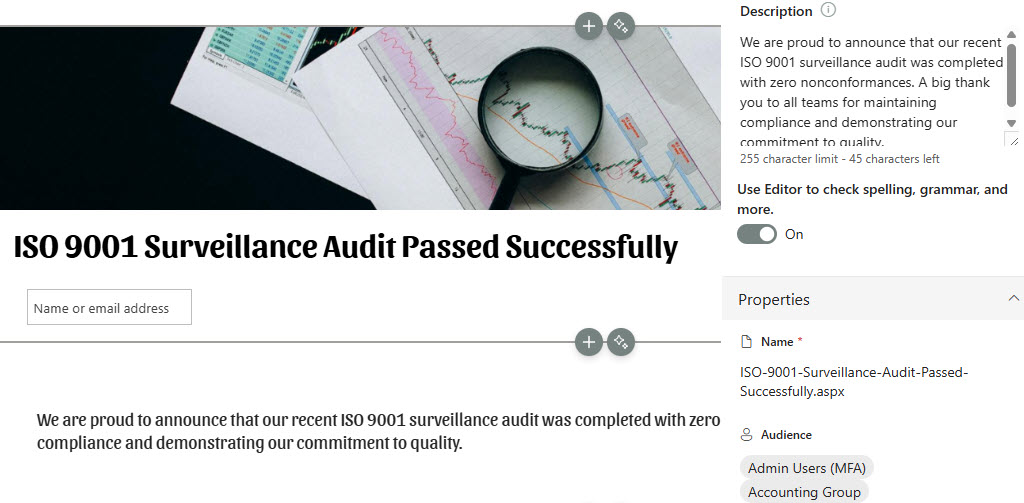
- Regional HR announcements: show HR news posts only to employees in a specific region or country instead of broadcasting to all staff
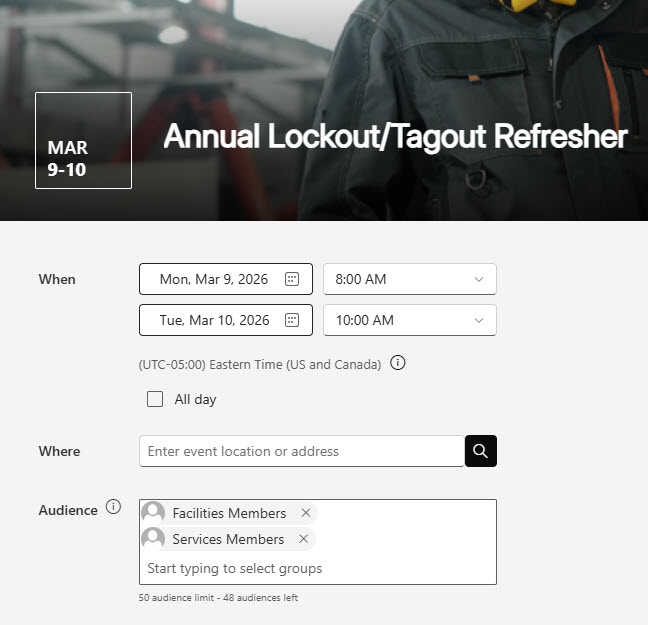
- Filtered company events: display certain events, such as full-time staff meetings, only to the employee groups they apply to
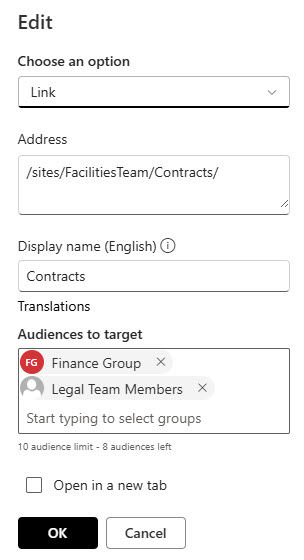
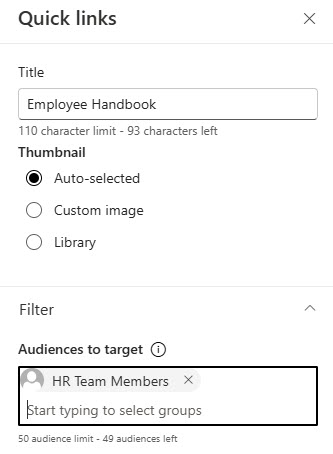
- Department quick links: give Finance staff Finance links and HR staff HR links on the same intranet homepage
- Region-specific hub navigation: tailor hub menu links per office or country while keeping a single hub for everyone
- Hiding private site links: keep links to confidential or leadership sites out of the navigation for users who do not belong there
- Personalized Viva Connections: target Dashboard cards so each employee’s app surfaces only the tools relevant to their role
Benefits
- One intranet for everyone: a single homepage serves every department and region with targeted news, links, and events instead of a sprawl of separate sites
- Less noise: employees see only the announcements and links that apply to them, which cuts information overload and lifts engagement
- Cleaner navigation: menus show only the links a user actually needs, so the intranet feels smaller and simpler to use
- No custom code: targeting is out-of-the-box on supported web parts, navigation, and libraries, with nothing to build or maintain
- Follows users everywhere: targeted news carries into the SharePoint start page and the mobile app automatically
- Scales with the directory: dynamic Entra ID groups keep audiences current as people change departments, with no manual list upkeep
Details
- Feature Category: Sharing & Permissions
How It Works
- Per-item targeting: you assign audiences (groups) to individual items such as a news post, event, quick link, page, or navigation link, and SharePoint filters the experience per user at view time
- Group-based audiences: Entra ID security groups, Microsoft 365 Groups, and dynamic groups are supported; individual users cannot be targeted
- Untargeted means visible: targeting only filters items that have an audience assigned; everything else shows to everyone
- Targeted news follows the user: filtering applies in News web parts, on the SharePoint start page, and in the mobile app
- Parent links cascade: targeting a parent navigation link automatically applies the same audience to all of its sub-links
- Supported surfaces: News, Events, Quick Links, and Highlighted Content web parts, site and hub navigation, page and document libraries, and Viva Connections Dashboard cards
Limits and Nuances
- Hides, does not secure: targeted items remain reachable by direct link or search if permissions allow; configure permissions separately for confidential content
- Groups only: Microsoft 365 Groups, Entra ID security groups, or dynamic groups; you cannot target an individual user directly
- Limited surfaces: only the News, Events, Quick Links, and Highlighted Content web parts, navigation menus, libraries, and Viva Connections cards support targeting; most other web parts do not
- Enable per surface: web parts, navigation, and libraries each have their own targeting toggle, and site navigation targeting can only be turned on by a site owner
- Navigation caps: up to 10 groups per link, and a parent link’s audience cascades to all its sub-links
- Propagation delay: newly created or recently changed groups take time to propagate, so targeting may not apply immediately
- Per-item and opt-in: each page or document carries its own Audience once the library setting is on (republish pages after changes), and anything left untargeted shows to everyone, so audit key pages
- Lookup column ceiling: enabling targeting adds lookup columns to the Site Pages library, which must stay under 12 total lookup columns or targeted web parts can fail
Common Questions About Audience Targeting
What is audience targeting in SharePoint?
Audience targeting is an out-of-the-box SharePoint feature that shows specific content – news posts, events, quick links, pages, and navigation links – only to members of specific groups. Everyone visits the same site, but each person sees a personalized slice of it, which cuts noise and makes the intranet feel relevant to every department.
Is audience targeting the same as permissions?
No, and this is the most important nuance. Audience targeting only hides content from the page – it does not secure it. A user outside the audience can still open a targeted page or document through a direct link or search if permissions allow. For anything confidential, configure permissions separately and treat targeting purely as a relevance filter.
Where can audience targeting be used?
It works in the News, Events, Quick Links, and Highlighted Content web parts, in site, hub, and footer navigation menus, on pages and documents in libraries, and on Viva Connections Dashboard cards. Each location has its own enable switch, so you turn it on exactly where you need it rather than tenant-wide.
Can I target content to an individual person?
Not directly – audiences must be Microsoft 365 Groups, Entra ID security groups, or dynamic groups. If you need person-level precision, create a group containing just those people, or use a dynamic group whose membership rule matches user attributes such as department or location. Group-based targeting is also far easier to maintain over time.
Why is audience targeting not working?
The usual suspects: the page was not republished after targeting changed, the group was created or modified recently and has not propagated yet, the navigation toggle was never enabled by a site owner, or the user is not actually in the group. Checking group membership and republishing the page resolves most cases.
Do we need separate sites for each department or region?
Usually not. Audience targeting lets one well-built intranet serve every department – HR news for HR, Finance links for Finance, regional events per office – without multiplying sites. This is a pattern Greg uses across the LookBook 365 examples: fewer, better sites with targeted news, links, and navigation typically beat a sprawl of department sites.