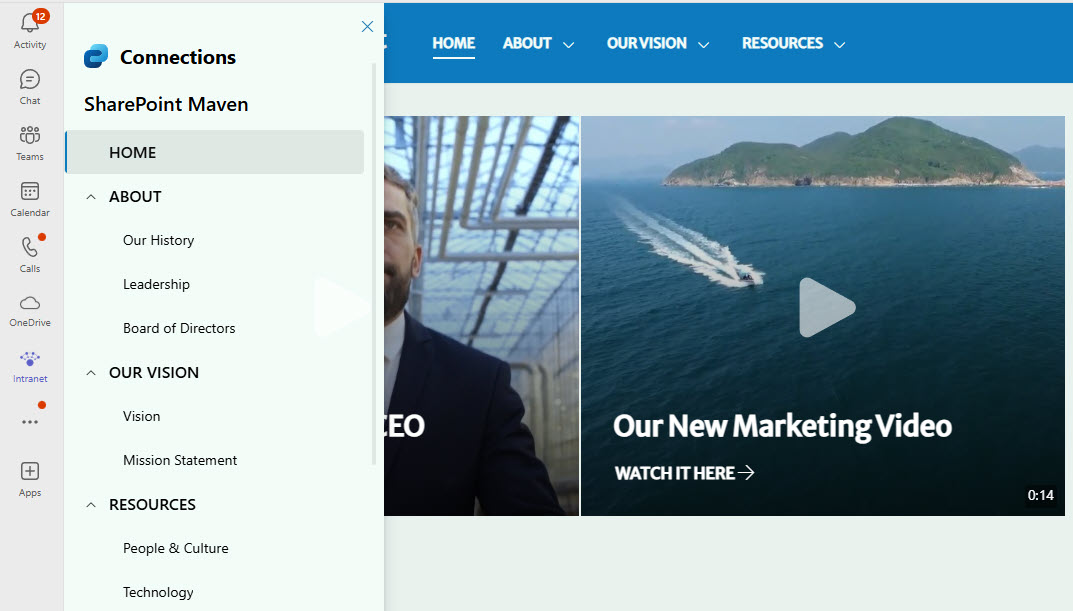
Viva Connections
Common Use Cases
- Intranet in Teams: the company home site and news delivered inside the app employees keep open all day
- Frontline dashboards: shift, task, and approval cards that give deskless workers what they need on a phone
- Targeted experiences: audience targeting that shows different cards to office staff, managers, and field teams
- Company-wide announcements: boosted news and the feed putting leadership messages in front of everyone
- Quick actions: cards for approvals, assigned tasks, and forms that get completed without leaving Teams
- Resource hub: curated links to HR systems, policies, and everyday tools in the resources section
Benefits
- Meets people where they work: no separate intranet URL to remember when everything surfaces in Teams
- Mobile-first for frontline: the dashboard is designed to work well on phones for workers without desks
- Included licensing: one Connections experience comes with Microsoft 365 E, F, and A licenses at no extra cost
- Card flexibility: built-in cards, a no-code card designer, and SPFx custom cards cover simple through sophisticated
- Audience targeting throughout: cards, news, and resources can all be tailored to specific groups
- Builds on SharePoint: existing sites, news, and navigation power the experience instead of being rebuilt
Details
- Feature Category: Sites & Navigation
How It Works
- Dashboard: a curated canvas of cards for tasks, approvals, shifts, news, links, and custom solutions, arranged and targeted by editors
- Feed: news from SharePoint sites and Viva Engage conversations, blended and ranked for each individual user
- Resources: a list of navigational links and icons, drawing from global navigation when a home site is in place
- Home site connection: a SharePoint home site supplies branding, navigation, and the default landing experience
- Desktop and mobile: the same experience adapts, with desktop offering the fuller intranet view while mobile anchors on the dashboard
- A Teams app: Connections is deployed as an app within Microsoft Teams, with a name, custom icon, and description managed centrally
Limits and Nuances
- License tiers: a Microsoft 365 E, F, or A license includes one Connections experience, while running two or more experiences, up to 50, requires Viva Suite or Viva Communications and Communities licensing for every user
- Teams is the container: Connections lives inside Microsoft Teams, so its reach depends on Teams being the daily habit
- Home site strongly recommended: the richest experience, including global navigation in resources, depends on designating a home site
- Curation is ongoing: dashboards and feeds stay useful only when owners keep cards, links, and news current
- Custom cards need development: beyond the built-in cards and the card designer, bespoke cards are SPFx development projects
- Permissions still apply: users only see news, sites, and content they already have access to
- Audience targeting: cards and resources can target Microsoft 365 groups so each role sees a relevant mix
- Multiple experiences: organizations licensed for it can run separate Connections experiences for different audiences
Common Questions About Viva Connections
What is Viva Connections?
Viva Connections is the Microsoft Teams app that turns the SharePoint intranet into a branded employee experience inside Teams. It is organized around three elements: a dashboard of interactive cards for tasks and tools, a feed combining SharePoint news with Viva Engage conversations, and a resources section of curated links. It works on desktop, tablet, and mobile versions of Teams.
Does Viva Connections cost extra?
The core experience is included: users with a Microsoft 365 Enterprise, Frontline, or Academic license can create and use one Connections experience at no additional cost. Organizations that want two or more experiences, up to 50, for different regions or workforces need Viva Suite or Viva Communications and Communities licensing for every user in the tenant.
What are dashboard cards?
Cards are the interactive tiles that make up the Connections dashboard. Microsoft supplies built-in cards for things like approvals, assigned tasks, shifts, news, and links; a no-code card designer handles custom quick views; and developers can build fully custom cards with the SharePoint Framework. Each card can be sized and targeted to specific audiences, so every role sees a relevant dashboard.
Do I need a home site for Viva Connections?
A home site is not strictly mandatory, but it is strongly recommended. The home site supplies the branding, the landing experience, and the global navigation that populates the resources section, so Connections without one feels noticeably thinner. Organizations get the most value by designating a polished communication site as the home site before rolling Connections out.
What shows up in the Viva Connections feed?
The feed dynamically aggregates SharePoint news posts and Viva Engage conversations, ranked for each user based on relevance, the sites they follow, and their activity. Boosted news posts from organizational news sites receive priority placement, which gives communicators a reliable way to put critical announcements at the top. Permissions are respected, so users only see content they can access.
How do I get started with Viva Connections?
Get the SharePoint side healthy first: a strong home site, hubs, current news, and clean navigation, because Connections amplifies whatever intranet already exists. Then enable the experience, build a targeted dashboard, and pin the app in Teams. This is the exact sequence Greg Zelfond follows in LookBook 365 projects, where intranets are designed from day one to plug into Viva Connections.