Created By Column
Common Use Cases
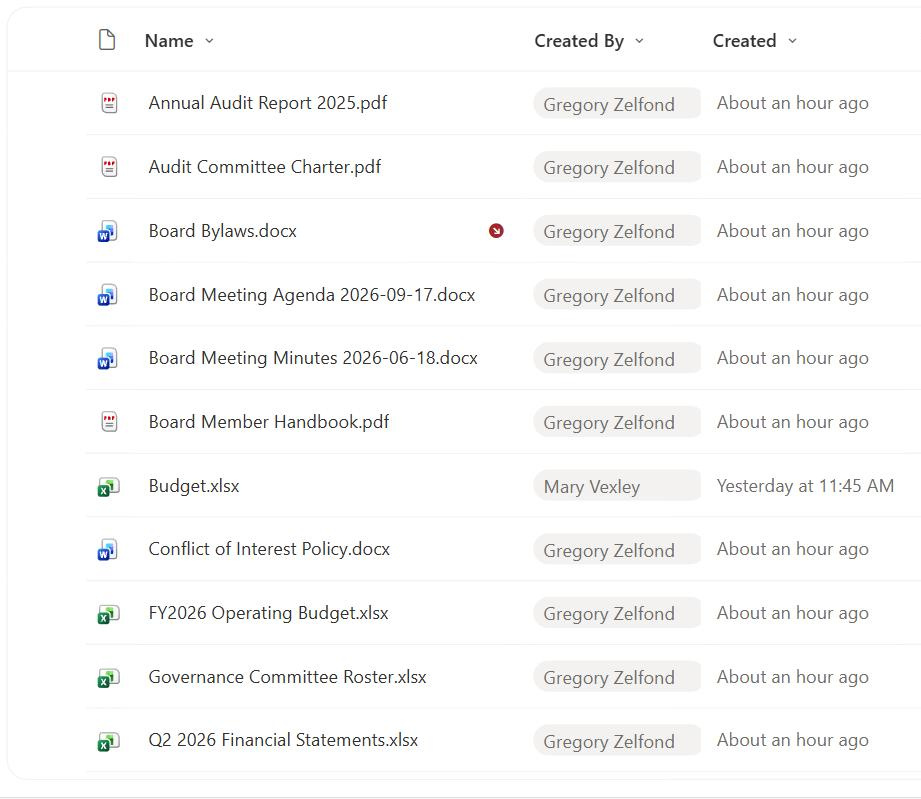
- Ownership at a glance: show who originally contributed each document in a shared library
- ‘Created by me’ views: filter a list to only the items the current user added
- Accountability trails: pair with Created to log who added what and when
- Contributor recognition: surface authors on news, knowledge base, or policy pages
- Routing and follow-up: contact the original creator when a record needs clarification
- Departmental filtering: combine with a person’s profile properties to group by team
How It Works
- Captured at creation: SharePoint records the signed-in user who created the item
- Internal name Author: displayed as Created By but referenced as Author in code and flows
- Person or Group type: stores a single resolved user, not free text
- Read-only in the UI: there is no browser control to reassign it
- Presence and profile card: renders as a live pill linking to the person’s details
- Fixed after creation: later edits by others do not change it
Benefits
- Automatic attribution: no one has to type who created the item
- Reliable accountability: a trustworthy record of the original contributor
- Personalized views: ‘created by me’ filters need no custom setup
- Rich people data: connects to Microsoft 365 profiles, photos, and job titles
- Governance support: helps identify orphaned content when people leave
- Consistent tenant-wide: the same behavior on every list and library
Details
- Feature Category: Columns & Views
Limits and Nuances
- Single user only: it holds one person, never a group of co-creators
- Not editable in the browser: reassigning requires PowerShell or the object model
- System accounts appear: automated uploads may show an app or service identity
- Deleted users linger: a former employee’s name can remain until cleaned up
- Author vs Editor confusion: Created By is Author, Modified By is Editor internally
- Migration overwrites: migrated content may credit the migration account instead of the real author
Common Questions About the Created By Column
What is the Created By column in SharePoint?
Created By is a built-in, read-only person field that records who first created a list item or uploaded a file. SharePoint captures the signed-in user automatically at the moment of creation and displays their name as a clickable pill that opens their profile card. Its internal name is Author, so you will see ‘Author’ in JSON formatting, Power Automate, and PowerShell even though the column label reads Created By.
Why is Created By called Author in formulas and flows?
It is a naming legacy. The friendly display name is Created By, but the field’s internal name has always been Author. SharePoint keeps the internal name stable so existing views, column formatting, and automations keep working. Whenever you reference the column in JSON, calculated logic, Power Automate, or PowerShell, use Author, and reserve Created By for what users see on the page.
Can I change who a document’s Created By points to?
Not in the browser, because the field is read-only by design. Changing it requires PowerShell or the object model, which is normally done only during migrations to restore the true original author from a source system. In day-to-day use, treat Created By as a fixed fact. If ownership needs to move, add a separate editable Owner person column rather than trying to rewrite Created By.
Does Created By update when someone else edits the file?
No. Created By is locked to whoever created the item and never changes, even after dozens of later edits by other people. The column that reflects the most recent editor is Modified By (internally Editor). Use Created By for original attribution and Modified By for the latest hands on the item; together they give a clear before-and-after picture of who touched the content.
Why does Created By sometimes show a system or app account?
When content is created by an automated process, such as a Power Automate flow, a migration tool, or a service, SharePoint records that identity rather than a human. You may see an app name, a service account, or ‘System Account’. This is expected. If you need the real business owner in those scenarios, capture it in a dedicated editable person column that your automation can set explicitly.
How should I use Created By in a well-governed site?
Use it for accountability and personalized views, such as ‘items I created’, and pair it with Created for a lightweight audit trail. It also helps find orphaned content when staff leave. Greg Zelfond, the consultant behind LookBook 365, treats Created By as part of a governance layer, combining it with dedicated Owner columns and views so responsibility is always visible without relying on people to fill anything in.