Review-Due Flag (Column JSON)


Overview
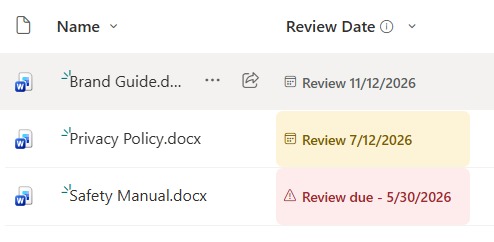
- Flags documents that are past their review or expiry date in red
- Files due within two weeks show an amber heads-up
- Files reviewed and current show a tidy neutral date
- Compares the review date to today automatically, so it stays current
- Applied as column-formatting JSON, so it changes nothing about the files
- Works on any review or expiry date column
Common Use Cases
- Policy and procedure review cycles
- Compliance and certification documents
- Contracts with renewal dates
- Safety and quality records
- Standard operating procedures
- Any library with review or expiry dates
Details
- Design Pattern: File & Library Display
- Format Scope: Column
Required Columns
| Display name | Column type | Internal name |
|---|---|---|
| Review Date | Date and time | [ReviewDate] |
Prerequisites
- Open your document library and add a Date column named Review Date.
- Because the JSON is applied at the column level, the Review Date column can use any name you want.
How to Apply JSON code
- On the Review Date column, open the column header menu, choose Column settings, then Format this column.
- Switch to Advanced mode.
- Paste the JSON below and click Save.
JSON Code
{
  "$schema": "https://developer.microsoft.com/json-schemas/sp/v2/column-formatting.schema.json",
  "elmType": "span",
  "style": {
    "display": "inline-flex",
    "align-items": "center",
    "width": "170px",
    "box-sizing": "border-box",
    "padding": "1px 7px",
    "border-radius": "6px",
    "line-height": "20px",
    "white-space": "nowrap",
    "background-color": "=if(@currentField == '', 'transparent', if(Number(Date(@currentField)) < Number(Date(@now)), '#fdeceb', if(Number(Date(@currentField)) < Number(addDays(Date(@now), 14)), '#fdf3d6', '#f3f2f1')))"
  },
  "children": [
    {
      "elmType": "span",
      "attributes": {
        "iconName": "=if(@currentField == '', 'Calendar', if(Number(Date(@currentField)) < Number(Date(@now)), 'Warning', 'Calendar'))"
      },
      "style": {
        "font-size": "11px",
        "margin-right": "5px",
        "line-height": "20px",
        "color": "=if(@currentField == '', '#8a8886', if(Number(Date(@currentField)) < Number(Date(@now)), '#a4262c', if(Number(Date(@currentField)) < Number(addDays(Date(@now), 14)), '#7a5c00', '#605e5c')))"
      }
    },
    {
      "elmType": "span",
      "style": {
        "font-size": "12px",
        "font-weight": "600",
        "line-height": "20px",
        "white-space": "nowrap",
        "overflow": "hidden",
        "text-overflow": "ellipsis",
        "color": "=if(@currentField == '', '#8a8886', if(Number(Date(@currentField)) < Number(Date(@now)), '#a4262c', if(Number(Date(@currentField)) < Number(addDays(Date(@now), 14)), '#7a5c00', '#605e5c')))"
      },
      "txtContent": "=if(@currentField == '', 'No date', if(Number(Date(@currentField)) < Number(Date(@now)), 'Review due - ' + toLocaleDateString(@currentField), 'Review ' + toLocaleDateString(@currentField)))"
    }
  ]
}Common Questions About the Review-Due Flag
What is the Review-Due Flag built with?
It is built with a standard SharePoint document library and a small piece of column-formatting JSON applied to a review-date column. There is no custom development, no SPFx solution, and no third-party tools. It is the kind of clean, maintainable formatting Greg Zelfond builds for teams that want to stay on top of reviews without ongoing development overhead.
How does it decide the color?
It compares the review date to today. Past dates show a red review-due flag, dates within the next two weeks show an amber heads-up, and later dates show a neutral date – all updating on their own as time passes.
Does this design use any custom development or third-party tools?
No. It uses only out-of-the-box SharePoint column formatting, which Microsoft supports natively. That keeps it stable and easy to maintain, and nothing breaks when SharePoint is updated. Out-of-the-box is the only way Greg builds, so you can own and extend the design yourself for years.
If LookBook 365 is code-free and out-of-the-box, why does this example include JSON?
Because SharePoint formatting JSON is not custom code – it is a native configuration feature built into lists and libraries. It is declarative: it only describes how existing columns and views look, and cannot run scripts, reach external services, or change your data. Nothing is deployed and nothing breaks when Microsoft updates SharePoint, and you can edit or remove it anytime. That is why LookBook 365 treats it as out-of-the-box and low risk.
Can I change the warning window?
Yes. The amber window is a single number in the JSON, so you can widen or narrow how far ahead the heads-up appears. The whole thing keys off your review-date column.
Can Greg build this for our library?
Yes – this is exactly the kind of work Greg Zelfond does. As an independent SharePoint consultant and Microsoft MVP, he designs out-of-the-box list and library formatting like this so your team can read and maintain it without a developer. Reach out through the contact page to talk about your library.