Weather Web Part

Benefits
- Timely at a glance: current conditions for every configured location appear right on the page, with no clicks required.
- One web part, many offices: several cities fit in a single Weather web part, so global organizations avoid stacking duplicates.
- Personal unit choice: every visitor can flip Fahrenheit to Celsius for their own view without changing the page for anyone else.
- Zero upkeep: the data comes from MSN Weather automatically, so there is nothing to maintain once the locations are set.
- A touch of life: a small detail that makes intranet homepages and office location pages feel current and alive.
Settings
- Add a location: start typing a city name and pick the match from the dropdown of locations MSN Weather recognizes.
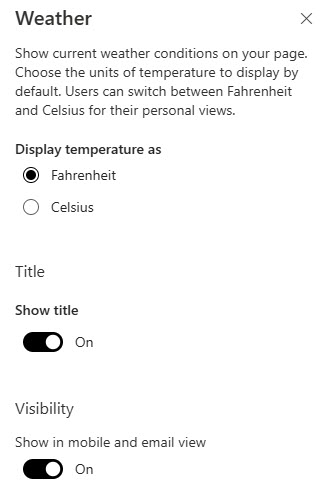
- Temperature units: set the default display to Fahrenheit or Celsius for all visitors.
- Default vs. personal view: the default unit applies to every visitor, but anyone can click the unit indicator right after the temperature to flip it for their own view only.
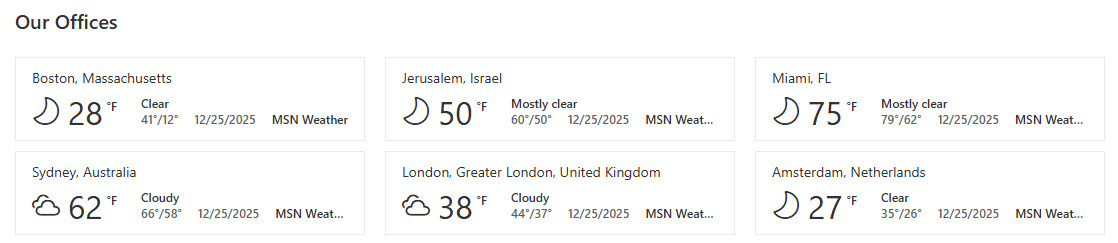
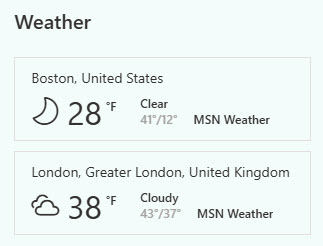
- Current conditions: the temperature and a weather icon for each location you add, pulled from MSN Weather.
- Multiple locations: add several cities to one Weather web part instead of stacking separate web parts on the page.
- A link to the full forecast: clicking the MSN Weather link opens the detailed forecast on the MSN site.
- A responsive display: the layout adapts to different screen sizes.
Limits and Nuances
- The web part cannot detect a visitor’s location: it always shows the locations the page author picked. There is no setting to show each person their own local weather.
- Locations must be picked from the MSN Weather suggestions: if the service does not recognize a place as you type it, you cannot add it manually.
- Weather data comes from MSN Weather only: there is no option to switch to a different weather provider.
- Only current conditions appear on the page: visitors click through to the MSN site for the detailed multi-day forecast.
Weather vs. the Alternatives
- Weather vs. World Clock: Weather shows current conditions for fixed locations; World Clock shows the current time across office locations. Global intranets often pair the two in the same page section.
- Weather vs. Embed: the Embed web part can host a third-party weather widget with richer forecasts, but it depends on an external service and admin-approved domains. Weather works out-of-the-box with nothing more than a location.
- Weather vs. Text: for a one-off notice like an office closure due to a storm, a Text web part or a News post is more direct. Weather is for always-on, ambient information.
Common Questions About the Weather Web Part
Can the Weather web part show each visitor their own local weather?
No. The web part displays the locations the page author configured – it does not detect where the visitor is. If your organization has offices in several cities, the practical workaround is to add each office location to the same Weather web part so everyone can find their city at a glance.
Where does the Weather web part get its data?
From MSN Weather, Microsoft’s own weather service. The web part shows the current conditions and temperature for each configured location, and clicking the MSN Weather link opens the full detailed forecast on the MSN site. There is no setting to connect a different weather provider or change how the data is presented.
Can users switch between Fahrenheit and Celsius?
Yes. The page author sets the default unit, and that default applies to every visitor. But anyone viewing the published page can click the unit indicator immediately after the temperature to flip between Fahrenheit and Celsius. The change applies only to that person’s view and does not affect anyone else.
Can one Weather web part show more than one city?
Yes. You can add multiple locations to a single Weather web part – just keep typing city names and pick each one from the suggestions. This is the cleanest approach for organizations with offices in several regions, since it avoids cluttering the page with a stack of separate web parts.
What does the Weather web part need to work?
Very little. It is a built-in SharePoint Online feature, so there is nothing to install or host – you simply add it to a page and pick one or more locations. The data comes from MSN Weather automatically, which means no API keys, no maintenance, and no custom code. Everything on this page applies to the modern SharePoint Online experience in Microsoft 365.
Where does the Weather web part work best on an intranet?
It shines in the top or side region of an intranet homepage, next to a World Clock web part on a global company’s landing page, or on individual office location pages. The intranet designs on LookBook 365 use this exact out-of-the-box web part with a custom theme – the only way Greg Zelfond builds, with no custom code to maintain. Weather Web Part Example Weather Web Part Example Weather Web Part Settings