Milestone Tracker (Column JSON)


Overview
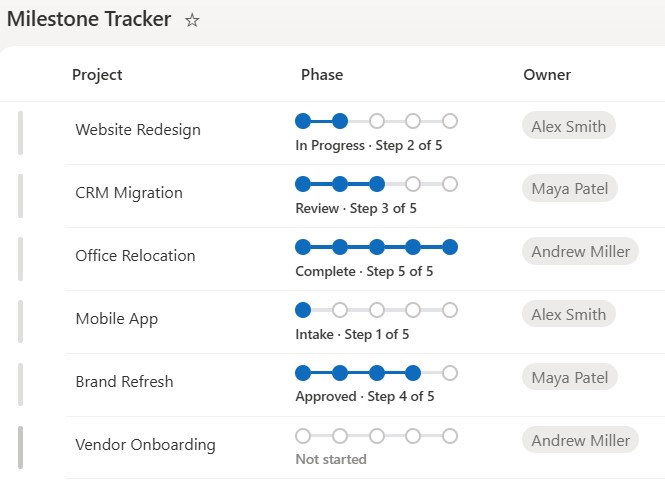
- Shows staged progress as a row of step dots joined by connectors, filled up to the current stage
- Each named stage maps to a fixed position, so the same five steps read consistently across every item
- The current stage name and a Step N of N count sit beside the dots for an exact read
- Completed dots and connectors are filled, while upcoming steps stay hollow
- A blank or unrecognized value shows empty dots labeled Not started, so the column never looks broken
- Applied as column-formatting JSON using the current column, so it travels with the view and changes nothing about the underlying data
Common Use Cases
- Project phases such as Initiate, Plan, Build, Test, Launch
- Approval or review workflow stages
- Sales pipeline stages
- Onboarding or offboarding steps
- Case or request handling stages
- Content lifecycle from draft to published
Details
- Design Pattern: Metrics & Progress
- Format Scope: Column
Required Columns
| Display name | Column type | Internal name |
|---|---|---|
| Title | Single line of text | [Title] |
| Phase | Choice | [Phase] |
| Owner | Person or Group | [Owner] |
Prerequisites
- Build a list with these columns before you paste the JSON.
- Populate the list with data.
- The JSON reads a column named Phase ([$Phase]), so the Choice column’s internal name must be Phase – a different internal name leaves the tracker in its Not started fallback state.
- The stage names and their order live in the JSON, so edit that short list to match your own process – add or remove stages and the dot count follows.
- Use these exact Choice values and capitalization: Intake, In Progress, Review, Approved, Complete.
How to Apply JSON code
- On the Phase column, open the column header menu, choose Column settings, then Format this column.
- Switch to Advanced mode.
- Paste the JSON below and click Save.
JSON Code
{
  "$schema": "https://developer.microsoft.com/json-schemas/sp/v2/column-formatting.schema.json",
  "elmType": "div",
  "style": {
    "display": "flex",
    "flex-direction": "column",
    "align-items": "flex-start",
    "justify-content": "center",
    "width": "100%",
    "min-height": "54px",
    "padding": "4px 0 4px 4px",
    "box-sizing": "border-box"
  },
  "children": [
    {
      "elmType": "div",
      "style": {
        "display": "flex",
        "align-items": "center",
        "justify-content": "flex-start"
      },
      "children": [
        {
          "elmType": "div",
          "style": {
            "width": "14px",
            "height": "14px",
            "border-radius": "50%",
            "flex-shrink": "0",
            "box-sizing": "border-box",
            "border": "=if(1 <= (if([$Phase] == 'Intake', 1, if([$Phase] == 'In Progress', 2, if([$Phase] == 'Review', 3, if([$Phase] == 'Approved', 4, if([$Phase] == 'Complete', 5, 0)))))), '2px solid #0f6cbd', '2px solid #c8c6c4')",
            "background-color": "=if(1 <= (if([$Phase] == 'Intake', 1, if([$Phase] == 'In Progress', 2, if([$Phase] == 'Review', 3, if([$Phase] == 'Approved', 4, if([$Phase] == 'Complete', 5, 0)))))), '#0f6cbd', '#ffffff')"
          }
        },
        {
          "elmType": "div",
          "style": {
            "width": "18px",
            "height": "3px",
            "flex-shrink": "0",
            "background-color": "=if(2 <= (if([$Phase] == 'Intake', 1, if([$Phase] == 'In Progress', 2, if([$Phase] == 'Review', 3, if([$Phase] == 'Approved', 4, if([$Phase] == 'Complete', 5, 0)))))), '#0f6cbd', '#e1e3e6')"
          }
        },
        {
          "elmType": "div",
          "style": {
            "width": "14px",
            "height": "14px",
            "border-radius": "50%",
            "flex-shrink": "0",
            "box-sizing": "border-box",
            "border": "=if(2 <= (if([$Phase] == 'Intake', 1, if([$Phase] == 'In Progress', 2, if([$Phase] == 'Review', 3, if([$Phase] == 'Approved', 4, if([$Phase] == 'Complete', 5, 0)))))), '2px solid #0f6cbd', '2px solid #c8c6c4')",
            "background-color": "=if(2 <= (if([$Phase] == 'Intake', 1, if([$Phase] == 'In Progress', 2, if([$Phase] == 'Review', 3, if([$Phase] == 'Approved', 4, if([$Phase] == 'Complete', 5, 0)))))), '#0f6cbd', '#ffffff')"
          }
        },
        {
          "elmType": "div",
          "style": {
            "width": "18px",
            "height": "3px",
            "flex-shrink": "0",
            "background-color": "=if(3 <= (if([$Phase] == 'Intake', 1, if([$Phase] == 'In Progress', 2, if([$Phase] == 'Review', 3, if([$Phase] == 'Approved', 4, if([$Phase] == 'Complete', 5, 0)))))), '#0f6cbd', '#e1e3e6')"
          }
        },
        {
          "elmType": "div",
          "style": {
            "width": "14px",
            "height": "14px",
            "border-radius": "50%",
            "flex-shrink": "0",
            "box-sizing": "border-box",
            "border": "=if(3 <= (if([$Phase] == 'Intake', 1, if([$Phase] == 'In Progress', 2, if([$Phase] == 'Review', 3, if([$Phase] == 'Approved', 4, if([$Phase] == 'Complete', 5, 0)))))), '2px solid #0f6cbd', '2px solid #c8c6c4')",
            "background-color": "=if(3 <= (if([$Phase] == 'Intake', 1, if([$Phase] == 'In Progress', 2, if([$Phase] == 'Review', 3, if([$Phase] == 'Approved', 4, if([$Phase] == 'Complete', 5, 0)))))), '#0f6cbd', '#ffffff')"
          }
        },
        {
          "elmType": "div",
          "style": {
            "width": "18px",
            "height": "3px",
            "flex-shrink": "0",
            "background-color": "=if(4 <= (if([$Phase] == 'Intake', 1, if([$Phase] == 'In Progress', 2, if([$Phase] == 'Review', 3, if([$Phase] == 'Approved', 4, if([$Phase] == 'Complete', 5, 0)))))), '#0f6cbd', '#e1e3e6')"
          }
        },
        {
          "elmType": "div",
          "style": {
            "width": "14px",
            "height": "14px",
            "border-radius": "50%",
            "flex-shrink": "0",
            "box-sizing": "border-box",
            "border": "=if(4 <= (if([$Phase] == 'Intake', 1, if([$Phase] == 'In Progress', 2, if([$Phase] == 'Review', 3, if([$Phase] == 'Approved', 4, if([$Phase] == 'Complete', 5, 0)))))), '2px solid #0f6cbd', '2px solid #c8c6c4')",
            "background-color": "=if(4 <= (if([$Phase] == 'Intake', 1, if([$Phase] == 'In Progress', 2, if([$Phase] == 'Review', 3, if([$Phase] == 'Approved', 4, if([$Phase] == 'Complete', 5, 0)))))), '#0f6cbd', '#ffffff')"
          }
        },
        {
          "elmType": "div",
          "style": {
            "width": "18px",
            "height": "3px",
            "flex-shrink": "0",
            "background-color": "=if(5 <= (if([$Phase] == 'Intake', 1, if([$Phase] == 'In Progress', 2, if([$Phase] == 'Review', 3, if([$Phase] == 'Approved', 4, if([$Phase] == 'Complete', 5, 0)))))), '#0f6cbd', '#e1e3e6')"
          }
        },
        {
          "elmType": "div",
          "style": {
            "width": "14px",
            "height": "14px",
            "border-radius": "50%",
            "flex-shrink": "0",
            "box-sizing": "border-box",
            "border": "=if(5 <= (if([$Phase] == 'Intake', 1, if([$Phase] == 'In Progress', 2, if([$Phase] == 'Review', 3, if([$Phase] == 'Approved', 4, if([$Phase] == 'Complete', 5, 0)))))), '2px solid #0f6cbd', '2px solid #c8c6c4')",
            "background-color": "=if(5 <= (if([$Phase] == 'Intake', 1, if([$Phase] == 'In Progress', 2, if([$Phase] == 'Review', 3, if([$Phase] == 'Approved', 4, if([$Phase] == 'Complete', 5, 0)))))), '#0f6cbd', '#ffffff')"
          }
        }
      ]
    },
    {
      "elmType": "div",
      "style": {
        "width": "100%",
        "margin-top": "5px",
        "font-size": "12px",
        "font-weight": "600",
        "text-align": "left",
        "white-space": "nowrap",
        "color": "=if((if([$Phase] == 'Intake', 1, if([$Phase] == 'In Progress', 2, if([$Phase] == 'Review', 3, if([$Phase] == 'Approved', 4, if([$Phase] == 'Complete', 5, 0)))))) == 0, '#8a8886', '#3b3a39')"
      },
      "txtContent": "=if((if([$Phase] == 'Intake', 1, if([$Phase] == 'In Progress', 2, if([$Phase] == 'Review', 3, if([$Phase] == 'Approved', 4, if([$Phase] == 'Complete', 5, 0)))))) == 0, 'Not started', [$Phase] + ' · Step ' + (if([$Phase] == 'Intake', 1, if([$Phase] == 'In Progress', 2, if([$Phase] == 'Review', 3, if([$Phase] == 'Approved', 4, if([$Phase] == 'Complete', 5, 0)))))) + ' of 5')"
    }
  ]
}Common Questions About the Milestone Tracker
What is the Milestone Tracker built with?
It is built with a standard Microsoft List (SharePoint list) and a small piece of column-formatting JSON. There is no custom development, no SPFx solution, and no third-party tools. It is the kind of clean, maintainable formatting Greg Zelfond builds for teams that want a process tracker without ongoing development overhead.
What kind of column does it need?
It needs one Choice column that stores the current stage, such as Initiate, Plan, Build, Test, or Launch. The JSON reads the current column rather than a fixed name, so it works on any stage field, and it matches each stage to its position by exact text.
Can I use my own stage names and number of steps?
Yes. The stages and their order live in a short list inside the JSON, so you rename them to match your process and add or remove stages. The number of dots follows the list, so a four-stage process shows four dots and a six-stage process shows six.
Does this design use any custom development or third-party tools?
No. It uses only out-of-the-box SharePoint column formatting, which Microsoft supports natively. That keeps it stable and easy to maintain, and nothing breaks when SharePoint is updated. Out-of-the-box is the only way Greg builds, so you can own and extend the design yourself for years.
If LookBook 365 is code-free and out-of-the-box, why does this example include JSON?
Because SharePoint formatting JSON is not custom code – it is a native configuration feature built into lists and libraries. It is declarative: it only describes how an existing column looks, and cannot run scripts, reach external services, or change your data. Nothing is deployed and nothing breaks when Microsoft updates SharePoint, and you can edit or remove it anytime. That is why LookBook 365 treats it as out-of-the-box and low risk.
Can Greg build a step tracker like this for our lists?
Yes – this is exactly the kind of work Greg Zelfond does. As an independent SharePoint consultant and Microsoft MVP, he designs out-of-the-box list and library formatting like this so your team can read and maintain it without a developer. Reach out through the contact page to talk about your processes.