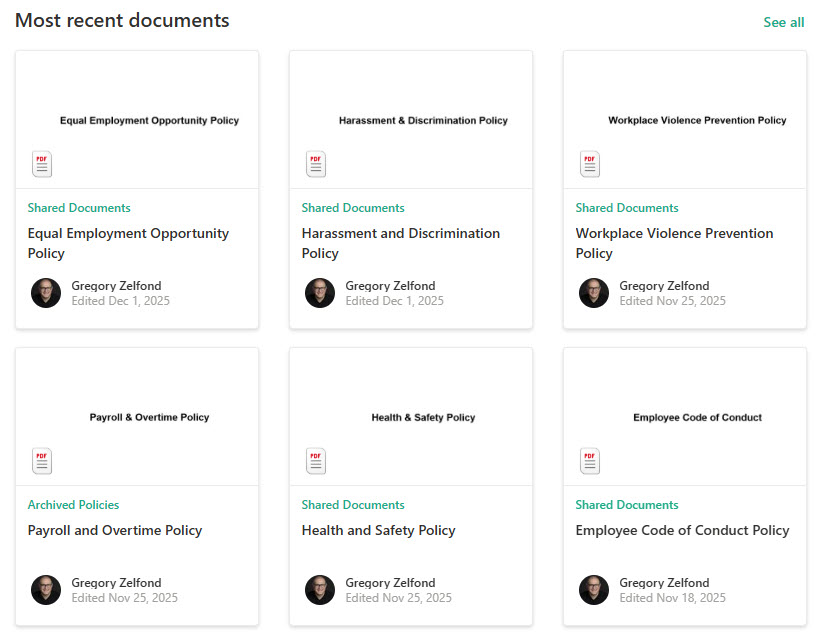
Highlighted Content Web Part

Benefits
- Automates content surfacing for key documents or pages
- Personalizes the user experience based on targeting
- Keeps content fresh with dynamic filtering
- Reduces manual content curation
- Improves discoverability of resources
- Works well across hubs or multiple sites
Settings
- Source: This site, A document library on this site, This site collection, The page library on this site, Select sites (up to 30), or All sites; All sites in the hub appears when the site is connected to a hub.
- Type: the kind of content to show (documents, pages, news, videos, images, and more); use + Add content type to combine several.
- Filter: title or content keywords, recently added, recently changed, created by, modified by, or a managed property.
- Sort by: Most recent, Most viewed, Trending, or a managed property ascending or descending.
- Custom query: switch from filters to your own KQL or CAML query string.
- Audience targeting and caching: show items only to their tagged audiences, and turn on group-level caching to cache search results per security group and speed up busy pages.
- Number of items and empty state: choose how many items to show and whether to display the web part when no items are found.
- Layout: Cards (thumbnail tiles, the default all-purpose choice), List (compact text rows), Carousel (one large slide paged through), Compact (small rows with mini thumbnails for narrow columns), or Filmstrip (a scrollable horizontal row of cards).
Limits and Nuances
- A maximum of 200 items can be returned: treat the web part as a spotlight, not an archive.
- Results come from the search index: new or freshly renamed content can take a few minutes to appear, and viewers only see items they have permission to open.
- It is display-only: viewers click through to content; nothing can be uploaded, edited, or deleted from the web part.
- Filter logic: multiple filters of the same type combine with OR, while filters of different types combine with AND; two title filters widen results, a title plus an author filter narrows them.
- Select sites caps at 30: and the option is not available in GCC High, DoD, or 21Vianet.
- Source affects filters and queries: the Managed property filter works with every source except a document library and the property must be searchable; custom queries also change language with the source, with site sources using KQL and library sources using CAML.
- Audience targeting must be enabled on the source library first: each item can be tagged with up to 50 audiences, and new groups take time to apply.
Highlighted Content vs. the Alternatives
- Highlighted Content vs. News: News is for publishing and promoting communications; Highlighted Content is for automatically rolling up existing content of any type.
- Highlighted Content vs. Document Library web part: Document Library shows one library with full file commands; Highlighted Content aggregates read-only results from many places.
- Highlighted Content vs. Quick Links: Quick Links is hand-curated and shows exactly what you choose; Highlighted Content updates itself but gives you less control over exactly what appears.
- Highlighted Content vs. Hero: Hero is for a few hand-picked, heavily designed promotions; Highlighted Content is for rule-driven volume.
Common Questions About the Highlighted Content Web Part
What does the Highlighted Content web part do?
It automatically displays content – documents, pages, news, videos, images – based on rules you configure instead of links you maintain by hand. You pick a source, a content type, filters, and a sort order, and the web part keeps itself up to date as content changes. By default it shows your most recent documents, which you can completely reconfigure.
Why is my new document not showing up in the Highlighted Content web part?
The web part pulls results from the search index, so brand-new or just-edited content can take a few minutes to appear. Also check the basics: the web part returns a maximum of 200 items, your filters use OR logic within a type and AND logic across types, and viewers only ever see content they have permission to open.
Can the Highlighted Content web part pull content from other sites?
Yes – that is its biggest strength. The source options include this site, a document library on this site, this site collection, the page library, up to 30 hand-picked sites, all sites, and all sites in the hub when your site is connected to one. The Select sites option is not available in GCC High, DoD, or 21Vianet environments.
What is a custom query in the Highlighted Content web part?
When the built-in filters are not enough, you can write your own query. Site-level sources use Keyword Query Language (KQL), while library sources use CAML. A practical example: the query ProgID:Media AND ProgID:Meeting surfaces only Teams meeting recordings. The web part appends the site and web IDs for you automatically when a site source is selected.
Can I show different content to different people?
Yes, through audience targeting. First enable audience targeting on the source library, tag each item with up to 50 audiences, then turn on the Enable audience targeting toggle in the web part. Members of those audiences see their content; everyone else does not. Newly created or changed audience groups can take some time before targeting applies.
Should I use Highlighted Content or the News web part?
Use News for communications – it has its own publishing, boosting, and notification behavior. Use Highlighted Content when you want an automatic, rule-driven rollup of any content type across sites. On the LookBook 365 intranet designs, Greg Zelfond typically pairs News for announcements with Highlighted Content for surfacing recent documents – all out-of-the-box, with just a custom theme. Highlighted Content Web Part Grid View Highlighted Content Web Part Configuration Settings