Copilot AI Actions

Overview
- Showcases how Microsoft 365 AI enhances SharePoint document libraries with built-in intelligence
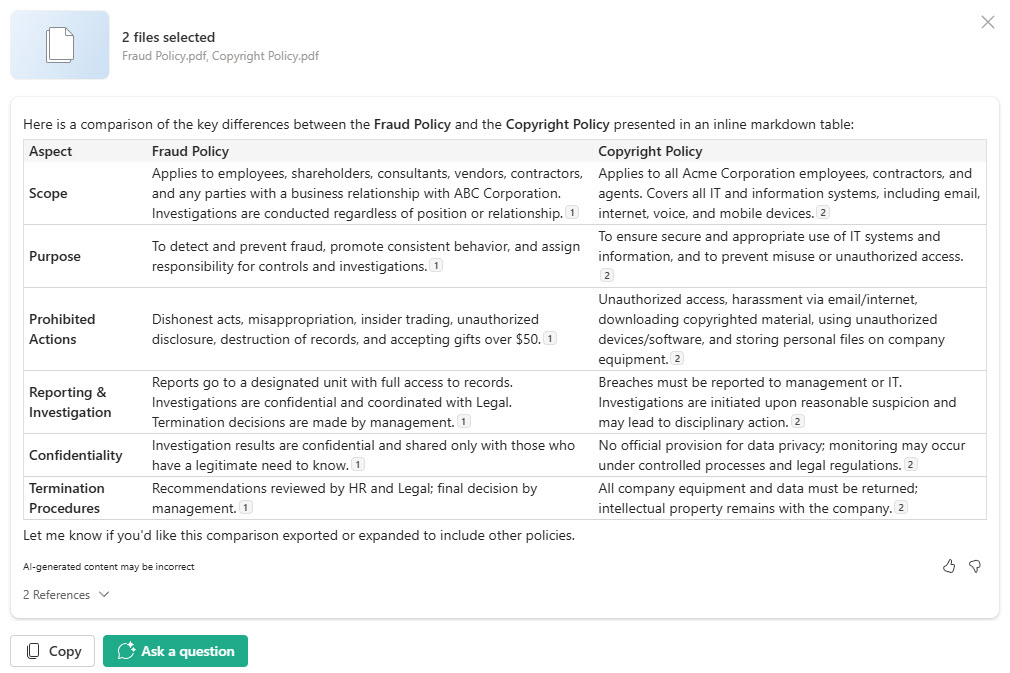
- Includes examples of AI Actions like Summarize, Compare Files, and Ask a Question directly from file menus
- Helps users quickly understand document content without opening each file manually
- Supports faster decision-making by generating instant summaries, differences, and insights
- Integrated directly into the modern document library experience: no custom code or add-ins
- Designed to improve productivity across departments like HR, Legal, Operations, and Project Management
Benefits
- Saves time by summarizing long or complex documents in a single click
- Highlights differences across versions or related files, making reviews easier and more accurate
- Allows users to ask natural-language questions and get instant answers extracted from document content
- Reduces the effort required for onboarding, audits, or large content reviews
- Encourages better understanding and adoption of AI-powered productivity tools
Common Questions About These Copilot AI Actions
What are these Copilot AI Actions built with?
AI Actions are a built-in Microsoft 365 capability inside the modern SharePoint document library – Summarize, Compare Files, and Ask a Question appear right in the file menu. There is no custom code, no add-ins, and no third-party tools. It is the kind of clean, maintainable document management Greg Zelfond builds for teams across HR, Legal, and Operations.
What’s included in this AI Actions design?
The design showcases three AI Actions available directly from a document library: Summarize, which condenses a long document in one click; Compare Files, which highlights differences across related files or versions; and Ask a Question, which returns natural-language answers pulled from a file’s content. Each runs from the file menu, so users get insight without opening and reading every document.
Does this design use any custom code or third-party tools?
No custom code and no third-party tools – AI Actions are native to SharePoint document libraries. They do rely on Microsoft 365 Copilot, so each user needs a Copilot license, and the document library itself comes with SharePoint. Your files stay in your Microsoft 365 tenant the whole time. Out-of-the-box is the only way Greg builds.
Can AI Actions be set up for our document libraries?
Absolutely. Greg helps structure your document libraries, metadata, and permissions so AI Actions return the most useful results, and he advises on which libraries and teams benefit most from Summarize, Compare Files, and Ask a Question. He tailors the rollout to your real content – HR, Legal, Operations, or project files – and to your Copilot licensing plan.
How do AI Actions work and what do they require?
When you select one or more files and choose an action, Copilot reads the document content and returns a summary, a comparison, or an answer to your question. The processing happens inside your Microsoft 365 tenant, so content is not exposed outside your organization. The main requirement is a Microsoft 365 Copilot license for each user who runs the actions.
Can Greg set up AI Actions for our organization?
Yes – this is exactly the kind of work Greg Zelfond does. As an independent SharePoint and Microsoft 365 consultant and Microsoft MVP, he builds document and knowledge management solutions in SharePoint, Lists, and Loop, and helps teams adopt Copilot capabilities like AI Actions. Reach out through the contact page to get started.