Police Activity (Log)


Overview
- Built entirely with Microsoft Lists and seamlessly integrated into SharePoint and Teams
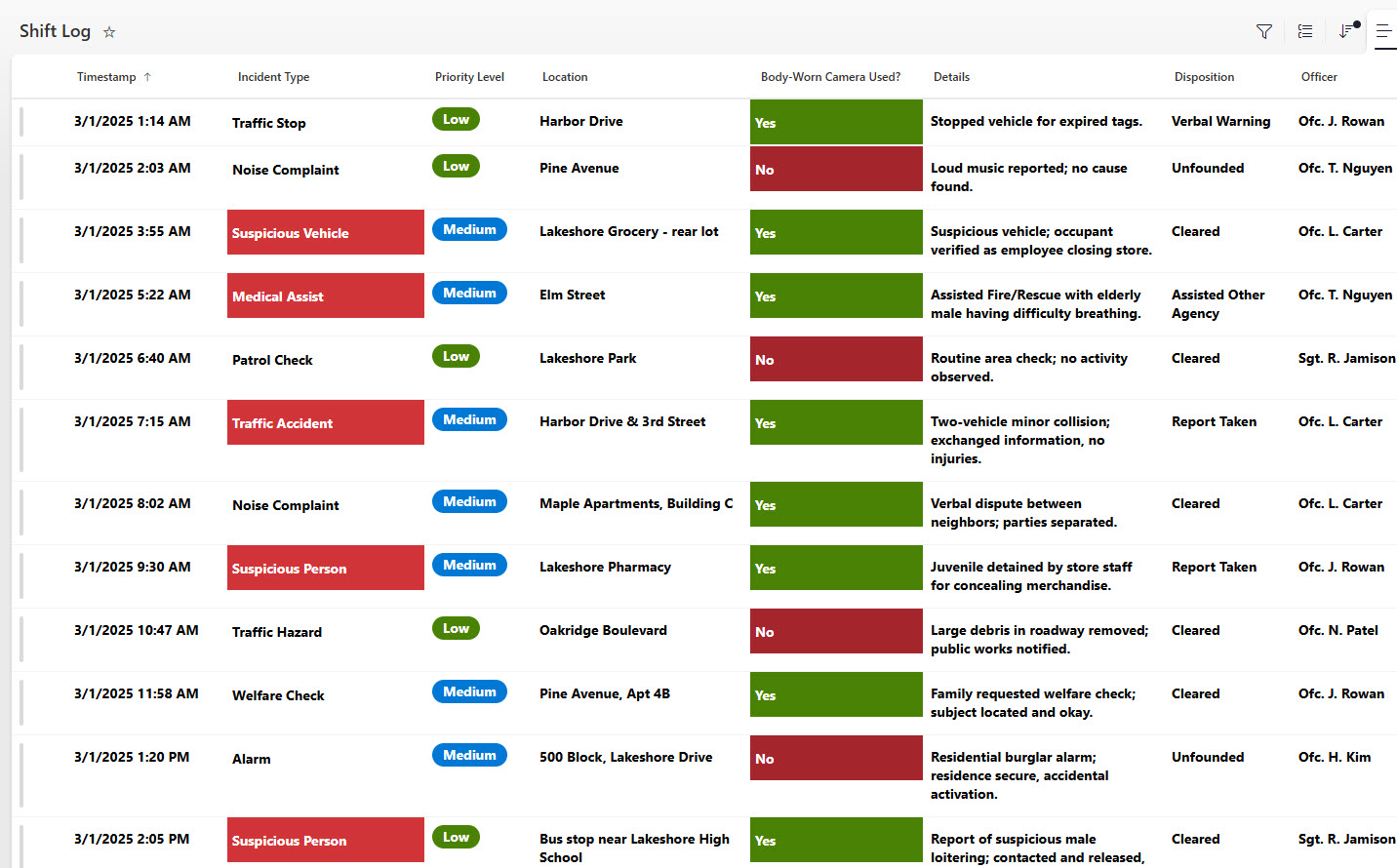
- Tracks key shift and incident details, such as Shift Date, Officer/Team, Shift Start Time, Shift End Time, Incident Type, Location, Incident Description, Status, and Follow-Up Actions
- Supports accountability and compliance by maintaining a consistent, time-stamped record of daily police activity
- Ideal for police departments, campus security teams, or any organization requiring organized shift/incident logging and reporting
- Allows supervisors to quickly review shift summaries, incidents, and follow-up actions without digging through separate systems
Benefits
- Clear visibility: instantly view all active, past, or upcoming shifts and incidents – who was on duty, where, and what occurred
- Integrated access: jump directly from the list to detailed incident reports or supporting documents (photos, statements, follow‑up forms)
- Efficiency & accuracy: maintain real‑time, accurate records of staffing and incidents without external spreadsheets or disconnected systems
- Better collaboration: dispatchers, supervisors, record‑keeping staff, and investigators all share one unified source of truth
- Fully out-of-the-box: no custom coding, Power Apps, or third‑party tools required – just Lists + SharePoint
Common Questions About This Daily Police Activity Log
What is this Daily Police Activity Log built with?
The Daily Police Activity Log is built entirely in Microsoft Lists, the tracking app included with Microsoft 365, and is seamlessly integrated into SharePoint and Teams. Each shift entry is a list item with columns for officers, times, incidents, and follow-ups. There is no custom code and there are no third-party tools. It is the kind of clean, collaborative tracker Greg Zelfond builds for police departments and public safety teams.
What’s included in the Daily Police Activity Log?
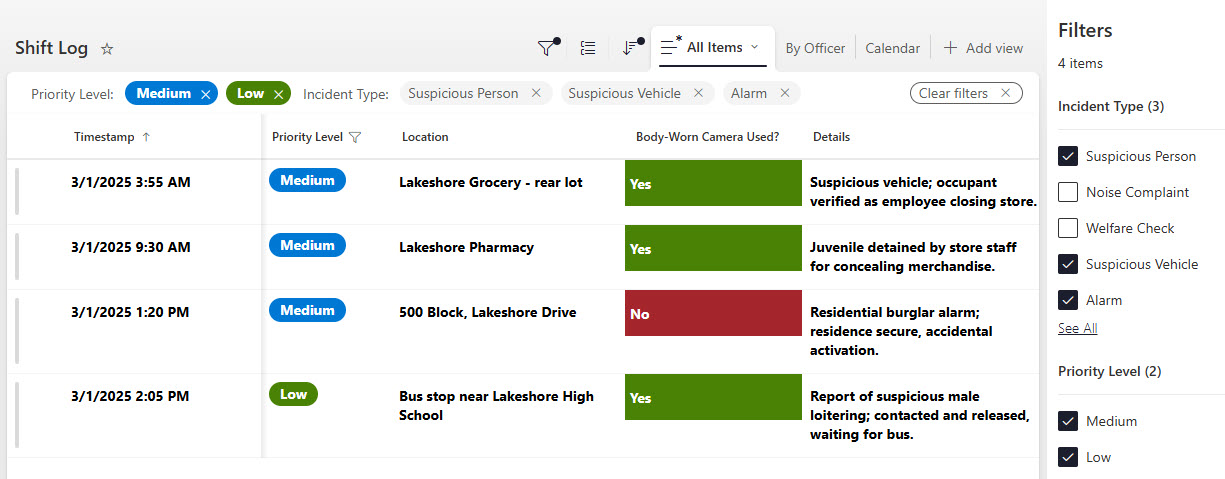
The log tracks key shift and incident details, including Shift Date, Officer or Team, Shift Start Time, Shift End Time, Incident Type, Location, Incident Description, Status, and Follow-Up Actions. The design includes a main grid view, a view grouped by officer, filtering, and a day view, so supervisors can review any shift or incident in seconds without digging through separate systems.
Does this design use any custom code or third-party tools?
No. The log is built entirely with Microsoft Lists, which is included with most Microsoft 365 business, enterprise, and government plans – no custom coding, no Power Apps, and no third-party tools. That keeps it stable, secure, and easy to maintain, with every time-stamped record stored safely inside your Microsoft 365 environment. Out-of-the-box is the only way Greg builds.
Can this log be customized for our department?
Absolutely. The columns, incident types, statuses, and views can all be tailored to your department’s reporting requirements – municipal police, campus security, transit, or private security operations. You can add fields for case numbers, units, or supervisor sign-off. Greg adapts the structure to the way your department actually logs shifts and incidents, so officers spend less time on paperwork.
What views does the Daily Police Activity Log include?
The design showcases a main grid view for the full activity log, a view grouped by officer so supervisors can see each person’s shifts and incidents together, filtering to narrow the log by incident type, status, or date, and a day view that pulls a single day’s activity into one screen. The same list can also be surfaced in SharePoint or Teams.
Can Greg build this tracker for our organization?
Yes – this is exactly the kind of work Greg Zelfond does. As an independent SharePoint and Microsoft 365 consultant and Microsoft MVP, he designs and builds trackers like this one in Microsoft Lists, SharePoint, Loop, and Planner, tailored to the way your department documents daily activity. Reach out through the contact page to get started.