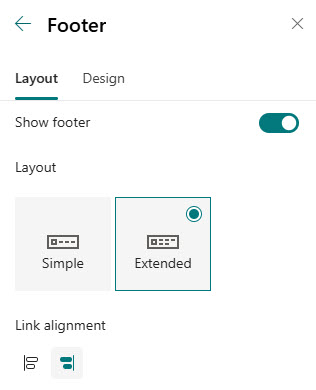
Footer
Common Use Cases
- Help Desk and support contacts: put the IT support link, phone number, and service desk email at the bottom of every page so users never hunt for help
- Legal and compliance links: privacy policy, terms of use, and disclaimers live in the footer instead of crowding the main navigation
- Policy quick links: an Extended footer groups key HR, safety, and IT policies under labeled columns visible on every page
- Branding reinforcement: display the organization logo and name site-wide for a finished, professional look
- Social and external links: point to the public website, LinkedIn, or other company channels from the intranet
- Header decluttering: move low-urgency, always-available destinations out of the top navigation so it stays focused on daily tasks
Benefits
- Per-site toggle: enable or disable the footer for each site
- Two layouts: Simple and Extended footer layouts to choose from
- Branding display: show the organization name, logo, or site branding
- Navigation links: add links for resources, policies, or key destinations
- Adjustable labels: rename and reorder link labels for clarity and structure
Details
- Feature Category: Branding & Theming
How It Works
- Two layouts: Simple shows one level of links and labels; Extended adds a second level, and both run up to eight columns wide
- Inline editing: links and labels are managed directly in the footer itself, not in a separate admin screen
- Logo and name: a footer logo is resized automatically on upload, and an optional display name can appear next to it
- Per-site configuration: each communication site has its own footer, turned on or off with a single toggle
- Design options: a background theme color or image, a font package, and link alignment round out the look
Limits and Nuances
- Communication sites only: team sites do not have a footer option
- Site pages only: the footer does not render on list pages, library pages, or settings pages
- No inheritance: footer settings do not carry over from a hub site to its associated sites or between sites
- Maximum of 8 top-level links or labels: the add button grays out once you reach the limit in either layout
- Sublinks in Extended only: and only one level of them; Simple is strictly a single row of links
- Background contrast: if you use a photo behind the footer, check that the links stay readable
- No mobile app footer: the footer does not display in the SharePoint mobile app, so keep critical links in the site navigation as well
- Design permissions required: if the footer options are missing for you, ask the site owner to grant design permissions or make the change
Common Questions About the SharePoint Footer
Why is there no footer option on my SharePoint site?
The footer is exclusive to communication sites. If you are on a team site – the kind created with a Microsoft 365 group for collaboration – the Footer option simply does not appear under Change the look. If your site is a communication site and you still do not see it, you likely lack design permissions, so ask a site owner to either grant access or make the change.
How many links can the SharePoint footer hold?
Both layouts allow up to eight top-level links or labels – once you reach eight, the add button grays out. The Extended layout adds one level of sublinks beneath each top-level label, which is how organizations fit groups like Support, Policies, and Quick Links into a single footer. If you need more than that, the header navigation or a dedicated links page is the better home.
What is the difference between the Simple and Extended footer layouts?
Simple displays a single row: logo, footer name, and one level of links or labels, up to eight columns wide. Extended is taller and displays two levels – top-level labels with a set of sublinks under each – which makes it behave like the footers you see on commercial websites. Extended is the layout to pick when the footer needs to organize links into categories.
Does the footer carry over to other sites in a hub?
No. The footer is configured per site and does not inherit from a hub site to its associated sites the way hub navigation does. If you want a consistent footer across an intranet, it has to be configured on each communication site individually – which is why it pays to document the standard layout, links, and background once and reuse it everywhere.
Can I change the footer background or add an image?
Yes. On the Design tab of the footer settings you can choose a background theme color or upload a custom background image – a popular touch for adding an office photo or brand pattern. There is also a Typography section for choosing the font used by the footer name and links. Just check contrast after adding a photo so the links stay readable.
What belongs in a SharePoint footer?
The footer works best for always-available, low-urgency destinations: support contacts, legal and privacy links, policy libraries, and the office address. Keeping those out of the header leaves the main navigation focused on what people use daily. When Greg Zelfond builds intranets for clients, the Extended footer typically carries the help desk link, key policies, and social or company links – quietly useful on every page.