Build Notes: Nonprofit SharePoint
Posted on October 1, 2026
By Greg Zelfond, the SharePoint consultant behind LookBook 365.
Nonprofits have been on my client list from the beginning, and I like working with them because they spend their day solving somebody else’s problems rather than their own. I myself spent many years of my life volunteering for several nonprofit organizations, related to my career and personal interests. So I know exactly how those organizations work and how they differ from my corporate clients.
First, many people in nonprofits are not employees. They are volunteers. They rotate constantly; they are not on the org chart, and nobody is going to run a training session for them.
Second, because of staff shortages and budget constraints, there might not be a dedicated person to run SharePoint or the Intranet. So it has to be really simple and intuitive.
In this edition of Build Notes, I want to explain some of my decision-making and demo work products for a typical nonprofit, using the design set I published on LookBook 365 as Nonprofit (Intranet).
Build at a glance
- Scope of work: Intranet homepage, Mission banner and quick link tiles, News and announcements, Events calendar, Office locations map, Photo gallery
- Build time: 6-8 weeks
- Custom code: None. Standard SharePoint only, no SPFx and no third-party tools.
- Also good for: Foundations, associations, faith-based organizations, and community service agencies

Branded Header & Mission Banner
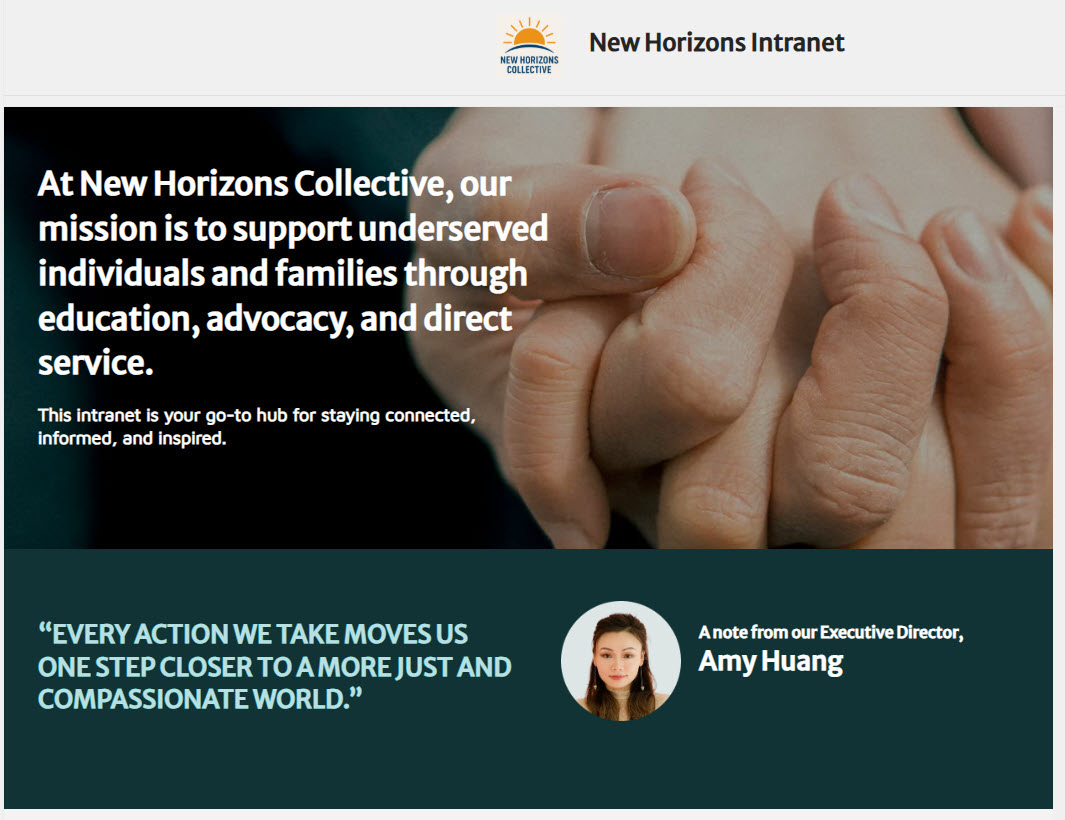
Nonprofits rarely have a brand team, but they almost always have a logo, a color, and a mission statement. I use the site header with the logo, a custom theme in the organization’s colors and custom fonts, then a banner underneath carrying the mission statement, built as a Text web part in a full-width section with the theme color behind it. The first thing anybody sees is what the organization is for, not a list of links.
→ Learn More: Header
Quick Links
Staff and volunteers need the same handful of things: HR forms, the volunteer onboarding packet, the expense form, and the calendar. At one nonprofit I helped, the link people asked for most was not a form at all. It was the volunteer onboarding packet, because new volunteers kept asking for it by email. I build these as a row of large linked tiles using the Image web part, one per column, rather than a plain list of links. Big targets matter a lot when someone has been with you for a week.
→ Learn More: Image Web Part

News & Announcements
A nonprofit with regional offices has the same problem every distributed organization has. The executive director sends an email, and the people who need to read it most aren’t sitting at a desk. A News web part in Top story layout on the homepage keeps policy updates and leadership messages in a permanent place instead of an inbox nobody opens, and since a nonprofit posts a few important items a month rather than a stream, the lead story can have a large image. And for volunteers who rarely open the portal, a news post can also be sent by email straight from SharePoint, so the message still reaches them.
→ Learn More: News Web Part

Events Calendar
Fundraisers, volunteer days, and board meetings. These are the dates a nonprofit actually organizes itself around, and they are the main reason a volunteer opens the portal at all. I used the Events web part in Filmstrip layout, because fundraisers and volunteer days usually come with a good photo, and each card still shows the date. I wish I’d had this when I sat on the Board of Directors and wondered when the next Board meeting was scheduled.
→ Learn More: Events Web Part

Weather for the Regional Offices
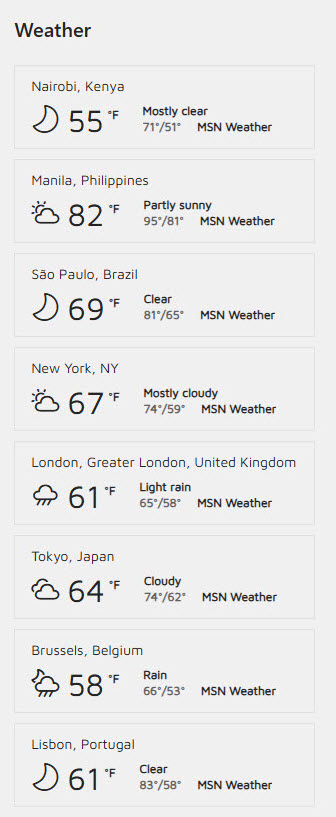
If an organization runs offices or program sites across a region, a row of Weather web parts is genuinely useful on a homepage. I add one per office, side by side in a multi-column section, since each web part shows a single location. Outdoor events get canceled for weather, volunteers drive to sites, and program staff plan around it. It costs nothing to add, and it is one of those small touches that makes a portal feel like it was built for this organization.
→ Learn More: Weather Web Part
Office Locations Map
Nonprofits grow by opening small offices and program sites, and after a few years nobody at headquarters can tell you where all of them are. Here I used several Bing Maps web parts, one per office, side by side in a multi-column section, rather than a single map graphic. Volunteers drive to these sites, and each map gives them directions with one click.
→ Learn More: Bing Maps Web Part

Photo Gallery
Nonprofits produce more photos than almost any client I have, be it volunteer days or community events, and most of them sit on somebody’s phone or laptop. I could have linked to a picture library, but nobody clicks through to a library to look at photos. The Image Gallery web part in Brick layout puts the best few right on the homepage, and it handles a mix of portrait and landscape phone photos without cropping them awkwardly. They remind everyone what the work is for.
→ Learn More: Image Gallery Web Part

→ No dedicated IT person? That is true for most of my nonprofit clients. I can build this homepage for you and hand it over ready to use, simple enough for a volunteer in their first week. Get this nonprofit design built for you.