Photo Repository


Overview
- Built entirely out-of-the-box in SharePoint using a Document Library and Image Gallery web part
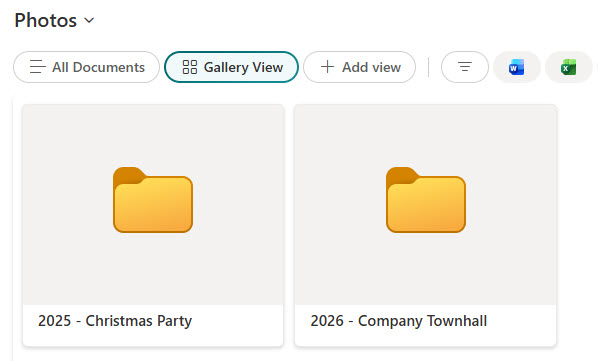
- Displays photos as thumbnails for quick scanning and easy navigation
- Organize images by albums/folders (or views) to keep large libraries tidy
- Add optional metadata columns (e.g., location, event, department, rights/usage) for categorization and filtering
- Embed curated photo sets directly on pages using dynamic image embedding via the Image Gallery web part
- User-friendly photo/image viewer for a better experience when viewing images, ensuring ease of use and clarity
Benefits
- Centralizes all visual content in one organized location, making it easy for teams to find and access images when needed
- Enables easy sharing and collaboration, allowing teams to comment, tag, and update images in real time
- Supports metadata tagging, so images can be filtered by category, event, department, or project
- Allows for gallery views and embedding, making it simple to display photo albums and collections directly on SharePoint pages
- Preserves photo quality and resolution, ensuring high-quality images are stored and shared without compression issues
Common Questions About This Photo Repository
What is this Photo Repository built with?
It is built with a standard SharePoint document library to store the images and the Image Gallery web part to display them, with optional metadata columns for organization. There is no custom code and there are no third-party tools. It is the kind of clean, maintainable image library Greg Zelfond builds for marketing, communications, and any team managing photos.
What’s included in the Photo Repository?
The repository stores all image types in a SharePoint document library with thumbnail views for quick scanning, albums and folders to keep large collections organized, and optional metadata columns such as event, location, department, and usage rights. The Image Gallery web part then displays curated photo sets as clean, browsable galleries that can be embedded on any SharePoint page.
Does this design use any custom code or third-party tools?
No. Everything is out-of-the-box SharePoint – the document library, the Image Gallery web part, metadata columns, and views are all standard Microsoft 365 capabilities. That keeps the repository stable, secure, and easy to maintain, and nothing breaks when Microsoft updates SharePoint. Out-of-the-box is the only way Greg builds.
Can this photo repository be customized for our team?
Absolutely. The metadata columns, album structure, views, and the galleries embedded on your pages are all tailored to how your team organizes and shares images – whether that is by campaign, event, location, or brand. Greg adapts the design for marketing, communications, HR, and any group that needs a tidy, reusable image library.
What is the advantage of the Image Gallery web part over a plain folder of photos?
A plain folder lists file names; the Image Gallery web part shows your photos as a clean visual grid that people can scan, open, and browse without downloading anything. Paired with metadata, you can curate specific sets – by event, project, or department – and embed them right on a SharePoint page, so the right images appear exactly where people need them.
Can Greg build this photo repository for our organization?
Yes – this is exactly the kind of work Greg Zelfond does. As an independent SharePoint and Microsoft 365 consultant and Microsoft MVP, he builds document and knowledge management solutions like this one, including the library structure, metadata, and embedded galleries that make images easy to find. Reach out through the contact page to get started.