FAQ Web Part

Benefits
- Reduces Repetitive Questions – Employees quickly find answers without needing to contact HR, IT, or support
- AI-Powered Efficiency – Copilot AI can auto-generate FAQs from existing documents, saving time on content creation
- Improves Self-Service – Users get instant, accurate responses without waiting for support staff
- Always Up to Date – AI-assisted suggestions help keep FAQs current with evolving policies and processes
- Enhances Onboarding – New employees have a single location to find answers and ramp up more quickly
- Better Search Results – AI-enriched FAQs surface in SharePoint search for quicker discovery
Settings
Web part level:
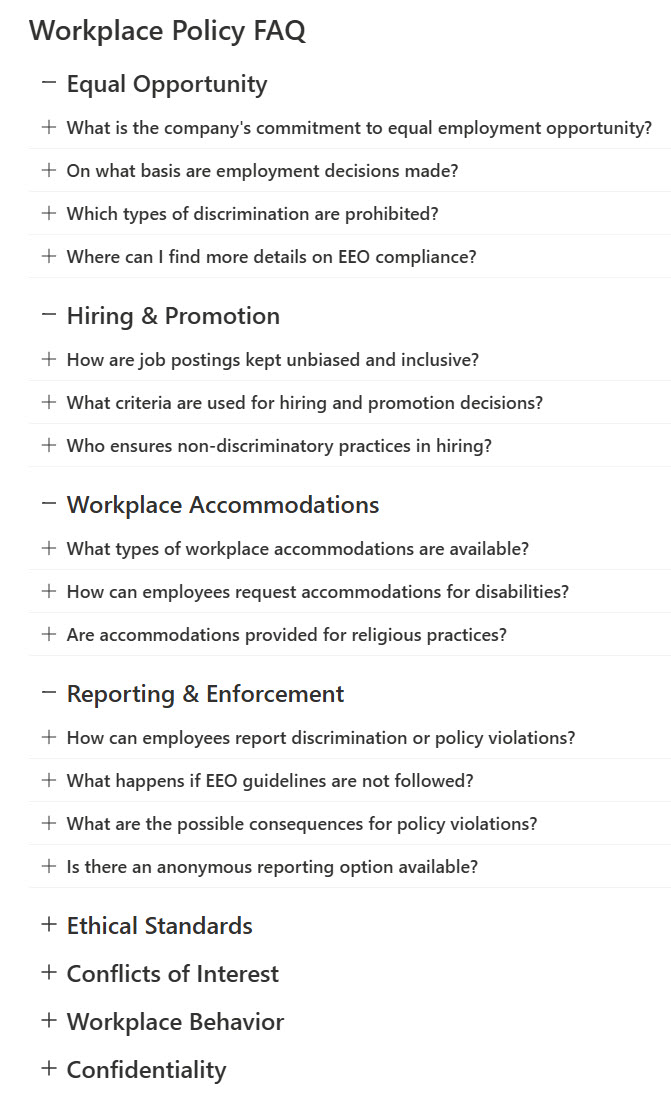
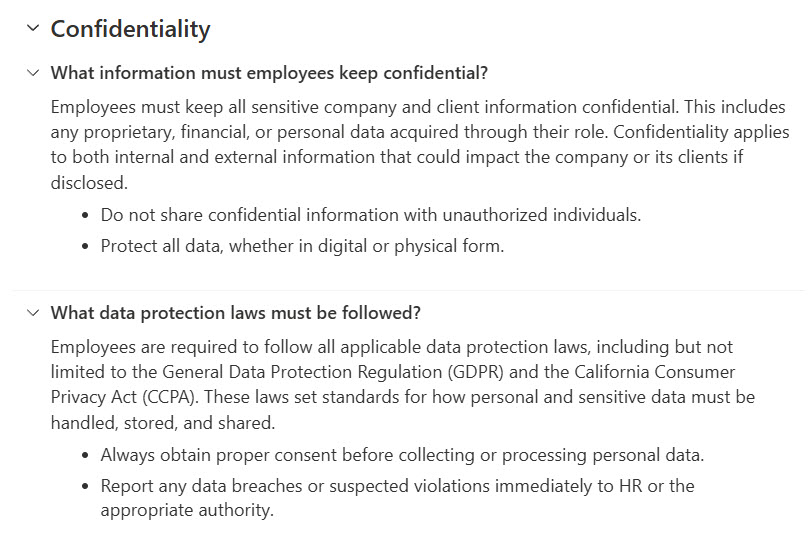
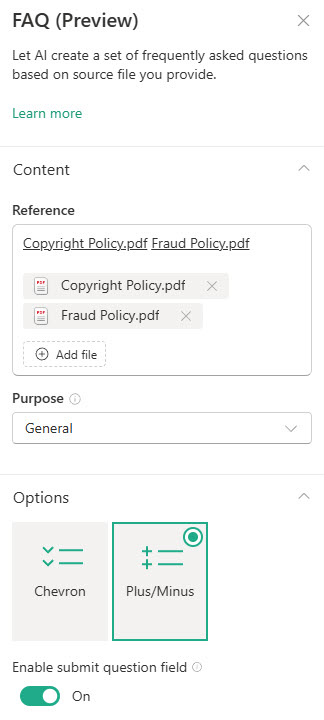
- Layout: Chevron (questions expand and collapse behind a chevron arrow, the classic accordion look) or Plus/Minus (a plus icon when collapsed, a minus when expanded, a cleaner fit for minimalist designs); both let you customize how answers expand and collapse.
- Viewer questions: a toggle that adds a Send to author field below the FAQ so viewers can submit questions you have not covered.
Generation setup:
- Source files and purpose: choose the grounding files (Word, PowerPoint, PDF, Loop, Meeting, and SharePoint Pages) and an FAQ purpose (Event, Product, Policy, or Other) that shapes the style of the generated questions and answers.
- Additional details and Start: optionally describe the audience or key points so Copilot generates more relevant FAQs, then Start generation; Copilot proposes categories first, then questions, then answers, and you approve each stage.
Per question and answer:
- Edit and organize: edit, add, remove, reorder, or move questions between categories before and after publishing, and Rewrite with Copilot to polish an individual answer’s accuracy or tone.
- Copy link and Import: share a direct link to a specific question and answer pair, or paste an existing FAQ to add it without generating from files.
Limits and Nuances
- Creating and editing requires a Microsoft 365 Copilot license: viewers need no license to read the FAQ or submit questions.
- Grounding sources are limited to Word, PowerPoint, PDF, Loop, Teams meetings, and SharePoint pages: other file types are not supported yet.
- Generation happens in stages: categories, then questions, then answers. Review each stage; clicking Keep it is what finalizes the FAQ.
- Nothing publishes without human approval: the web part reminds authors that AI-generated content may be incorrect, so review every answer.
- AI update suggestions appear only when changes are detected in a reference file or when viewers repeatedly ask similar questions: do not expect a constant stream.
- Viewer-submitted questions never post directly to the page: the author reviews them in a dropdown while editing, with non-relevant submissions filtered out by design.
- The web part is in public preview: the experience and supported file types are still evolving.
FAQ vs. the Alternatives
- FAQ web part vs. collapsible page sections: collapsible sections give you a manual accordion for any content; use the FAQ web part when you want true Q&A structure with Copilot generation and viewer-submitted questions.
- FAQ web part vs. Text web part: a plain text list of questions works for two or three items, but it cannot collapse, categorize, or update from source documents.
- FAQ web part vs. a custom SharePoint list: a list with the List web part suits large, filterable knowledge bases with many editors; the FAQ web part suits a curated, page-level FAQ.
- FAQ web part vs. a Copilot agent: an agent answers free-form questions in chat; the FAQ web part publishes a fixed, reviewed set of answers that everyone sees the same way.
Common Questions About the FAQ Web Part
Do I need a Microsoft 365 Copilot license to use the FAQ web part?
Only authors do. Creating and editing the FAQ web part requires a Microsoft 365 Copilot license, because Copilot generates the categories, questions, and answers. Viewers need no Copilot license at all – anyone with access to the page can read the FAQ, expand the answers, and submit new questions if the author has enabled that option.
Where does the FAQ web part get its answers?
From files you choose. You select grounding sources – Word documents, PowerPoint decks, PDFs, Loop pages, Teams meetings, or SharePoint pages – and Copilot generates categories, questions, and answers from that content. You then pick a purpose (Event, Product, Policy, or Other) and can add details about your audience so the generated FAQ matches your scenario.
Can employees submit their own questions?
Yes. A viewer questions toggle adds a field below the FAQ where viewers can type a question and click Send to author. Submissions do not appear on the page automatically – when the author edits the web part and adds a question, relevant viewer submissions appear in a dropdown, and non-relevant ones are filtered out by design.
Does the FAQ update itself when the source documents change?
Not silently, which is a good thing. When changes are detected in a reference file, or when viewers repeatedly ask similar questions, a Review AI suggestions option appears in edit mode. The author reviews each suggested update and chooses Replace, Insert below, or Dismiss. Nothing changes on the published page until a person approves it.
Can I write the FAQ myself instead of using Copilot generation?
Yes. You can import an existing FAQ by copying and pasting it into the web part, and you can add, edit, remove, and reorder categories and questions manually at any time. Most teams combine both: generate a first draft from policy documents, then refine the wording. Either way, a Copilot license is still required to create and edit the web part.
Why use the FAQ web part instead of plain text on the page?
Structured questions and answers are easier to scan, and the collapsible layout keeps long FAQs compact. Well-organized FAQ content also surfaces in SharePoint search, the same way FAQ content paired with FAQPage schema improves AI and search visibility on public websites. The FAQ designs on LookBook 365 use this exact web part with a custom theme – the only way Greg Zelfond builds. FAQ Web Part Example FAQ Web Part with expanded questions FAQ Web Part Settings