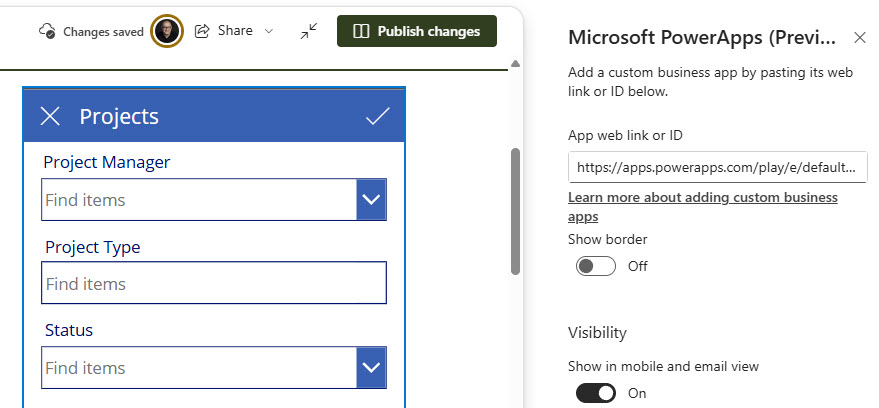
Microsoft PowerApps Web Part

Benefits
- Apps where people already are: employees use the app right on the intranet page instead of hunting for a separate link
- Interactive pages: forms, calculators, and mini applications run inline alongside news and documents
- One sign-in: the app uses the same Microsoft 365 account as the page, with no extra login
- Context through parameters: the page can pass values into the app through the web link, opening it pre-filtered
- No custom page code: embedding is pure configuration; the app itself is built in Power Apps
Settings
- Embed by link or ID: paste the app’s web link or App ID into the web part and the canvas app renders on the page
- Resize to fit: drag the handle on the web part to size the app to the page layout
- Pass parameters: append ?name=value (and &name=value for more) to the web link to send context into the app
- Runs live: the embedded app is the real app; updates published in Power Apps appear on the page automatically
Limits and Nuances
- Canvas apps only: the web part embeds canvas apps; model-driven apps are not supported here
- Access is separate from the page: viewers need the app shared with them in Power Apps and permission to its data sources; page permissions alone are not enough
- Licensing follows the app: apps built on standard connectors are covered by Microsoft 365 licenses, while premium connectors require a Power Apps license for every user
- Design for the space: an app embedded in a page works best when built for the size it will occupy; a phone-layout app in a wide section looks cramped
- Encode your parameters: values containing spaces or special characters must be URL encoded or the link breaks
Power Apps Web Part vs. the Alternatives
- Power Apps vs. Microsoft Forms web part: Forms collects simple submissions; Power Apps handles multi-screen logic, lookups, and writing to multiple data sources.
- Power Apps vs. List web part: the List web part shows and edits list data directly; Power Apps wraps the same data in a guided, branded experience.
- Power Apps vs. Embed web part: Embed displays external content generically; the Power Apps web part handles app sizing and Microsoft 365 sign-in natively.
- Power Apps vs. a plain app link: a link sends people away to the app; embedding keeps them on the intranet, with page context passed in via parameters.
Common Questions About the Power Apps Web Part
What does the Power Apps web part do?
It embeds a canvas app – built in Microsoft Power Apps – directly on a SharePoint page. Paste the app’s web link or App ID into the web part, resize it to fit, and the app runs inline: employees can submit requests, look up records, or work through a guided process without leaving the intranet. The embedded app is live, so updates published in Power Apps appear on the page automatically.
Why can’t my users see the app on the page?
Almost always a sharing gap. Seeing the page does not grant access to the app – the app must be shared with users in Power Apps, and they also need permission to the data sources behind it, such as a SharePoint list or Dataverse table. Share the app and its data with the same audience as the page, and the web part lights up for everyone.
Do users need a Power Apps license to use an embedded app?
It depends on the app’s connectors. Apps built on standard connectors – SharePoint, Office 365 users, Outlook – are covered by the Microsoft 365 licenses your users already have. Apps that use premium connectors, such as Dataverse or SQL, require a Power Apps license for every user who runs them. Worth confirming before a page goes live to the whole organization.
Can the page pass information into the app?
Yes – through web link parameters. Append values to the app link in the form ?name=value (and &name=value for additional ones), and the app can read them on startup to pre-filter a gallery, open a specific record, or adapt to the page it lives on. Values containing spaces or special characters must be URL encoded so the link stays valid.
Can I embed a model-driven app with this web part?
No – the web part supports canvas apps only. A model-driven app cannot be embedded this way; the practical pattern is to link to it instead, or to rebuild the scenario that belongs on the page as a focused canvas app. For most intranet use cases – request forms, lookups, small tools – a purpose-built canvas app is the better fit anyway.
Can Greg build this for our organization?
Yes – this is exactly the kind of work Greg Zelfond does. As an independent SharePoint and Microsoft 365 consultant and Microsoft MVP, he designs intranet pages that put tools where people actually work – including embedding the right Power Apps in the right places. Reach out through the contact page to get started.