Group Calendar Web Part

Benefits
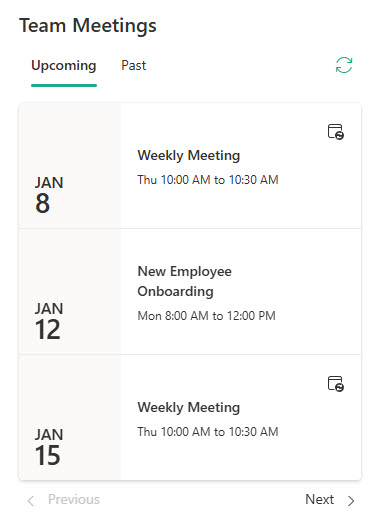
- The schedule lives where the team works: upcoming group meetings appear right on the team site instead of requiring a trip to Outlook.
- Zero duplicate data entry: events are created once in Outlook and the page stays in sync automatically.
- Recurring meetings just work: recurrence is native to Outlook, so weekly staff meetings display correctly with no extra effort.
- Nothing to maintain: no list to curate and no events to re-enter; the web part reads the live group calendar.
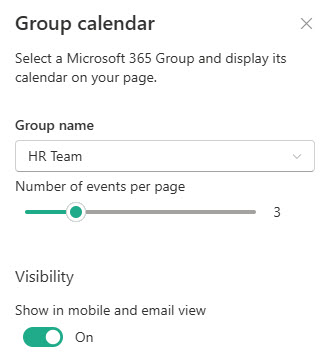
- Quick setup: pick the group, set the number of events, done.
Settings
- Upcoming meetings and events: pulled straight from a Microsoft 365 group‘s Outlook calendar.
- Up to 10 events at a time: you control how many appear on the page.
- Recurring meetings: the events live in Outlook, where recurrence is native, so each occurrence displays correctly.
- Automatic updates: when someone schedules or changes a group meeting in Outlook, the page reflects it without any page edits.
- A Create a meeting link: shown when nothing is scheduled; it opens the group calendar in Outlook on the web.
Limits and Nuances
- Configuration is just two choices: which Microsoft 365 group to display and how many events to show, up to a maximum of 10; there are no other settings.
- Works only on team sites: Microsoft 365 groups exist only for group-connected team sites, so the web part does not work on communication sites.
- Only events scheduled within the next 6 months appear: anything further out is invisible until it enters the window.
- The web part is read-only on the page: users add and edit events in Outlook, not in SharePoint.
- Viewers typically need to be members of the Microsoft 365 group: site visitors who are not group members can end up looking at an empty calendar.
- Not available in Microsoft 365 GCC High: if the web part appears on a page in that environment, it will not work and should be removed.
- There are no layout, color, or filter options: if you need filtering or visual layouts, this is not the web part for the job.
Group Calendar vs. the Alternatives
- Group Calendar vs. Events: the Events web part reads a SharePoint Events list and offers layouts, category filters, and audience targeting, but it does not support recurring events; the Group Calendar web part reads a Microsoft 365 group’s Outlook calendar, so recurring meetings display correctly. Use Events for curated one-off events, Group Calendar for a real meeting schedule.
- Group Calendar vs. a Teams channel calendar: the channel calendar app surfaces channel meetings inside Teams for people already working there; the Group Calendar web part puts the group’s Outlook calendar where site visitors will see it on SharePoint.
- Group Calendar vs. Quick links to Outlook: a link sends users away to Outlook; the web part keeps the next meetings visible at a glance on the page itself.
Common Questions About the Group Calendar Web Part
What does the Group Calendar web part actually show?
It shows upcoming meetings and events from a Microsoft 365 group’s Outlook calendar – the same calendar the group sees in Outlook – directly on a SharePoint page. You choose which group to display and how many events appear, up to 10. Because the source is Outlook, the web part stays in sync automatically: when someone schedules or updates a group meeting, the page reflects it.
Why can I not add the Group Calendar web part to my communication site?
The web part depends on a Microsoft 365 group, and groups exist only for group-connected team sites – so the web part works only on team sites. Communication sites have no group behind them. If you need events on a communication site, use the Events web part instead, which reads a SharePoint Events list and works on any modern site.
Does the Group Calendar web part support recurring events?
Yes, and this is its standout strength. Because it reads the group’s Outlook calendar, where recurrence is native, weekly staff meetings and monthly reviews display correctly without extra work. The Events web part, by contrast, does not support recurring events at all – each occurrence has to be created separately. If your schedule is built on recurring meetings, Group Calendar is the right choice.
Why do some users see an empty Group Calendar?
Two common reasons. First, viewers typically need to be members of the Microsoft 365 group – site visitors who are not group members often see nothing. Second, the web part only shows events scheduled within the next 6 months, so a calendar with only far-future events appears empty. Check group membership first; it accounts for the vast majority of empty-calendar complaints.
How many events can the Group Calendar web part display?
Up to 10. A setting controls how many upcoming events appear on the page, and 10 is the ceiling – there is no way to raise it. The web part also limits its view to events within the next 6 months. If you need a fuller picture of the calendar, the web part is best treated as a preview, with users clicking through to the full group calendar in Outlook.
How do people add events to the calendar shown on the page?
In Outlook – the web part itself is read-only on the page. Group members schedule meetings on the group calendar in Outlook or Outlook on the web, and the web part picks them up automatically; if nothing is scheduled, it even offers a Create a meeting link that opens Outlook. The team site designs on LookBook 365 pair this web part with a custom theme – out-of-the-box only, the way Greg Zelfond builds. Group Calendar Web Part Group Calendar Web Part Settings