Client Onboarding (Checklist)



Overview
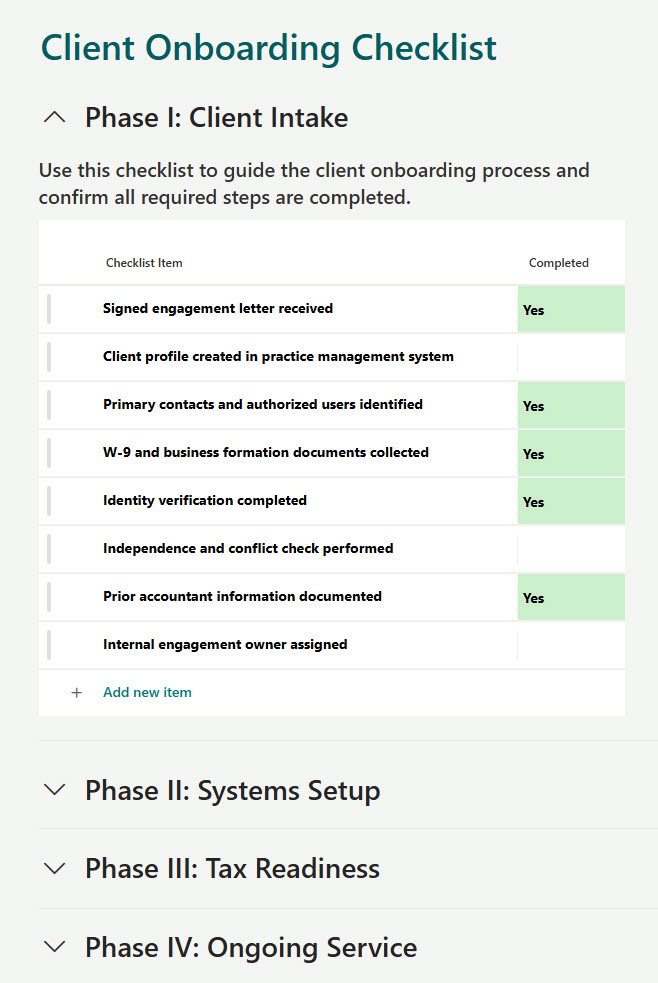
- Built using SharePoint Lists with a Yes/No column for quick task updates
- Embedded directly on SharePoint pages for seamless interaction
- Uses collapsible sections to keep content organized and scannable
- Allows users to check off items without opening the list view
- Designed for clarity, simplicity, and ease of use
- Flexible structure that works for any client onboarding process
Benefits
- Keeps onboarding steps visible and actionable in one place
- Saves time by reducing navigation between pages and lists
- Improves completion rates with simple, intuitive checkboxes
- Scales easily for multiple clients or teams
- No custom development required: fully native solution
- Enhances the overall user experience with a clean, focused layout
Common Questions About This Client Onboarding Checklist
What is this Client Onboarding Checklist built with?
The checklist is built entirely with Microsoft Lists and SharePoint, both included with Microsoft 365 – a list with a Yes/No column for quick task updates, embedded on a SharePoint page through the List web part and organized with collapsible sections. There is no custom code and there are no third-party tools. It is the kind of clean, collaborative checklist Greg Zelfond builds for client-facing teams.
What’s included in the Client Onboarding Checklist?
The checklist is a SharePoint list of onboarding tasks with a Yes/No column, so each item is checked off with a single click. It is embedded directly on a SharePoint page, where collapsible sections keep the content organized and scannable, and users complete items without ever opening the list view. The flexible structure works for any client onboarding process and scales across multiple clients or teams.
Does this design use any custom code or third-party tools?
No. The checklist is built entirely with Microsoft Lists and SharePoint, both included with most Microsoft 365 business and enterprise plans – no custom code, no third-party add-ons, and nothing extra to buy. That keeps it stable, secure, and easy to maintain, with everything stored safely inside your Microsoft 365 environment. Out-of-the-box is the only way Greg builds.
Can this checklist be customized for our onboarding process?
Absolutely. The tasks, sections, and page layout can all be tailored to your client onboarding process – kickoff steps, document collection, account setup, finance checks, or whatever your workflow requires. Greg adapts the structure to the way your team actually onboards clients, and the design scales easily as you duplicate it for additional clients or teams.
Can tasks be completed directly on the SharePoint page?
Yes – that is the standout feature of this design. Because the list is embedded on the page with a Yes/No checkbox column, users check off onboarding items right where they work, without navigating into the list itself. That saves time, improves completion rates with simple, intuitive checkboxes, and keeps the whole onboarding picture visible in one clean, focused layout.
Can Greg build this checklist for our organization?
Yes – this is exactly the kind of work Greg Zelfond does. As an independent SharePoint and Microsoft 365 consultant and Microsoft MVP, he designs and builds checklists and trackers like this one in Microsoft Lists, SharePoint, Loop, and Planner, tailored to the way your team onboards clients. Reach out through the contact page to get started.