Document Acknowledgement (Form)



Overview
- A practical system for capturing employee acknowledgment of important policies and documents inside SharePoint
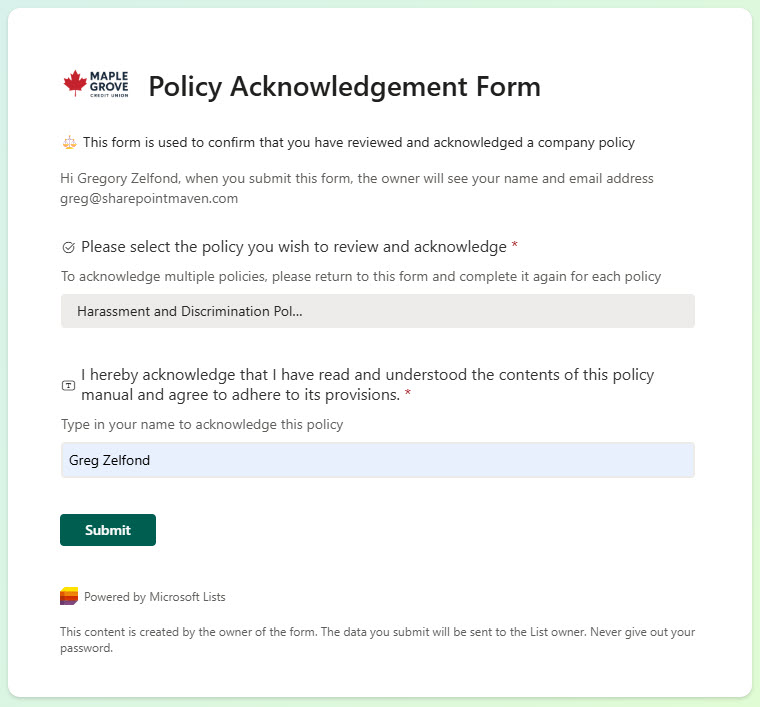
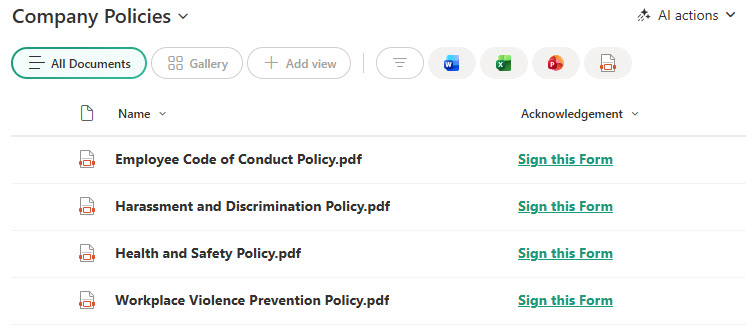
- Employees access the policy, review the information, and record acknowledgment using a straightforward Form entry
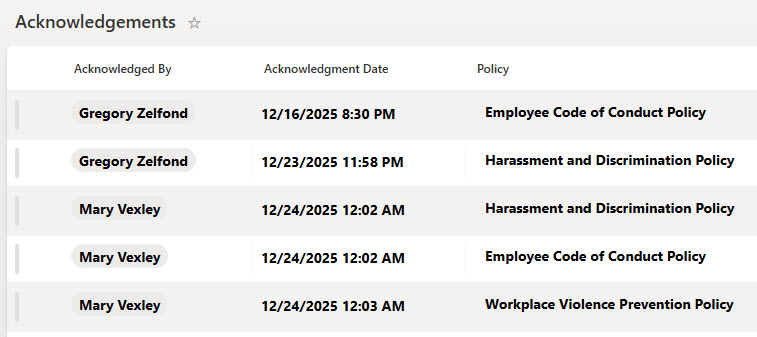
- Acknowledgments are stored in a centralized place, providing a permanent record of who has read and accepted a document
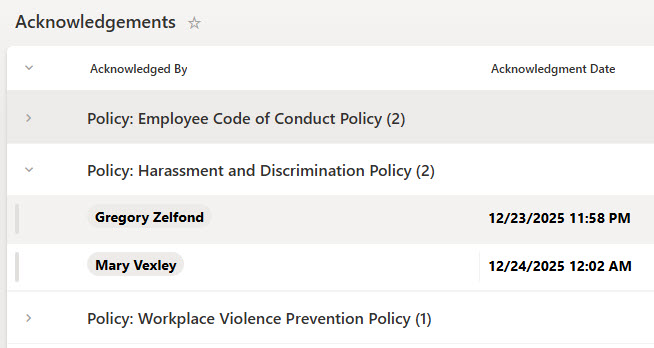
- Administrators can easily view acknowledgment status and filter by user, policy, or date
- Perfect for HR, IT, Compliance, and Legal teams that need confirmation from employees but want to avoid complex workflows
- Built entirely using native SharePoint List capabilities: simple to configure, easy to maintain, and ready to scale
Benefits
- Lightweight & Practical: No workflows, no automation, no complex setup – just a clear acknowledgment record
- Clear Visibility: Quickly see who has acknowledged a policy and who hasn’t using filters and views
- Audit Friendly: Every acknowledgment is timestamped and stored, making it easy to demonstrate compliance
- Easy for Employees: Straightforward acknowledgment experience with no extra steps or apps required
- Reduces Manual Tracking: Eliminates spreadsheets and messy email confirmation trails
Common Questions About This Document Acknowledgement Solution
What is this Document Acknowledgement solution built with?
The solution is built entirely with Microsoft Lists and Microsoft Forms inside SharePoint, all included with Microsoft 365 – a document library holds the policies, a simple form captures each acknowledgment, and a centralized list stores the permanent record. There is no custom code and there are no third-party tools. It is the kind of clean, collaborative tracker Greg Zelfond builds for HR, IT, Compliance, and Legal teams.
What’s included in the Document Acknowledgement solution?
Employees access the policy in the document library, review the information, and record acknowledgment through a straightforward form entry. Every acknowledgment is timestamped and stored in a centralized list, where administrators can view status, group records by policy, and filter by user, policy, or date. A gallery view presents the policy documents visually, so employees can browse what needs their attention without digging through folders.
Does this design use any custom code or third-party tools?
No. The solution is built entirely with Microsoft Lists and Microsoft Forms, both included with most Microsoft 365 business and enterprise plans – no custom code, no third-party add-ons, no complex workflows, and nothing extra to buy. That keeps it stable, secure, and easy to maintain, with everything stored safely inside your Microsoft 365 environment. Out-of-the-box is the only way Greg builds.
Can this solution be customized for our compliance process?
Absolutely. The form questions, list columns, views, and policy library can all be tailored to your acknowledgment process – employee handbooks, IT security policies, safety procedures, annual compliance attestations, or new-hire onboarding packets. Greg adapts the structure to the documents your organization actually needs acknowledged and the way your administrators need to report on them.
How do employee acknowledgments get recorded?
Through the acknowledgment form built with Microsoft Forms. After reviewing a policy, the employee submits a short form entry – no extra steps and no additional apps required. Each submission lands in the centralized acknowledgment list as a timestamped record, where administrators can group by policy, filter by user or date, and quickly see who has acknowledged a document and who has not. That makes demonstrating compliance simple and audit friendly.
Can Greg build this solution for our organization?
Yes – this is exactly the kind of work Greg Zelfond does. As an independent SharePoint and Microsoft 365 consultant and Microsoft MVP, he designs and builds trackers like this one in Microsoft Lists, Forms, and SharePoint, tailored to the way your HR, IT, or compliance team manages policy acknowledgments. Reach out through the contact page to get started.