Invoices (Document Library)


Overview
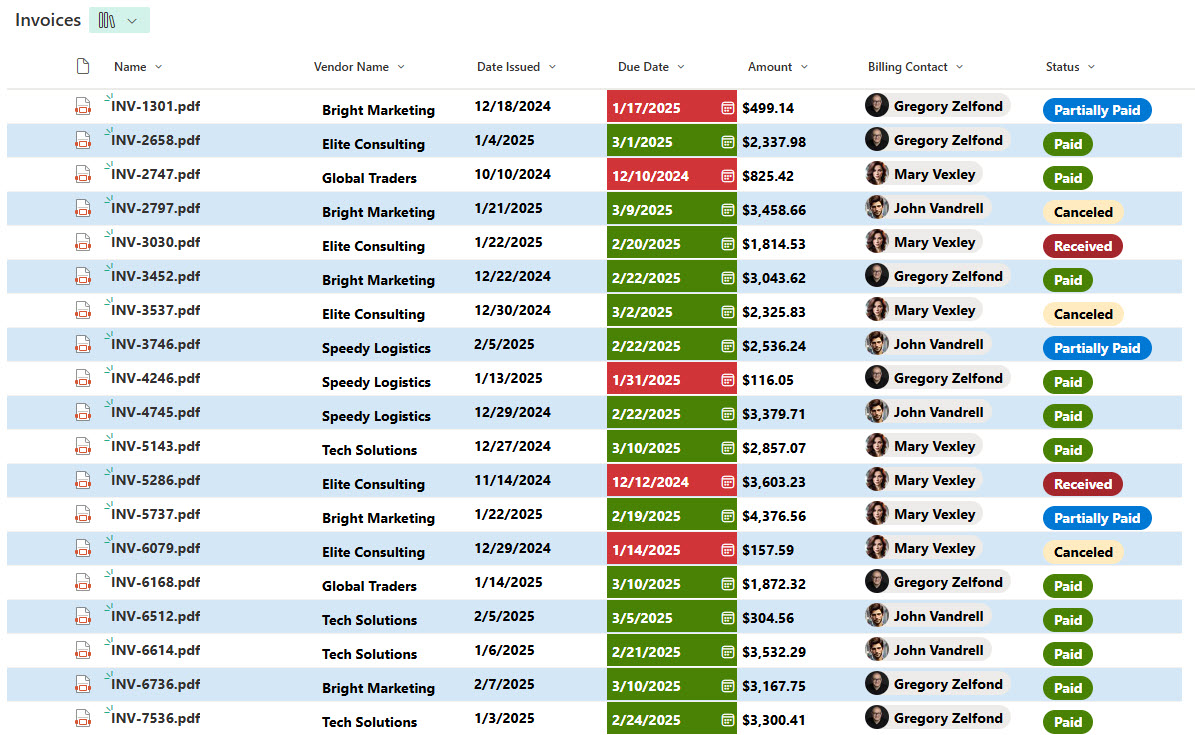
- Custom Metadata for Invoice attributes enables tracking of key invoice details such as invoice number, vendor, amount, due date, and payment status
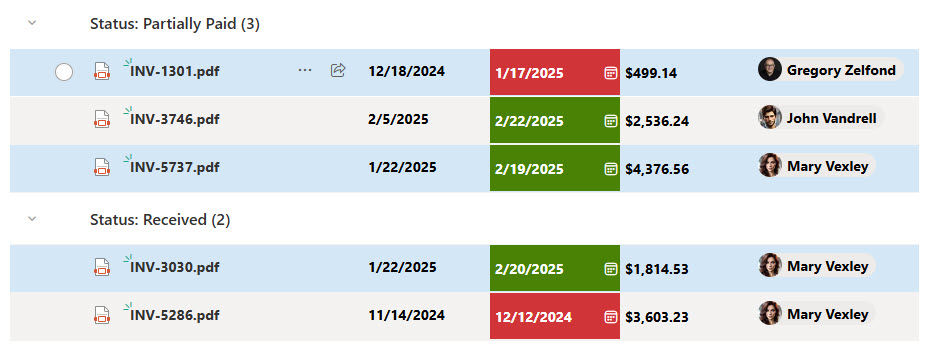
- Color-coded indicators provide visual cues to help users easily identify invoice status (e.g., pending, approved, overdue).
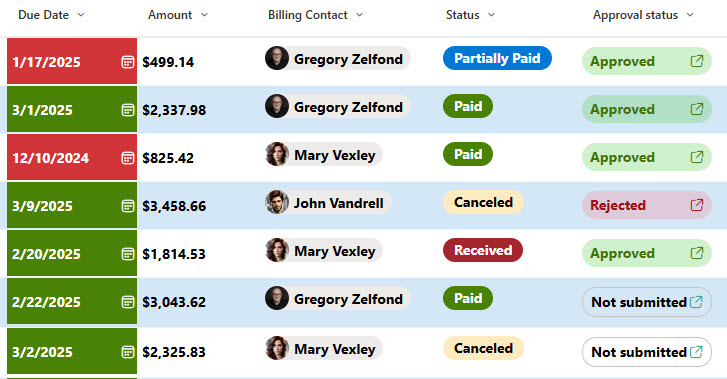
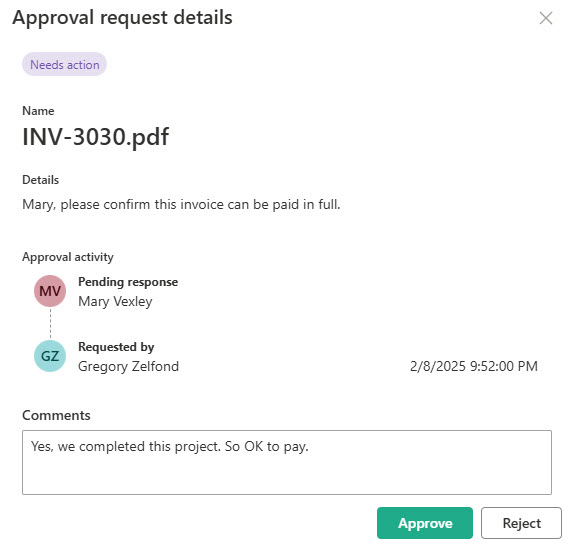
- Built-in Approval Workflow ensures a smooth and efficient review and payment workflow
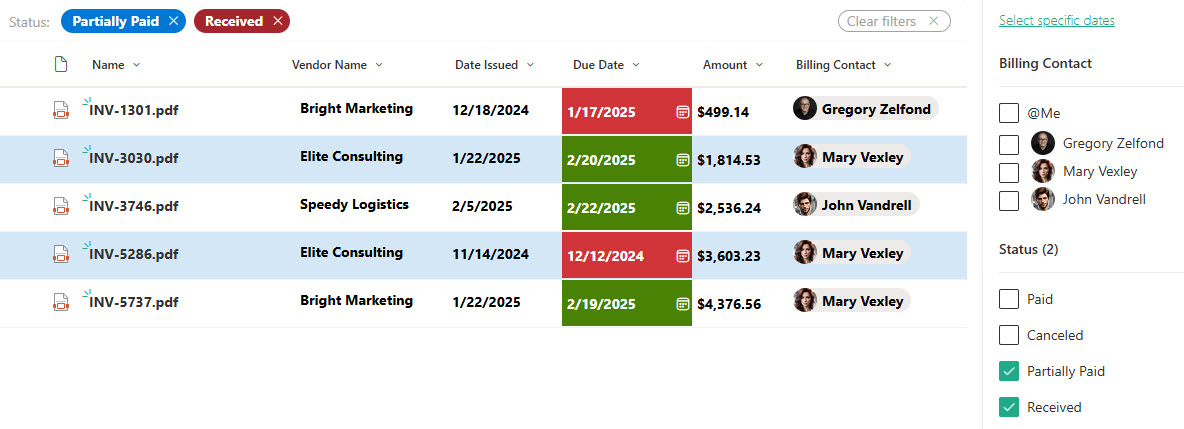
- Advanced Filtering, Sorting, and Grouping allow users to organize invoices in multiple ways for better visualization and easier management
- Audit Tracking & Version History maintains a record of changes, approvals, and updates, ensuring compliance and accountability
Benefits
- Centralizes all invoice documents in one secure location, eliminating scattered files and reducing the risk of duplicates
- Improves visibility into invoice status, so finance teams and approvers can easily see what’s pending, approved, or overdue
- Streamlines the approval process, with built-in workflows that route invoices automatically to the right people
- Reduces manual tracking and follow-ups, saving time and minimizing errors in invoice handling
- Supports audit and compliance needs, by maintaining version history, timestamps, and approval records for every invoice
- Enhances organization with metadata, making it easy to filter invoices by vendor, department, date, or status
Common Questions About This Invoices Library
What is this Invoices Library built with?
The library is built with a standard SharePoint document library and custom metadata columns – invoice number, vendor, amount, due date, and payment status – plus a built-in approval process. There is no custom code and there are no third-party tools. It is the kind of clean, maintainable document management Greg Zelfond builds for finance and accounting teams.
What’s included in the Invoices Library?
Each invoice carries metadata such as invoice number, vendor, amount, due date, and payment status, with color-coded indicators that flag pending, approved, or overdue items at a glance. Views group and filter invoices by vendor, department, date, or status, a built-in approval workflow routes each invoice for review, and version history records every change and approval.
Does this design use any custom code or third-party tools?
No. Everything is out-of-the-box SharePoint – the document library, metadata columns, color-coded views, approval workflow, and version history are all standard Microsoft 365 capabilities. That keeps the library stable, secure, and easy to maintain, and nothing breaks when Microsoft updates SharePoint. Out-of-the-box is the only way Greg builds, which matters for financial records.
Can this library be customized for our finance team?
Absolutely. The metadata is where the tailoring happens – vendors, departments, amount fields, due dates, payment statuses, and approval routing all get aligned to the way your finance team works. Greg adapts the columns, color-coded views, and workflow so the library matches your real accounts payable process instead of forcing you into a generic template.
How does the invoice approval process work?
Invoices route through a built-in approval workflow that sends each one to the right reviewer automatically, so nothing sits in an inbox or gets lost. Color-coded status indicators show what is pending, approved, or overdue at a glance, and version history records who approved what and when. The result is fewer manual follow-ups and a clear audit trail for every payment.
Can Greg build this library for our organization?
Yes – this is exactly the kind of work Greg Zelfond does. As an independent SharePoint and Microsoft 365 consultant and Microsoft MVP, he designs and builds document management solutions like this one, including the metadata, color-coded views, and approval workflow that keep invoices organized and audit-ready. Reach out through the contact page to get started.