Licenses and Permits (Document Library)
Cost: $1,800, including configuration of all metadata columns, views and formatting, plus meetings and training.


Overview
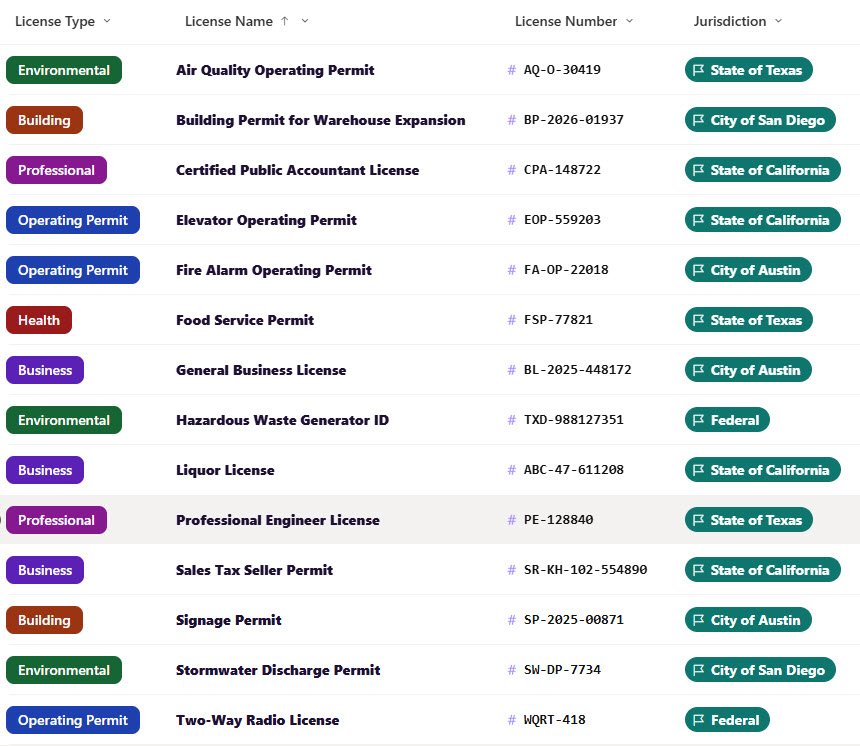
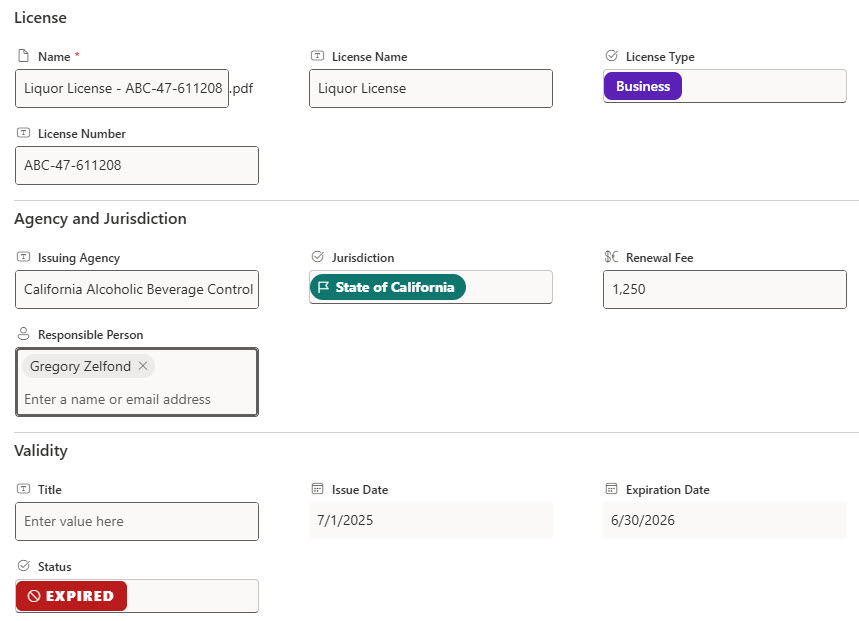
- Metadata Columns: License name, license type, issuing agency, license number, jurisdiction, issue date, expiration date, status, renewal fee, and responsible person
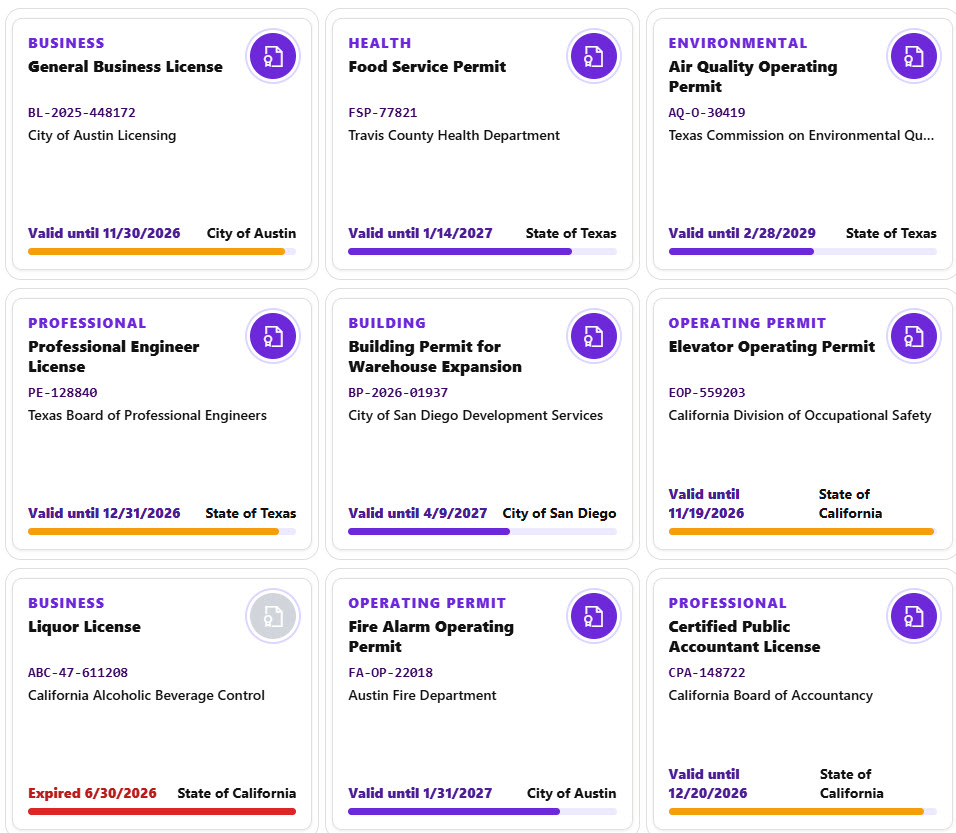
- Countdown Badges: Circular countdown badges that show the days or years left before each license expires, colored green, amber, or red
- Validity Stamps: Dashed validity stamps for valid, renewing, expired, and suspended licenses
- Tags and Numbers: License type tags, monospace license numbers, and jurisdiction tags with a flag icon
- Attention Views: Expiring in 60 Days and Renewal In Progress views that pull the licenses that need action
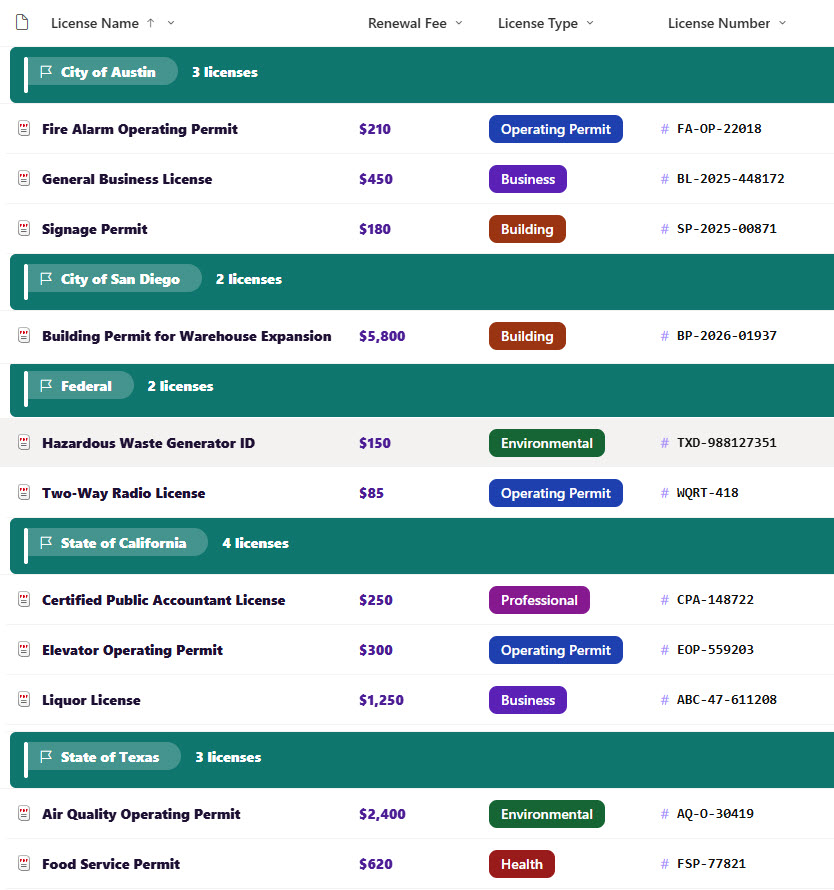
- By Jurisdiction View: A By Jurisdiction view with flag-style headers and a license count
- Gallery and Form: A gallery of certificate cards with a seal icon and a validity bar, plus a properties form with License, Agency and Jurisdiction, and Validity sections
Benefits
- No Lapses: Never let a business license or permit lapse by accident
- Renewal Visibility: See which renewals are already in progress
- One Searchable Place: Keep license numbers and issuing agencies in one searchable place
- Jurisdiction Grouping: Group licenses by city, state, or federal jurisdiction
- Fee Planning: Plan for renewal fees before they are due
- Full History: Keep a full version history of every license and permit
Library Columns
- License Name (Single line of text) - the name of the license or permit
- License Type (Choice) - Business, Operating Permit, Professional, Environmental, Building, or Health
- Issuing Agency (Single line of text) - the agency that issued the license
- License Number (Single line of text) - the number printed on the license
- Jurisdiction (Choice) - the city, state, or federal jurisdiction
- Issue Date (Date and Time) - when the license was issued, used for the validity bar
- Expiration Date (Date and Time) - when the license expires, used for the countdown badge
- Status (Choice) - Active, Renewal In Progress, Expired, or Suspended
- Renewal Fee (Currency) - the fee to renew the license
- Responsible Person (Person or Group) - the person who keeps the license current
Common Questions About This Licenses and Permits Library
What is this licenses and permits library built with?
It is built entirely with out-of-the-box SharePoint: a document library with metadata columns, list, grouped, and gallery views, built-in column and view formatting for the countdown badges, validity stamps, jurisdiction tags, and certificate cards, and a sectioned properties form. There is no custom code and no third-party tool, which is the kind of clean, maintainable document management Greg Zelfond builds for his clients.
What’s included in the licenses and permits library?
The library stores each license with its type, issuing agency, license number, jurisdiction, issue and expiration dates, status, renewal fee, and responsible person. Views show all licenses, licenses expiring soon, and renewals in progress, a By Jurisdiction view groups everything by jurisdiction, and a gallery shows each license as a certificate card.
How does the countdown badge work?
Each license stores an expiration date. The badge shows the number of days left, or the number of years for long-term licenses, and turns amber and then red as the date gets close. Once a license expires, the badge changes to a gray expired marker.
Does this design use any custom code or third-party tools?
No. The countdown badges, validity stamps, jurisdiction tags, and certificate cards all use formatting features that ship with SharePoint and are set in the library settings. Nothing is installed or deployed, so the library stays stable, secure, and easy to maintain as Microsoft updates SharePoint. Out-of-the-box is the only way Greg builds.
Can this library be customized for our organization?
Absolutely. The license types, jurisdictions, and warning thresholds can be changed to match your organization. The colors can follow your brand, columns can be added or removed to match how your team works, and the views can be adjusted for each team that uses the library. The same approach can also be reused for other document types across your organization.
Can Greg build this library for our organization?
Yes - this is exactly the kind of work Greg Zelfond does. As an independent SharePoint consultant and Microsoft MVP, he designs and builds out-of-the-box document libraries like this one, with metadata, views, formatting, and forms tailored to how your compliance, legal, or operations team keeps licenses and permits current. Reach out through the contact page to talk about your project.
How much does it cost to build this library?
This library costs a flat $1,800. That includes configuration of all metadata columns, views and formatting, plus meetings and training.