Project Charters (Document Library)
Cost: $1,800, including configuration of all metadata columns, views and formatting, plus meetings and training.


Overview
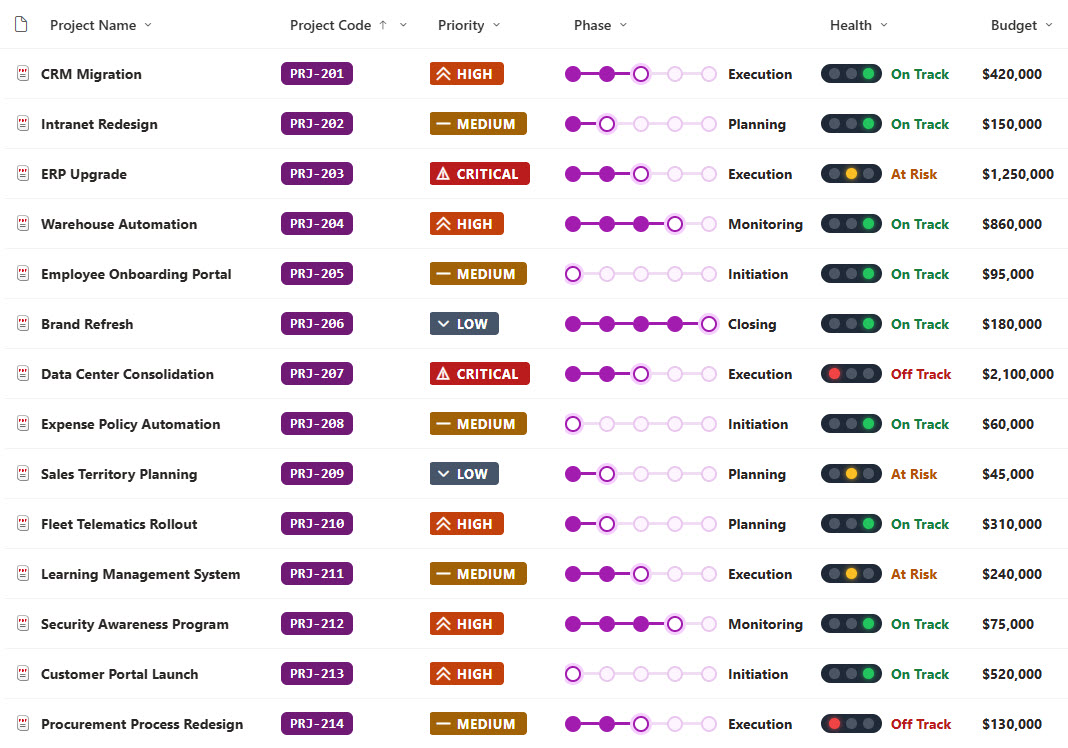
- Metadata Columns: Project name, project code, department, priority, phase, approval status, health, budget, start date, target end date, sponsor, and project manager
- Milestone Tracker: A milestone tracker that shows the current phase from initiation to closing
- Health and Priority: A health traffic light and a priority badge with an icon for each level
- Timeline Bar: A timeline bar that fills as the project moves from its start date toward its target end date, with a countdown as the end date gets close
- Attention Views: Awaiting Approval and At Risk or Off Track views that pull the charters that need attention
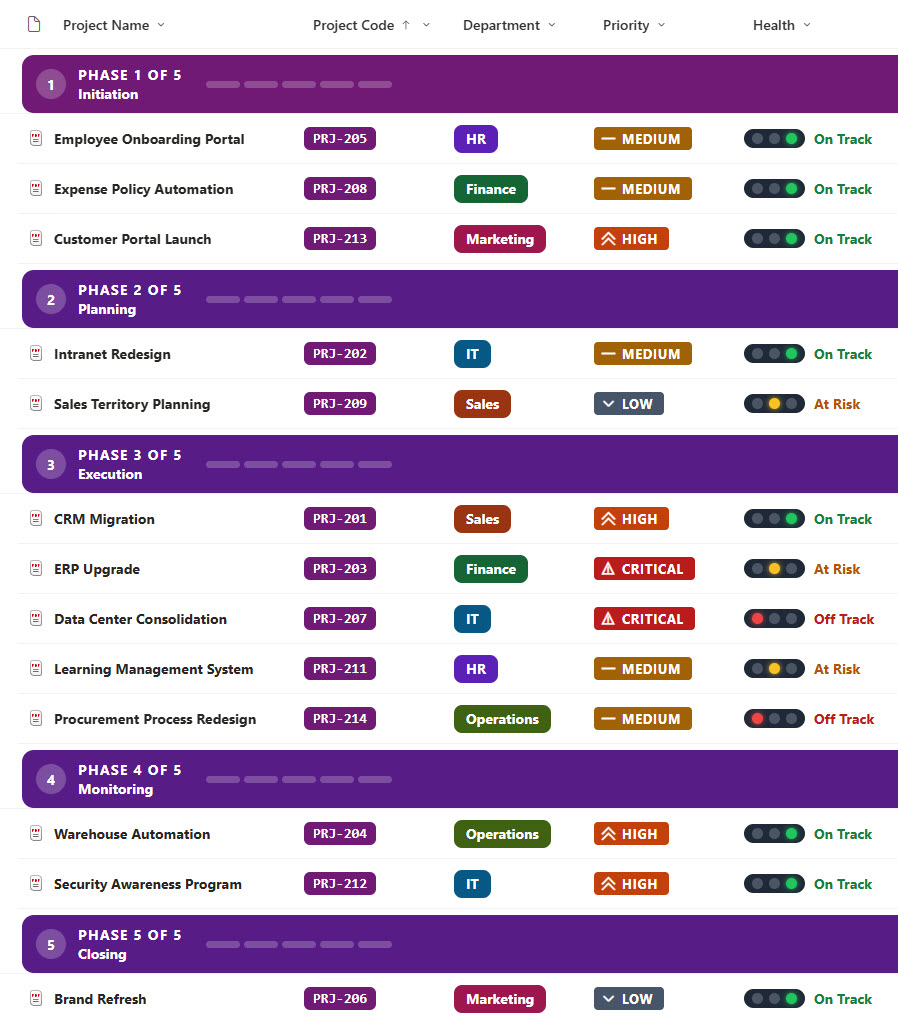
- Phase Groups: A By Phase view with numbered step headers that keep the phases in order
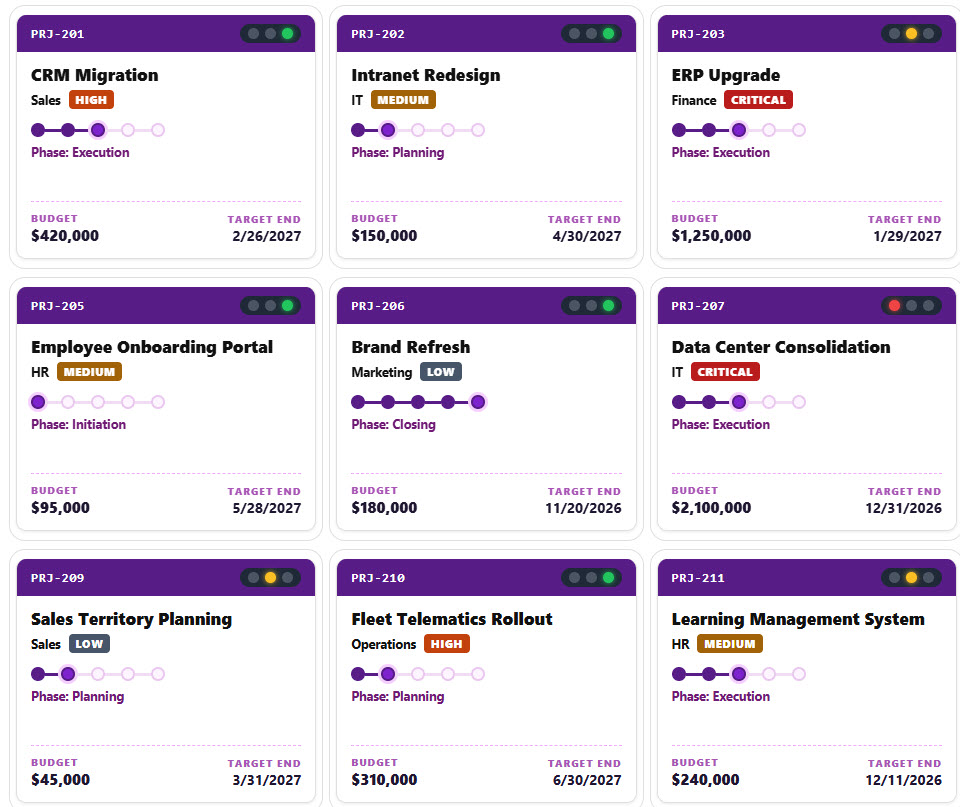
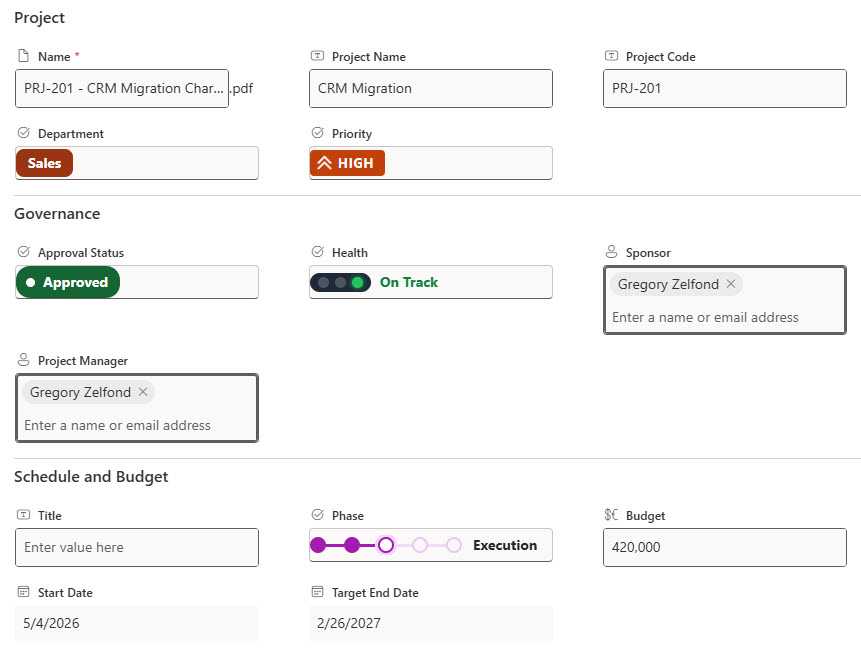
- Gallery and Form: A gallery of project status cards and a properties form with Project, Governance, and Schedule and Budget sections
Benefits
- Leadership Review: Give leadership one place to review every project before and after approval
- Early Warning: Spot projects that are at risk or off track before they slip further
- Lifecycle at a Glance: See where every project sits in its lifecycle at a glance
- Consistent Charters: Keep scope, budget, and schedule details consistent across charters
- Clear Ownership: Make sponsors and project managers visible on every charter
- Version History: Keep a full version history of every charter
Library Columns
- Project Name (Single line of text) - the name of the project
- Project Code (Single line of text) - the unique project code, shown as a code chip
- Department (Choice) - the department that owns the project
- Priority (Choice) - Critical, High, Medium, or Low
- Phase (Choice) - Initiation, Planning, Execution, Monitoring, or Closing
- Approval Status (Choice) - Draft, Submitted, Approved, On Hold, or Rejected
- Health (Choice) - On Track, At Risk, or Off Track
- Budget (Currency) - the approved budget
- Start Date (Date and Time) - when the project starts
- Target End Date (Date and Time) - when the project is due to finish, used for the timeline bar
- Sponsor (Person or Group) - the executive sponsor
- Project Manager (Person or Group) - the person who runs the project
Common Questions About This Project Charters Library
What is this project charters library built with?
It is built entirely with out-of-the-box SharePoint: a document library with metadata columns, list, grouped, and gallery views, built-in column and view formatting for the phase trackers, traffic lights, priority badges, and timeline bars, and a sectioned properties form. There is no custom code and no third-party tool, which is the kind of clean, maintainable document management Greg Zelfond builds for his clients.
What’s included in the project charters library?
The library stores each charter with its project name, code, department, priority, phase, approval status, health, budget, start and target end dates, sponsor, and project manager. Views show all charters, charters awaiting approval, and projects that are at risk or off track, a By Phase view groups charters in phase order, and a gallery shows each project as a status card.
How does the library keep the phases in order in the grouped view?
SharePoint sorts groups alphabetically, so the library adds a hidden calculated column that puts the step number in front of each phase. The By Phase view groups by that column, and the group header shows the step number, the phase name, and a progress strip.
Does this design use any custom code or third-party tools?
No. The phase trackers, traffic lights, priority badges, and timeline bars all use formatting features that ship with SharePoint and are set in the library settings. Nothing is installed or deployed, so the library stays stable, secure, and easy to maintain as Microsoft updates SharePoint. Out-of-the-box is the only way Greg builds.
Can this library be customized for our organization?
Absolutely. The departments, phases, and priority levels can be changed to match your organization. The colors can follow your brand, columns can be added or removed to match how your team works, and the views can be adjusted for each team that uses the library. The same approach can also be reused for other document types across your organization.
Can Greg build this library for our organization?
Yes - this is exactly the kind of work Greg Zelfond does. As an independent SharePoint consultant and Microsoft MVP, he designs and builds out-of-the-box document libraries like this one, with metadata, views, formatting, and forms tailored to how your PMO or leadership team reviews and approves projects. Reach out through the contact page to talk about your project.
How much does it cost to build this library?
This library costs a flat $1,800. That includes configuration of all metadata columns, views and formatting, plus meetings and training.