Insurance Claims (Document Library)
Cost: $1,800, including configuration of all metadata columns, views and formatting, plus meetings and training.


Overview
- Document Set Content Type: A Claim Document Set content type with shared columns for claim number, policy number, insured name, and adjuster that flow down to every file inside the set
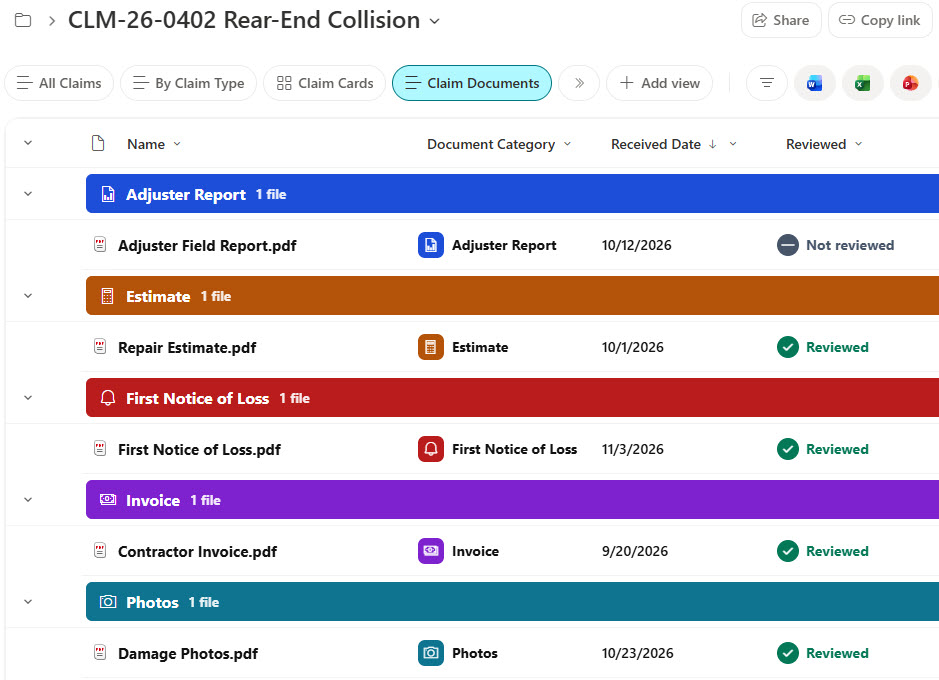
- Default Document Content Type: Only the default Document content type inside each set, with Document Category, Received Date, and Reviewed columns on every file
- Welcome View: A documents-only welcome view, so opening a claim shows just its files and their document columns, without the set-level columns
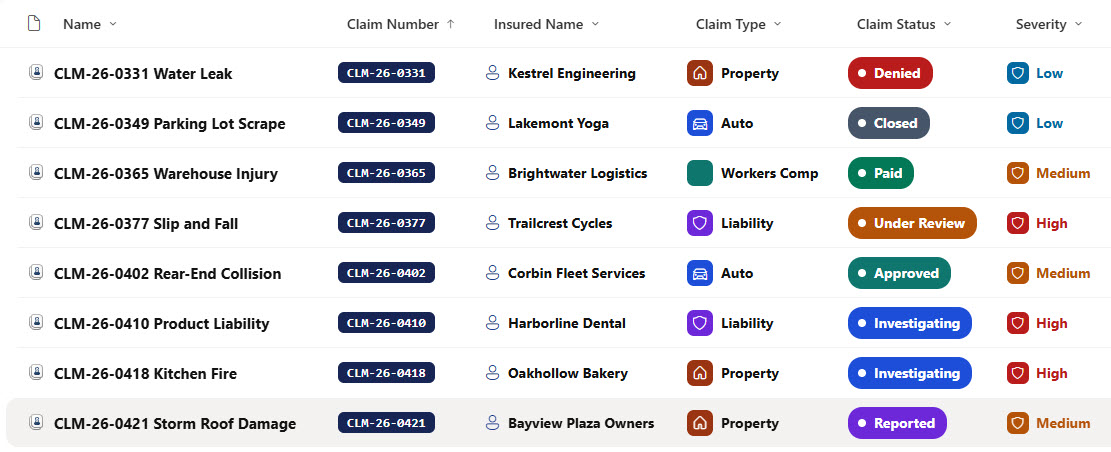
- Visuals: Claim status steppers, severity badges, claim type tiles, adjuster photos, and reserve and paid amounts
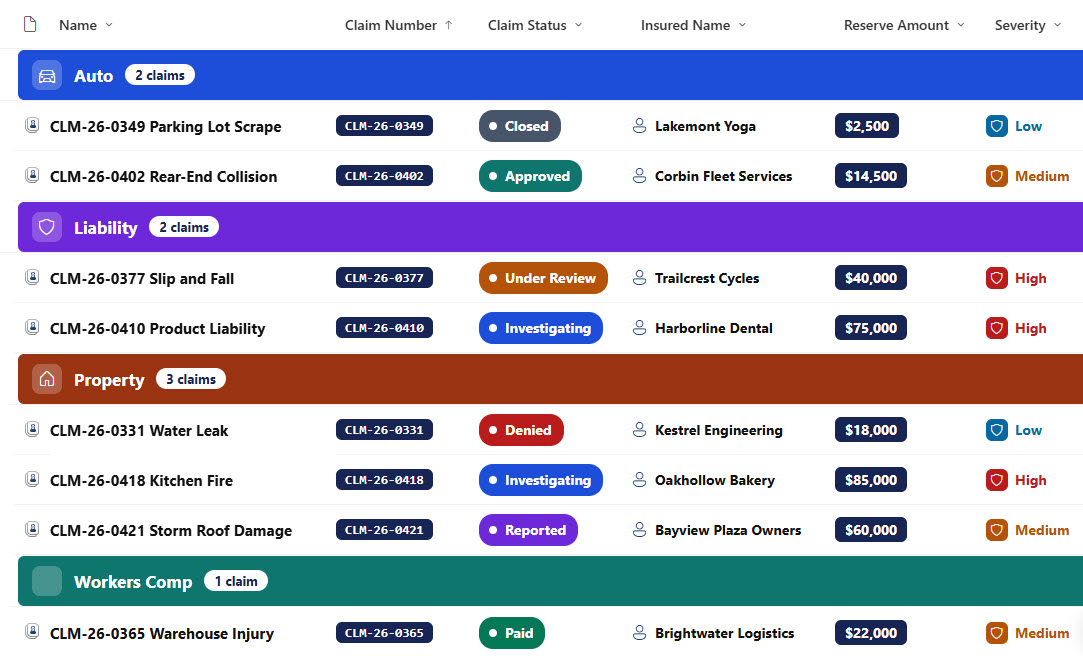
- Attention Views: Open Claims and High Severity views, plus a By Claim Type view with colored headers and a claim count
- Gallery and Form: A gallery of claim cards and a properties form with Claim, Loss Details, and Financials and Ownership sections
Benefits
- Open Claims at a Glance: See every open claim and its status at a glance
- High Severity First: Spot high severity claims that need senior attention
- Shared Metadata: Let every claim document carry the claim and policy number
- Reviewed Documents: Know which documents have been reviewed
- Reserves vs Payments: Compare reserves against payments
- Easy Handover: Hand a claim to another adjuster without losing context
Library Columns
- Claim Number (Single line of text) - the claim reference number, shared with every file in the set
- Policy Number (Single line of text) - the policy the claim is filed under, shared with every file in the set
- Insured Name (Single line of text) - the policyholder, shared with every file in the set
- Adjuster (Person or Group) - the adjuster handling the claim, shared with every file in the set
- Claim Type (Choice) - Property, Auto, Liability, or Workers Comp
- Claim Status (Choice) - Reported, Investigating, Under Review, Approved, Paid, Denied, or Closed
- Date of Loss (Date and Time) - when the loss happened
- Reported Date (Date and Time) - when the claim was reported
- Reserve Amount (Currency) - the amount reserved for the claim
- Paid Amount (Currency) - the amount paid so far
- Severity (Choice) - Low, Medium, or High
Every file inside a claim also carries these document columns, which show in the Claim Documents welcome view.
- Document Category (Choice) - First Notice of Loss, Photos, Adjuster Report, Estimate, Invoice, Settlement Letter, or Correspondence
- Received Date (Date and Time) - when the document was received
- Reviewed (Yes/No) - whether the adjuster has reviewed the document
Common Questions About This Insurance Claims Library
What is this insurance claims library built with?
It is built entirely with out-of-the-box SharePoint: a document library with a Claim Document Set content type, shared metadata columns, document-level columns for the files inside each set, a documents-only welcome view, list, grouped, and gallery views, column and view formatting for the status steppers, severity badges, claim type tiles, reserve and paid amounts, and claim cards, and a sectioned properties form. There is no custom code and no third-party tool.
What is a Document Set and how is it different from a folder?
A Document Set looks like a folder but behaves like a single item with its own metadata. Columns set on the Document Set are shared with every file inside it, each set opens to a welcome view you choose, and the files inside keep their own document columns. A plain folder offers none of that.
Does this design use any custom code or third-party tools?
No. The status steppers, severity badges, claim type tiles, reserve and paid amounts, and claim cards all use formatting features that ship with SharePoint and are set in the library settings, and the Document Set is a built-in SharePoint content type. Nothing is installed or deployed, so the library stays stable, secure, and easy to maintain as Microsoft updates SharePoint. Out-of-the-box is the only way Greg builds.
Can this library be customized for our organization?
Absolutely. The claim types, statuses, severity levels, and document categories can all be changed to match your lines of business. The colors can follow your brand, columns can be added or removed to match how your team works, and the views can be adjusted for each team that uses the library.
How does the library help adjusters manage their claims?
Every claim shows its status, severity, and reserve and paid amounts, so adjusters can see where each claim stands. The Open Claims and High Severity views surface the claims that need attention, and each document shows whether it has been reviewed.
Can Greg build this library for our organization?
Yes - this is exactly the kind of work Greg Zelfond does. As an independent SharePoint consultant and Microsoft MVP, he designs and builds out-of-the-box document libraries and Document Sets like this one, with content types, metadata, views, formatting, and forms tailored to how your claims team handles claims. Reach out through the contact page to talk about your project.
How much does it cost to build this library?
This library costs a flat $1,800. That includes configuration of all metadata columns, views and formatting, plus meetings and training.