Budgets (Document Library)
Cost: $1,800, including configuration of all metadata columns, views and formatting, plus meetings and training.


Overview
- Metadata Columns: Budget name, department, fiscal year, budget type, budget amount, spent to date, percent used, version, budget owner, and approval date
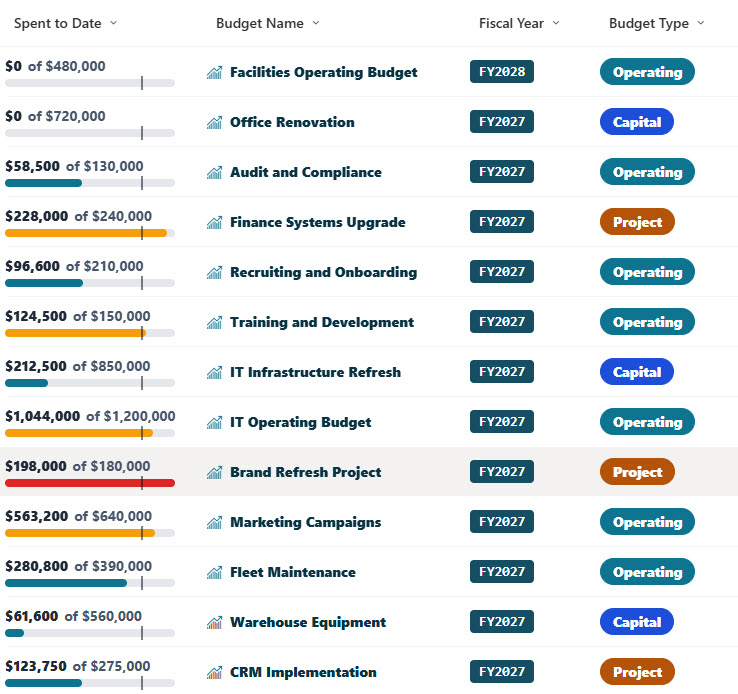
- Spent vs Budget Bar: A spent vs budget bar with a marker at 80 percent that turns amber near the limit and red when the budget is overspent
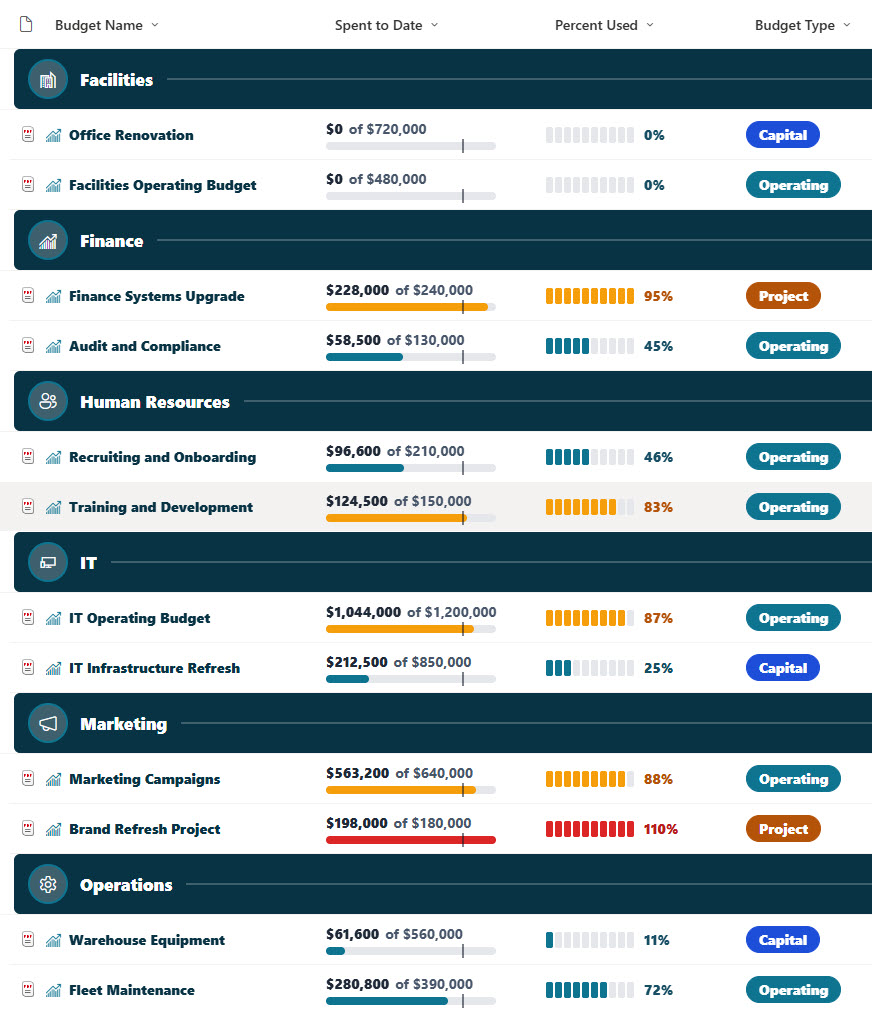
- Percent-Used Meter: A segmented percent-used meter with ten blocks that fill as the budget is used
- Tags and Chips: Budget type tags for operating, capital, and project budgets, plus a fiscal year chip and department icons
- Version Stamps: A version stamp for draft, proposed, approved, and revised budgets
- Attention Views: Over 80 Percent Used and Capital Budgets views, plus a By Department view with department icon headers and a budget count
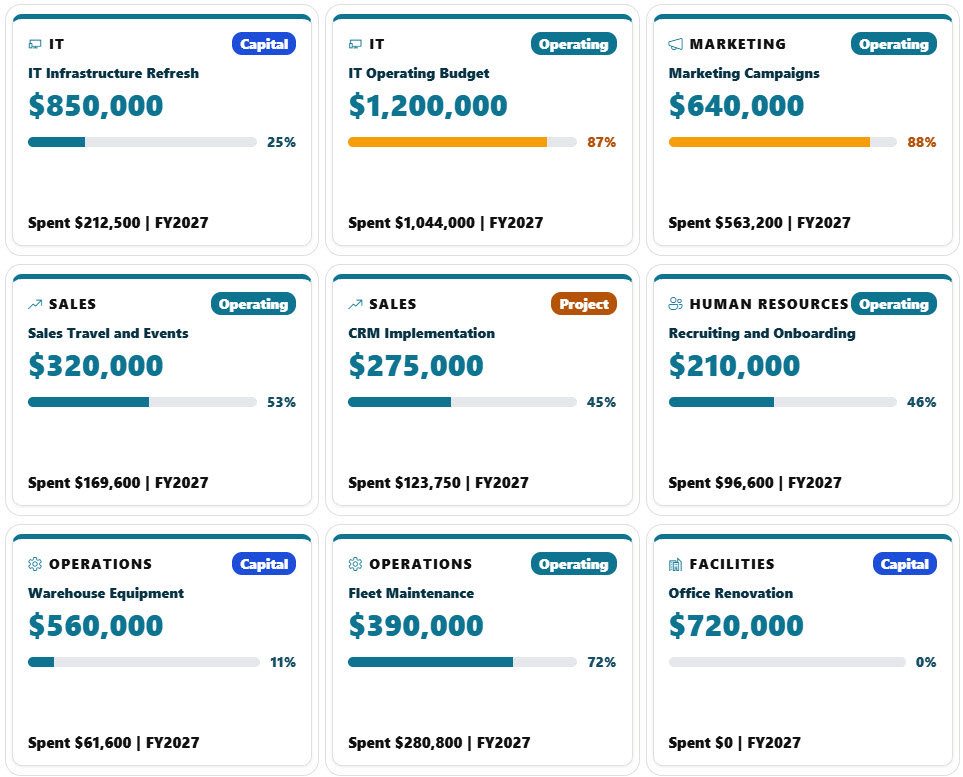
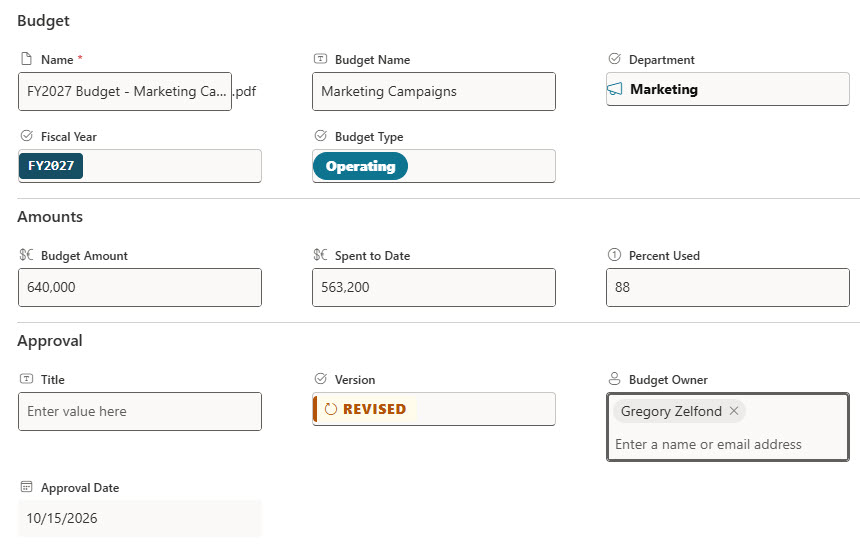
- Gallery and Form: A gallery of KPI-style budget tiles with the budget amount and a percent-used gauge, plus a properties form with Budget, Amounts, and Approval sections
Benefits
- Early Warnings: Catch budgets that are close to their limit
- Department Comparison: Compare spending across departments
- Capital vs Operating: Separate capital spending from operating spending
- Approval Status: See which budgets are approved and which are still in draft
- Leadership Summary: Give leadership a quick visual summary of every budget
- Full History: Keep a full version history of every budget document
Library Columns
- Budget Name (Single line of text) - the name of the budget
- Department (Choice) - Finance, IT, Marketing, Sales, Human Resources, Operations, or Facilities
- Fiscal Year (Choice) - the fiscal year the budget covers
- Budget Type (Choice) - Operating, Capital, or Project
- Budget Amount (Currency) - the approved budget amount
- Spent to Date (Currency) - the amount spent so far, used for the spent vs budget bar
- Percent Used (Number) - the share of the budget spent so far
- Version (Choice) - Draft, Proposed, Approved, or Revised
- Budget Owner (Person or Group) - the person accountable for the budget
- Approval Date (Date and Time) - when the budget was approved
Common Questions About This Budgets Library
What is this budgets library built with?
It is built entirely with out-of-the-box SharePoint: a document library with metadata columns, list, grouped, and gallery views, built-in column and view formatting for the spent vs budget bars, percent-used meters, version stamps, and KPI budget tiles, and a sectioned properties form. There is no custom code and no third-party tool, which is the kind of clean, maintainable document management Greg Zelfond builds for his clients.
What’s included in the budgets library?
The library stores each budget with its department, fiscal year, budget type, budget amount, amount spent, percent used, version, budget owner, and approval date. Views show all budgets, budgets over 80 percent used, and capital budgets, a By Department view groups everything by department, and a gallery shows each budget as a KPI tile.
How does the library show budgets that are running out?
The spent vs budget bar and the percent-used meter stay teal while spending is on track, turn amber once a budget passes 80 percent, and turn red when it goes over. The Over 80 Percent Used view lists those budgets, highest first.
Does this design use any custom code or third-party tools?
No. The spent vs budget bars, percent-used meters, version stamps, and KPI budget tiles all use formatting features that ship with SharePoint and are set in the library settings. Nothing is installed or deployed, so the library stays stable, secure, and easy to maintain as Microsoft updates SharePoint. Out-of-the-box is the only way Greg builds.
Can this library be customized for our organization?
Absolutely. The departments, fiscal years, budget types, and versions can be changed to match your budgeting process. The colors can follow your brand, columns can be added or removed to match how your team works, and the views can be adjusted for each team that uses the library. The same approach can also be reused for other document types across your organization.
Can Greg build this library for our organization?
Yes - this is exactly the kind of work Greg Zelfond does. As an independent SharePoint consultant and Microsoft MVP, he designs and builds out-of-the-box document libraries like this one, with metadata, views, formatting, and forms tailored to how your finance team plans and tracks budgets. Reach out through the contact page to talk about your project.
How much does it cost to build this library?
This library costs a flat $1,800. That includes configuration of all metadata columns, views and formatting, plus meetings and training.