Leases (Document Library)
Cost: $1,800, including configuration of all metadata columns, views and formatting, plus meetings and training.


Overview
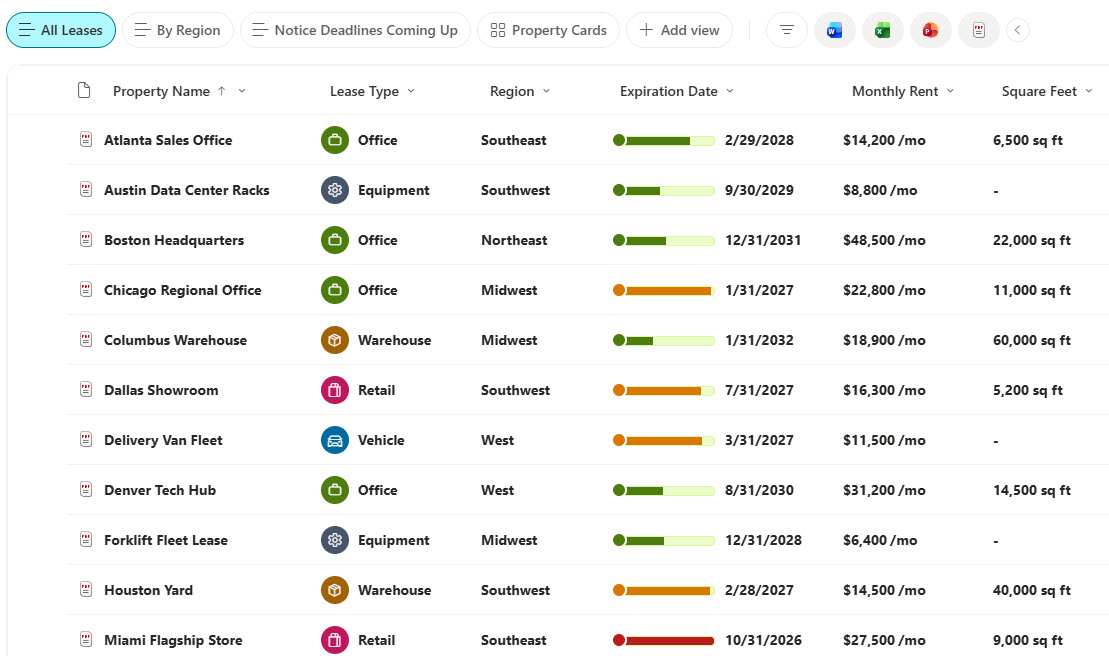
- Metadata Columns: Property name, lease type, landlord or lessor, region, monthly rent, square feet, commencement date, expiration date, notice deadline, lease status, and lease administrator
- Lease Type Icons: Lease type icons for office, warehouse, retail, equipment, and vehicle leases
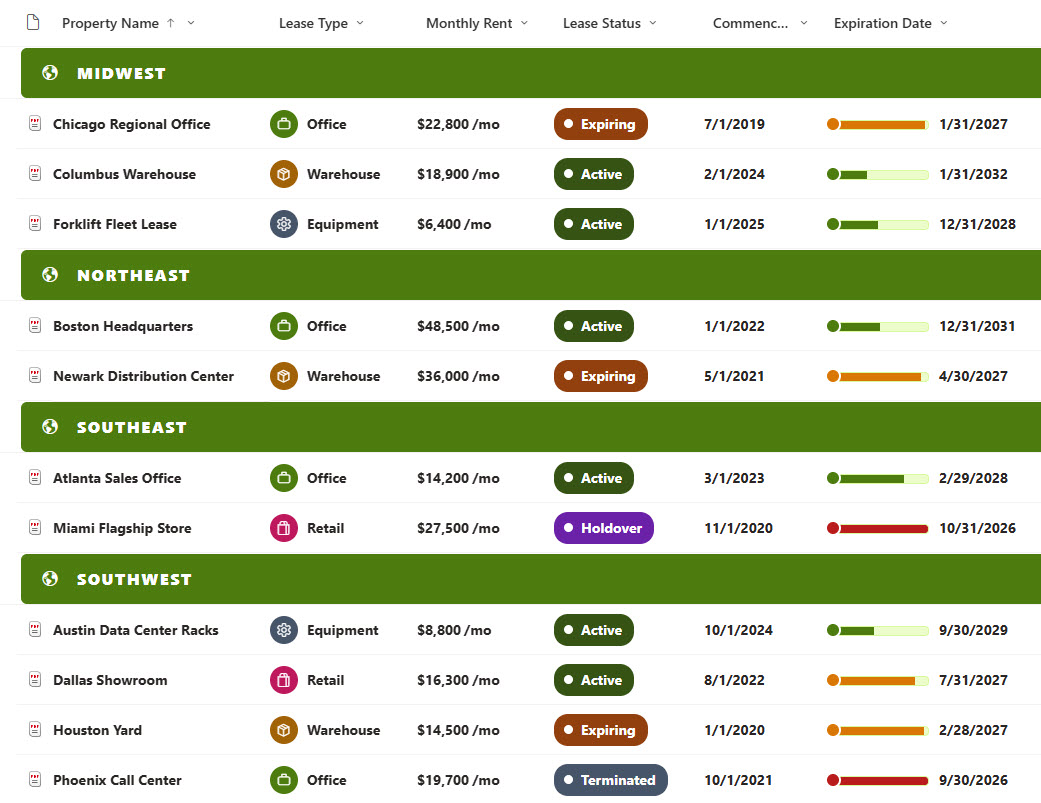
- Term Thermometers: A term thermometer that fills from the commencement date to the expiration date and turns amber and red near the end of the term
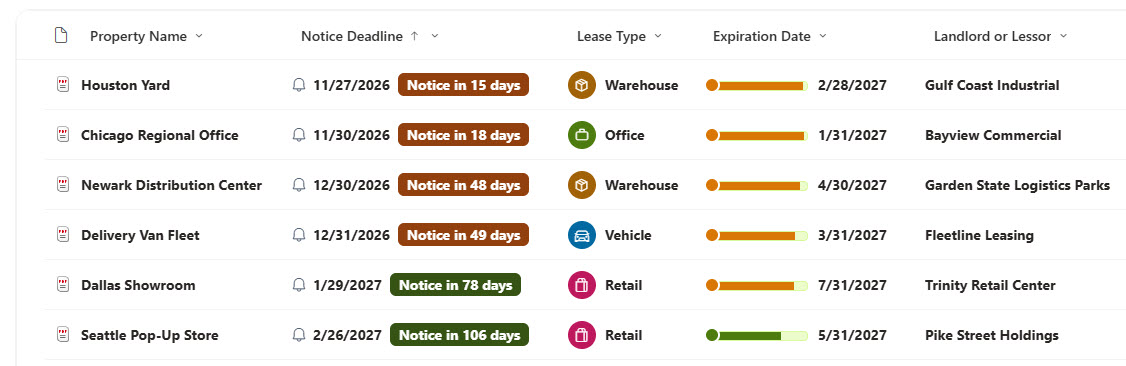
- Notice Countdowns: Notice countdowns that appear as the notice deadline gets close and flag deadlines that have passed
- Action View: A Notice Deadlines Coming Up view that lists the leases whose notice deadline is getting close, soonest first
- Grouped Region View: A By Region view with letter-spaced region headers and a lease count
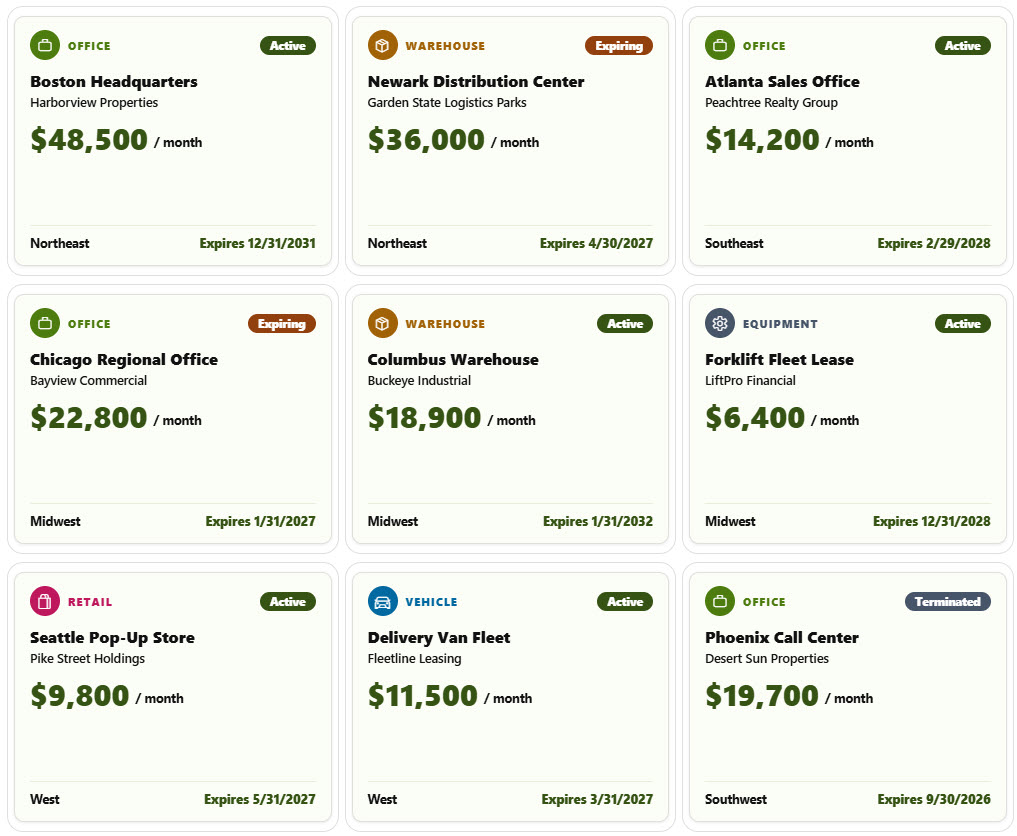
- Gallery and Form: A gallery of property cards with a big monthly rent, plus a properties form with Property, Financials, and Key Dates sections
Benefits
- Notice Deadlines: Never miss a renewal or termination notice deadline
- Term at a Glance: See how much of each lease term has passed at a glance
- Rent Comparison: Compare rent and space across regions and property types
- One Place: Keep property, equipment, and vehicle leases in one place
- Finance Visibility: Give finance a clear view of monthly lease costs
- Version History: Keep a full version history of every lease
Library Columns
- Property Name (Single line of text) - the property, equipment, or fleet covered by the lease
- Lease Type (Choice) - Office, Warehouse, Retail, Equipment, or Vehicle
- Landlord or Lessor (Single line of text) - the company that owns the leased asset
- Region (Choice) - the region where the lease applies
- Monthly Rent (Currency) - the monthly rent or lease payment
- Square Feet (Number) - the leased space, left empty for equipment and vehicles
- Commencement Date (Date and Time) - when the lease term starts
- Expiration Date (Date and Time) - when the lease term ends, used for the term thermometer
- Notice Deadline (Date and Time) - the last day to give renewal or termination notice, used for the countdown
- Lease Status (Choice) - Active, Holdover, Expiring, or Terminated
- Lease Administrator (Person or Group) - the person who manages the lease
Common Questions About This Leases Library
What is this leases library built with?
It is built entirely with out-of-the-box SharePoint: a document library with metadata columns, list, grouped, and gallery views, built-in column and view formatting for the lease type icons, term thermometers, notice countdowns, and bold rent, and a sectioned properties form. There is no custom code and no third-party tool, which is the kind of clean, maintainable document management Greg Zelfond builds for his clients.
What’s included in the leases library?
The library stores each lease with its property, lease type, landlord or lessor, region, monthly rent, square feet, commencement and expiration dates, notice deadline, status, and lease administrator. Views show all leases and upcoming notice deadlines, a By Region view groups everything by region, and a gallery shows each lease as a property card.
How does the library help with lease notice deadlines?
Each lease stores the last day to give renewal or termination notice. A countdown appears next to that date as it gets close, turns amber and then red, and changes to notice passed once the date is gone. The Notice Deadlines Coming Up view lists only the leases with a deadline in the next four months.
Does this design use any custom code or third-party tools?
No. The lease type icons, term thermometers, notice countdowns, and bold rent all use formatting features that ship with SharePoint and are set in the library settings. Nothing is installed or deployed, so the library stays stable, secure, and easy to maintain as Microsoft updates SharePoint. Out-of-the-box is the only way Greg builds.
Can this library be customized for our organization?
Absolutely. The lease types, regions, and notice window can be changed to match your organization. The colors can follow your brand, columns can be added or removed to match how your team works, and the views can be adjusted for each team that uses the library. The same approach can also be reused for other document types across your organization.
Can Greg build this library for our organization?
Yes - this is exactly the kind of work Greg Zelfond does. As an independent SharePoint consultant and Microsoft MVP, he designs and builds out-of-the-box document libraries like this one, with metadata, views, formatting, and forms tailored to how your real estate, facilities, or finance team manages leases. Reach out through the contact page to talk about your project.
How much does it cost to build this library?
This library costs a flat $1,800. That includes configuration of all metadata columns, views and formatting, plus meetings and training.