Tenant Files (Document Library)
Cost: $1,800, including configuration of all metadata columns, views and formatting, plus meetings and training.


Overview
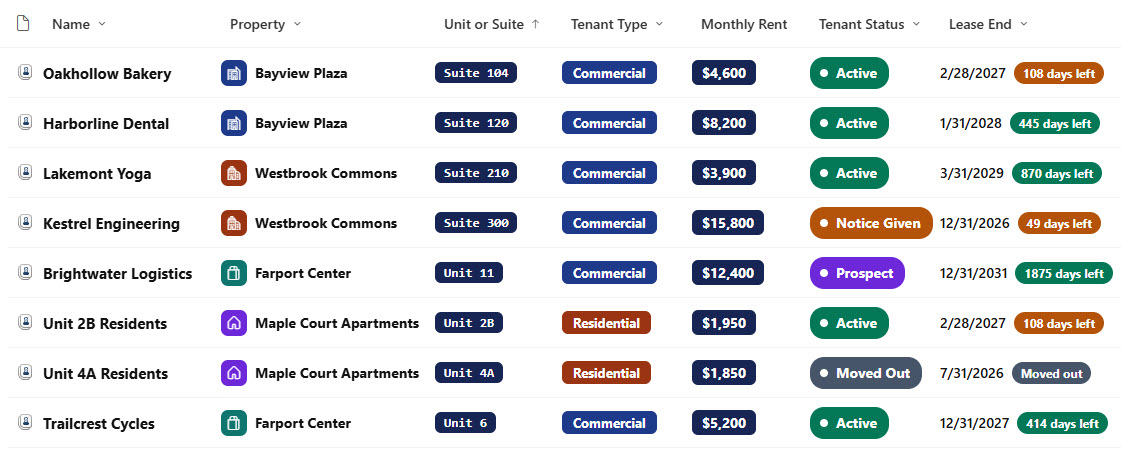
- Document Set Content Type: A Tenant File Document Set content type with shared columns for property, unit or suite, and property manager that flow down to every file inside the set
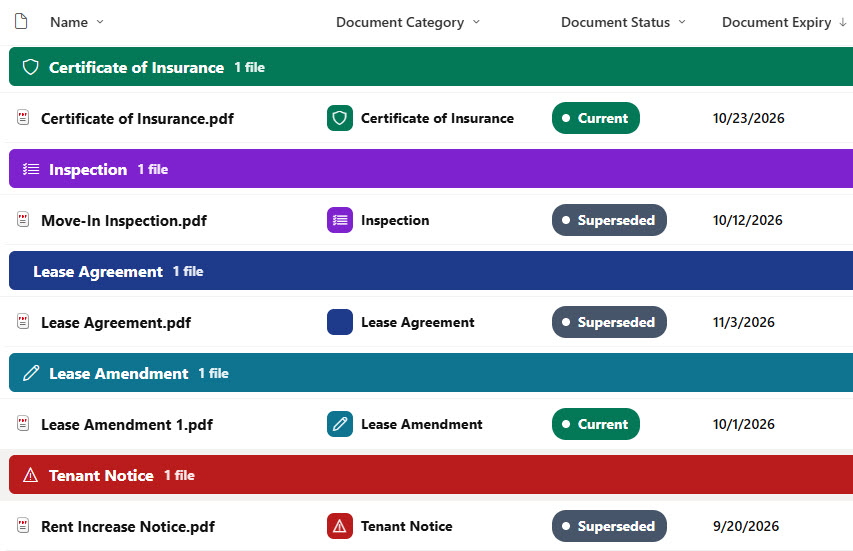
- Default Document Content Type: Only the default Document content type inside each set, with Document Category, Document Status, and Document Expiry columns on every file
- Welcome View: A documents-only welcome view, so opening a tenant shows just its files and their document columns, without the set-level columns
- Visuals: Tenant status steppers, property chips, rent and deposit amounts, renewal option toggles, and countdowns to lease end and insurance expiry
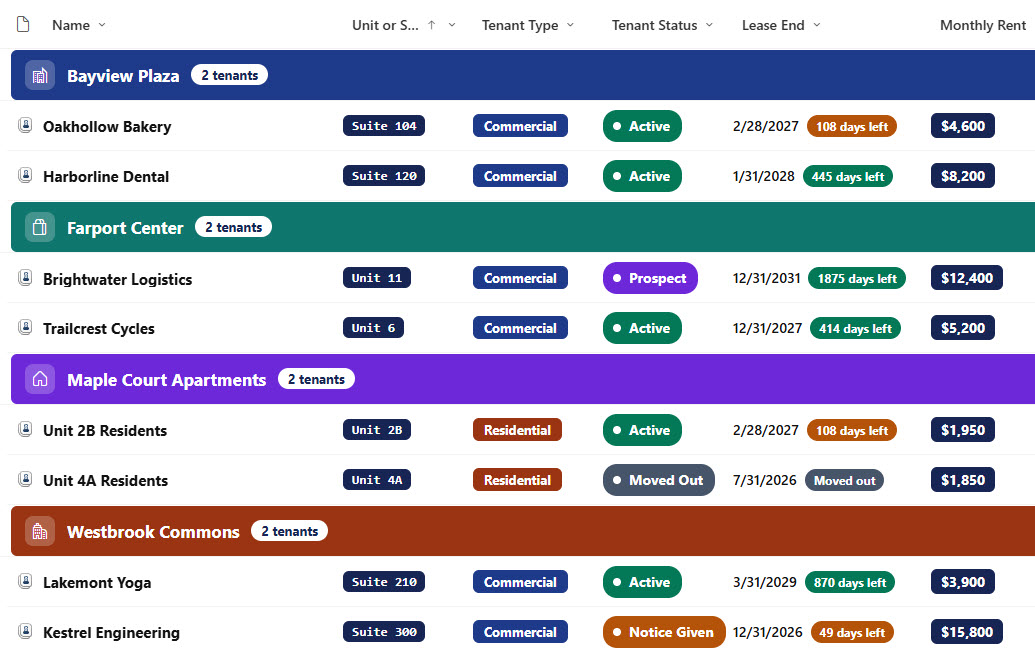
- Attention Views: Leases Ending Soon and Insurance Expiring views, plus a By Property view with colored headers and a tenant count
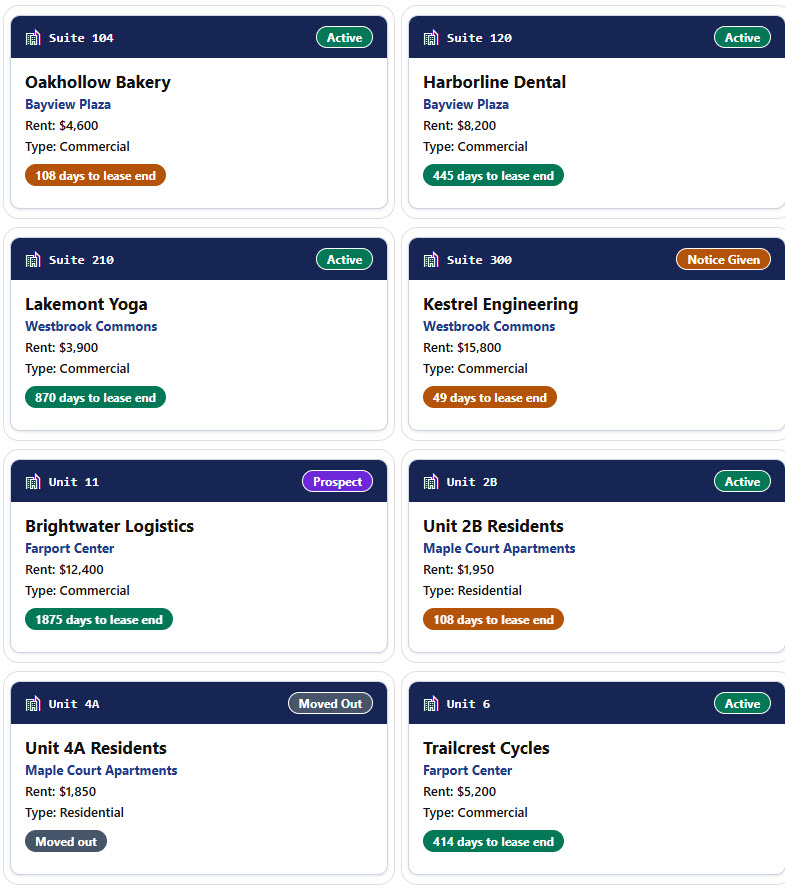
- Gallery and Form: A gallery of tenant cards and a properties form with Tenant, Lease Terms, and Insurance and Ownership sections
Benefits
- Lease Renewals: Know which leases are ending before notice periods pass
- Insurance Compliance: Catch expired certificates of insurance early
- Shared Metadata: Let every tenant document carry the property and unit
- Clear Versions: Keep superseded leases and amendments clearly marked
- Portfolio View: See every tenant by property at a glance
- Easy Handover: Hand a property over to a new manager without losing context
Library Columns
- Property (Choice) - the building or property the tenant occupies, shared with every file in the set
- Unit or Suite (Single line of text) - the unit or suite number, shared with every file in the set
- Property Manager (Person or Group) - the person who manages the tenant, shared with every file in the set
- Tenant Status (Choice) - Prospect, Active, Notice Given, or Moved Out
- Tenant Type (Choice) - Commercial or Residential
- Lease Start (Date and Time) - when the lease starts
- Lease End (Date and Time) - when the lease ends, used for the countdown and the Leases Ending Soon view
- Monthly Rent (Currency) - the monthly rent
- Security Deposit (Currency) - the deposit held
- Insurance Expiry (Date and Time) - when the tenant’s certificate of insurance expires, used for the Insurance Expiring view
- Renewal Option (Yes/No) - whether the lease includes a renewal option
Every file inside a tenant also carries these document columns, which show in the Tenant Documents welcome view.
- Document Category (Choice) - Lease Agreement, Lease Amendment, Certificate of Insurance, Tenant Notice, Inspection, or Correspondence
- Document Status (Choice) - Current or Superseded
- Document Expiry (Date and Time) - when the document expires, such as a certificate of insurance
Common Questions About This Tenant Files Library
What is this tenant files library built with?
It is built entirely with out-of-the-box SharePoint: a document library with a Tenant File Document Set content type, shared metadata columns, document-level columns for the files inside each set, a documents-only welcome view, list, grouped, and gallery views, column and view formatting for the status steppers, property chips, rent amounts, renewal toggles, countdowns, and tenant cards, and a sectioned properties form. There is no custom code and no third-party tool.
What is a Document Set and how is it different from a folder?
A Document Set looks like a folder but behaves like a single item with its own metadata. Columns set on the Document Set are shared with every file inside it, each set opens to a welcome view you choose, and the files inside keep their own document columns. A plain folder offers none of that.
Does this design use any custom code or third-party tools?
No. The status steppers, property chips, rent amounts, renewal toggles, countdowns, and tenant cards all use formatting features that ship with SharePoint and are set in the library settings, and the Document Set is a built-in SharePoint content type. Nothing is installed or deployed, so the library stays stable, secure, and easy to maintain as Microsoft updates SharePoint. Out-of-the-box is the only way Greg builds.
Can this library be customized for our organization?
Absolutely. The properties, tenant statuses, tenant types, and document categories can all be changed to match your portfolio. The colors can follow your brand, columns can be added or removed to match how your team works, and the views can be adjusted for each team that uses the library.
How does the library flag leases and insurance that are about to expire?
Every tenant shows countdowns to the lease end and the insurance expiry date that turn amber and then red as the dates get close. The Leases Ending Soon and Insurance Expiring views list only the tenants that need attention, so the property manager can send renewal notices and request new certificates in time.
Can Greg build this library for our organization?
Yes - this is exactly the kind of work Greg Zelfond does. As an independent SharePoint consultant and Microsoft MVP, he designs and builds out-of-the-box document libraries and Document Sets like this one, with content types, metadata, views, formatting, and forms tailored to how your property management and leasing teams manage tenants. Reach out through the contact page to talk about your project.
How much does it cost to build this library?
This library costs a flat $1,800. That includes configuration of all metadata columns, views and formatting, plus meetings and training.